 Tool
The best time tracking software for small teams
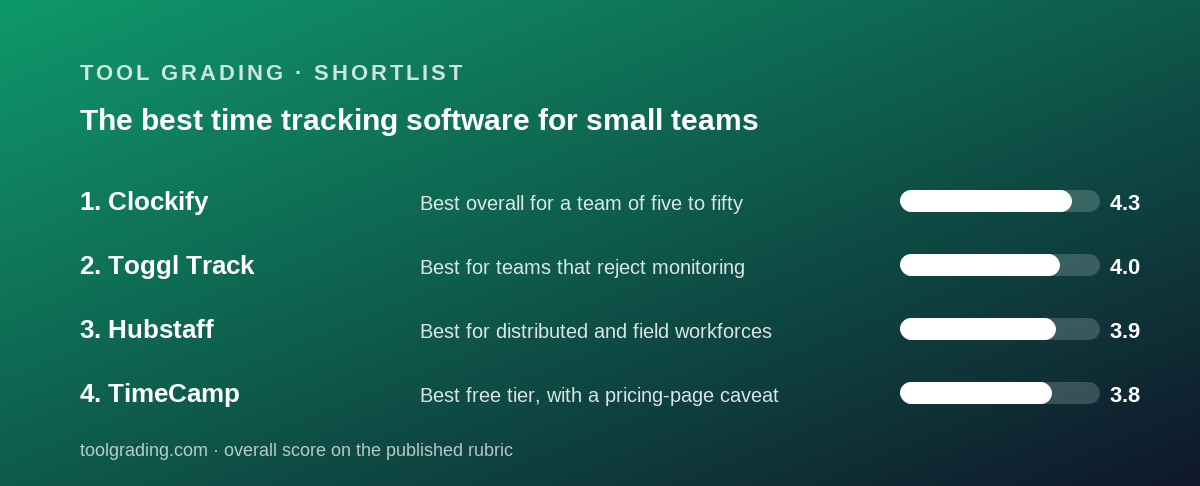
Clockify is the top pick on our rubric at 17.2 out of 20, because it is cheaper at every rung than the rest of the field and still ships billable rates, invoicing and timesheet approvals below US$6 per seat per month. Toggl Track is second on 15.9 and is the right purchase for a team that will not accept a monitoring product. Hubstaff is third on 15.6 and the only one of the four built to evidence and pay out contractor hours. TimeCamp is fourth on 15.3 with the most generous free tier in the category and a pricing page that prints two different price lists at once. All four grades come from vendor documentation read on October 12, 2026; no first-hand testing was run and none is claimed.
Our picks
- Best overall for a team of five to fifty: Clockify
- Best for teams that reject monitoring: Toggl Track
- Best for distributed and field workforces: Hubstaff
- Best free tier, with a pricing-page caveat: TimeCamp
A time tracker is a cheap product that becomes expensive in two specific ways. The first is tier placement: billable rates, invoicing, approvals and single sign-on sit on different rungs at every vendor, and the rung decides the bill, not the headline rate. The second is add-ons, which can double a price list without changing a single tier.
This guide ranks the four trackers graded on this site and says plainly where each price list bites. The products are Clockify, Toggl Track, Hubstaff and TimeCamp. If your shortlist is already down to the first two, read our head-to-head on Toggl Track against Clockify instead, which goes row by row.
The four at a glance
Totals are out of 20 on our rubric. Annual figures below are the entry paid rate per seat per month, read October 12, 2026.
- Clockify, 17.2 of 20, from US$3.99. Best overall for five to fifty people. Cheapest at every rung, invoicing and approvals at the second rung
- Toggl Track, 15.9 of 20, from $9. Best for teams that reject monitoring. No screenshots by stated policy, highest ease score, dearest per seat
- Hubstaff, 15.6 of 20, from $4.99 with a 2 seat minimum. Best for distributed and field workforces. Deepest evidence and payout toolkit, six paid add-ons
- TimeCamp, 15.3 of 20, from $2.49. Best free tier, with a caveat. Free forever for unlimited users, and a pricing page that contradicts itself
What the category actually sells
Every product here stores the same object: a duration attached to a project, an optional task, a description, tags and a billable flag. None of them differ meaningfully in how that object is created, because all four offer a timer, a manual entry, a weekly grid and some form of automatic suggestion.
The differences are entirely on the output side. Four outputs matter to a small team, and they are not bundled the same way by any two vendors.
An invoice. Hours become a bill a client will accept. Clockify puts invoicing at US$5.49 per seat per month billed annually. TimeCamp puts it at its first paid rung. Hubstaff has clients and invoices in its entry tier. Toggl Track does not list invoicing among its plan contents at all, which pushes an hourly business toward a second product.
An approval. A manager signs off a timesheet and the period locks. Clockify at US$5.49, TimeCamp at its top paid rung, Toggl Track at $16 per user per month. Hubstaff publishes timesheets and approval handling across its tiers rather than as one named feature.
A margin. Labor cost against revenue per project. Toggl Track and Clockify both reach this, at $16 and US$7.99 respectively. TimeCamp reaches it at $4.99.
A piece of evidence. Proof that the hour was worked. Only Hubstaff treats this as the main event, with activity levels, screenshots, app and URL capture, geofenced job sites and a silent desktop agent. Clockify sells a narrower version at US$7.99. TimeCamp holds screenshots for its top rung. Toggl Track refuses to sell it.
Deciding which of those four outputs you are buying settles the choice faster than any feature matrix. Our note on how the Tool Grading rubric works explains why we grade tier placement rather than feature presence.
Why Clockify sits first
Clockify totals 17.2: ease 4.3, features 4.4, value 4.6, support 3.9. The value sub-score is the highest in this category and it is won on arithmetic rather than opinion.
Per the pricing page read October 12, 2026, BASIC is US$3.99 per seat per month billed annually, STANDARD US$5.49, PRO US$7.99 and ENTERPRISE US$11.99, each about US$1 to US$3 higher billed monthly. For ten people that is $478.80, $658.80, $958.80 and $1,438.80 a year by our arithmetic.
STANDARD at $658.80 a year is the cheapest complete billing-and-approval setup of the four, and nothing else graded here comes close at that price. The free tier works for five people indefinitely, with a one-month reporting range, PDF-only export, 30 API requests per hour and up to three webhooks.
Two things keep it off a perfect score. Single sign-on, SCIM provisioning and the audit log are all concentrated at ENTERPRISE, so a security-conscious ten-person team pays three times the BASIC bill. And no support response time is published on the contact page, which lists email, chat and a telephone number but no commitment.
The seat rule is printed next to every price, which deserves credit: every active or invited user on the Team page occupies one paid seat, and deactivated users do not. An unaccepted invitation is therefore billable, and that is the clause our note on how to read a per-seat pricing page tells buyers to hunt for.
Why Toggl Track sits second
Toggl Track totals 15.9: ease 4.6, features 4.0, value 3.5, support 3.8. It holds the single highest sub-score in this guide and the lowest value score, and both come from the same decision.
The pricing page carries a strip reading no screenshots, no surveillance, and the vendor describes an anti-surveillance stance beside its compliance claims. Desktop activity tracking exists but the plan comparison states the record stays private and the user chooses which activity becomes a time entry. A tracker that cannot screenshot does not have to be defended to the people it tracks, and adoption resistance is the most common way a tracker purchase quietly fails.
It costs for that. Starter is $9 per user per month billed annually and Premium $16, against $12 and $24 billed monthly, which the page labels as a 33.3 percent annual saving. Ten users cost $1,080 or $1,920 a year. Approvals, labor costs, profitability, fixed fee projects and single sign-on all arrive together at Premium.
The add-on arithmetic is the trap. Time Off Pro is $2 per user per month and Capacity Management $5, so Starter plus both costs exactly the Premium rate without any Premium reporting. Compare the two configurations feature by feature, because the price is identical.
Two documentation problems cost it points rather than any software flaw. The free tier is described only as free for a limited number of users, on the pricing page and again in the help-centre article on payment plans, with no figure on either page we read.
And the same pricing page states 99.9 percent uptime with SOC 2 Type 1 in one block and 99.99 percent uptime with SOC Type 2 in another. We are not asserting which is right; we are recording that both appear.
Why it sits below Clockify: it costs roughly three times as much for the invoicing-and-approval job, and it does not list invoicing at all.
Why Hubstaff sits third
Hubstaff totals 15.6: ease 4.0, features 4.5, value 3.4, support 3.7. It owns the highest feature sub-score in this guide and the lowest value sub-score, which is the signature of a product whose price list needs reading twice.
On capability it is the deepest tracker graded on this site. Activity levels, screenshots, app and URL tracking, idle policy, GPS job sites and a silent agent for company-owned devices cover the evidence job completely. Payments and payroll at the Team tier mean a tracked hour becomes a contractor payout without an export.
The pricing page would not render to a plain request; the figures here were read from the fully rendered page on October 12, 2026. On the annual view, Starter is $4.99 per seat per month, Grow $7.50, Team $10 and Enterprise $25, with a 2 seat minimum on the first three. Ten seats cost $598.80, $900, $1,200 and $3,000 a year.
Then come the add-ons, each per seat per month: Insights from $2.50, Tasks from $2.50, more screenshots from $2.50, locations from $3.33, the silent app from $2.50, and six-year data retention from $1.67. Adding Tasks and Insights to Starter brings a ten-seat bill to about $1,199 a year, within a dollar a month of the Team tier that includes both. The entry rate is therefore a marketing number rather than a buying decision.
Three contract terms matter as much as the rates, and all three are published, which is to the vendor's credit. There is no free tier, only a 14-day trial and a 30-day money-back guarantee. Every seat is billed even if the person never tracks time, stated plainly in the vendor's own FAQ. And there are no prorated refunds or credits for removed users on either billing cycle.
Why it sits below Toggl Track: the add-on sheet erases its apparent price advantage, there is no free tier to pilot with, and the Enterprise step from $10 to $25 per seat is the only route to HIPAA, SOC-2 Type II and SCIM. Teams whose real problem is cross-border contractor payment rather than hours should read our best payroll and HR software guide first, because a tracker may be solving the wrong half.
Why TimeCamp sits fourth
TimeCamp totals 15.3: ease 3.8, features 4.2, value 4.0, support 3.3. It has the best free tier in the category and the weakest buying documentation, and the second cancels out much of the first.
The free plan is described as free forever with unlimited users and unlimited projects, and it includes timesheets, web, desktop and mobile apps, a browser plugin, a time clock kiosk, geofencing, CSV import, keyword-triggered automatic tracking, an activity timeline, idle tracking and two-factor authentication. No rival graded here offers a free tier without a seat cap.
The paid rates are the lowest in the category. On the current block of the pricing page, Starter is $2.49 per user per month billed annually, Premium $3.99 and Ultimate $4.99, with month-to-month rates of $3.49, $4.99 and $6.99. Ultimate carries SSO, audit log, approvals, billing rates, labor costs, screenshots and unlimited integrations, which makes $598.80 a year for ten people the cheapest route to that feature set graded here.
The problem is that the same page, read the same day, also carries an older plan table showing Starter at $2.99 annually, Premium at $4.99 and Ultimate at $7.99. At Ultimate the two readings differ by $360 a year for a ten-person team.
The summary table at the foot of the page agrees with the lower set, so the most likely reading is that the second table is stale, but we are recording rather than asserting.
The practical advice is to take the plan to checkout and treat the payment screen as the price.
Two further gaps hold the support sub-score to 3.3. No support channel or response window is named on the pricing page for any paid tier below Enterprise, which is an on-request tier. And every paid plan carries a start your free trial button without stating how long the trial runs.
One more figure belongs in any budget here. The AI Time Tracker appears on every tier including Free but is billed by token usage, with the vendor estimating about $6 per user per month, roughly $720 a year for ten people, which is more than the Ultimate plan itself.
Why it sits below Hubstaff: a value grade rests on a price, and this vendor publishes two. Our note on when a vendor blocks the pricing page argues that an unreadable price and a self-contradicting price are the same problem for a buyer.
Also considered, and why they are not here
This guide ranks only what this site has graded, and four products is a short list by design. Three adjacent options are worth naming because buyers raise them.
The timesheet inside your project tool. Asana, ClickUp and the rest of the field in our best project management software for small teams guide carry task-level time data. If hours are a rough signal rather than an invoice line, no separate purchase is needed.
The timesheet inside your accounting package. FreshBooks and Xero are graded on this site, and our best accounting software for small business guide sets out which of them track time natively. If the only consumer of the hours is the invoice, that route avoids a second subscription entirely.
Monitoring-first products sold as employee surveillance rather than time tracking. We have not graded them, and we are not ranking a category we have not read. Buyers heading that way should note that the compliance and consent questions are larger than the software question.
How to choose in four questions
What happens to the hour after it is recorded? If it becomes an invoice or a payroll figure, the cheapest complete answer is Clockify at STANDARD. If it becomes a margin report, Toggl Track at Premium or TimeCamp at Ultimate. If it becomes evidence behind a contractor payment, Hubstaff at Team.
Will your team accept monitoring? If the honest answer is no, the decision is already made, because one product in this field cannot take a screenshot and three can. That is a deployment fact, not a preference.
How many people need a paid seat, and who counts? Read the seat definition before the rate. One vendor bills invited-but-inactive users. One applies a 2 seat minimum. One sells cheaper kiosk seats for shared devices. One has no seat cap on its free tier at all.
Can you total the bill in advance? Add the tier, the add-ons, any metered AI feature and the billing-cycle penalty before comparing. Two of the four price lists here understate a working configuration by roughly half. Our note on annual against monthly SaaS billing covers the last of those variables, and our note on what free tiers are actually for covers the first.
Bottom line
For most teams of five to fifty, Clockify at STANDARD, $658.80 a year for ten seats by our arithmetic, is the right purchase and the end of the search.
Pay more than that for exactly two reasons. Toggl Track at $1,920 a year if a surveillance-free product is what makes adoption possible. Hubstaff at $1,200 a year if the hours have to carry proof and turn into a payout.
Spend nothing first if your situation allows it. TimeCamp's free tier runs an entire team at no cost, and Clockify's runs five people indefinitely, which is enough to learn what you actually need before a single invoice arrives. Teams reviewing a whole stack rather than one line item should start from our best tools for a ten-person remote team guide.
Best overall for a team of five to fifty: Clockify
Total 17.2 of 20: ease 4.3, features 4.4, value 4.6, support 3.9. The cheapest rung-for-rung price list in the category, with billable rates at US$3.99 per seat per month billed annually, invoicing and timesheet approvals at US$5.49, and expenses, labor cost, profit, budgets and GPS at US$7.99, per the pricing page read October 12, 2026. Ten seats cost $478.80 to $1,438.80 a year by our arithmetic. The free tier works for up to 5 users with a one-month reporting range, PDF-only export, 30 API requests per hour and three webhooks. Kiosk seats from US$0.79 change the sums for shift workforces. Single sign-on, SCIM and audit log are concentrated at the ENTERPRISE rung, and no support response time is published.
Visit Clockify
We have no affiliate relationship with this vendor. Link goes to the official site.
Best for teams that reject monitoring: Toggl Track
Total 15.9 of 20: ease 4.6, features 4.0, value 3.5, support 3.8. The highest ease score in this guide, earned on policy: the pricing page states no screenshots and no surveillance, and the plan comparison says the user controls which recorded activity becomes a time entry. Starter is $9 per user per month billed annually and Premium $16, against $12 and $24 monthly, so ten users cost $1,080 or $1,920 a year. Approvals, labor costs, profitability, fixed fee projects and single sign-on all arrive at Premium. Capacity Management at $5 and Time Off Pro at $2 per user per month mean Starter plus add-ons equals the Premium price. The free-tier user limit is not published on either page we read, and the pricing page carries two different uptime figures and two different SOC descriptions.
Visit Toggl Track
We have no affiliate relationship with this vendor. Link goes to the official site.
Best for distributed and field workforces: Hubstaff
Total 15.6 of 20: ease 4.0, features 4.5, value 3.4, support 3.7. The highest feature score here, earned on evidence and payout: activity levels, screenshots, app and URL tracking, GPS job sites, a silent agent for company-owned devices, and payments and payroll inside the product at the Team tier. On the annual view read October 12, 2026 through a fully rendered browser, Starter is $4.99 per seat per month, Grow $7.50, Team $10 and Enterprise $25, with a 2 seat minimum on the first three; ten seats cost $598.80 to $3,000 a year. Six add-ons from $1.67 to $3.33 per seat per month mean Starter plus Tasks and Insights costs about what Team costs. No free tier exists, only a 14-day trial and a 30-day money-back guarantee, and removed users attract no refund or credit.
Visit Hubstaff
We have no affiliate relationship with this vendor. Link goes to the official site.
Best free tier, with a pricing-page caveat: TimeCamp
Total 15.3 of 20: ease 3.8, features 4.2, value 4.0, support 3.3. The only free tier in this category with no published seat cap: free forever, unlimited users and unlimited projects, including timesheets, a time clock kiosk, geofencing, keyword-triggered automatic tracking, idle tracking and two-factor authentication. On the current block of the pricing page, Starter is $2.49 per user per month billed annually, Premium $3.99 and Ultimate $4.99, so ten users cost $298.80 to $598.80 a year and Ultimate is the cheapest published route to SSO plus audit log graded here. The same page also carries an older table showing $2.99, $4.99 and $7.99, a $360 annual difference at Ultimate for ten people. The AI Time Tracker is metered at roughly $6 per user per month by the vendor's own estimate, and no trial length or support channel is published.
Visit TimeCamp
We have no affiliate relationship with this vendor. Link goes to the official site.
How we chose
Four time tracking products with full reviews on this site were ranked by the sum of their four rubric sub-scores, ease of use, feature depth, value at a realistic team size and support quality, as defined on the method page. Sub-scores were built from vendor pricing pages, published plan comparisons, help-centre articles and terms of service, all read on October 12, 2026. Where a pricing page would not render to a plain request, it was read again in a fully rendered browser and the figures taken from that reading; where a vendor publishes two conflicting figures, both are printed. We did not run tests of our own, and we did not quote any third-party star rating, because the public review aggregator pages for this category returned an HTTP 403 response on the day they were requested. Totals are out of 20. Ten-seat annual costs quoted throughout are our arithmetic from published per-seat rates, not vendor quotes.
Frequently asked
What is the cheapest complete time tracking setup for ten people?
Clockify at STANDARD, US$5.49 per seat per month billed annually, which is $658.80 a year for ten seats by our arithmetic and includes billable rates, invoicing and timesheet approvals. TimeCamp's Starter is cheaper at $298.80 but holds approvals back to its top paid rung.
Is any of these genuinely free for a whole team?
TimeCamp, per its pricing page read October 12, 2026, which describes a free forever plan with unlimited users and unlimited projects. Clockify's free tier stops at 5 users. Toggl Track's free tier has a limit the vendor does not print. Hubstaff has no free tier at all.
Which one should I buy if I need screenshots as proof of work?
Hubstaff. Limited screenshots start at Starter, $4.99 per seat per month on the annual view, and unlimited screenshots with unlimited app and URL tracking arrive at Team, $10 per seat per month. Clockify sells a narrower version at US$7.99 and TimeCamp holds screenshots for its top paid rung.
Which one should I buy if my team objects to being monitored?
Toggl Track. Its pricing page states no screenshots and no surveillance, and it is the only product in this guide that does not sell monitoring at any tier. Starter is $9 per user per month billed annually, which is the premium you pay for that position.
Why are there only four products in this ranking?
Because this site has graded four time trackers, and we do not rank what we have not read. More will be added as reviews are published. Three adjacent options, the timesheets inside project and accounting tools, are named in the also considered section rather than ranked.
Why do you not quote G2 or Capterra ratings?
The public review aggregator pages for this category returned an HTTP 403 response when requested on October 12, 2026, so no independent star average could be read at source. Vendor-published rating badges appear on two of these sites and we treat those as marketing, not evidence.
Do I need a separate time tracker at all?
Often not. If hours only produce an invoice, the timesheet inside your accounting software may be enough. If hours only inform a project plan, your project tool probably already records them. Buy a tracker when the hours have to do two jobs at once, such as billing and payroll.