 Tool

Clockify
A per-seat timesheet platform whose published rates are the lowest in this category and whose free tier stops at five users.
Scored on the published rubric, from documentation, pricing and verified user reports.
Best for: Teams of five to fifty that need billable hours, approvals and payroll-ready timesheets at the lowest published per-seat rate in the category.
Verdict
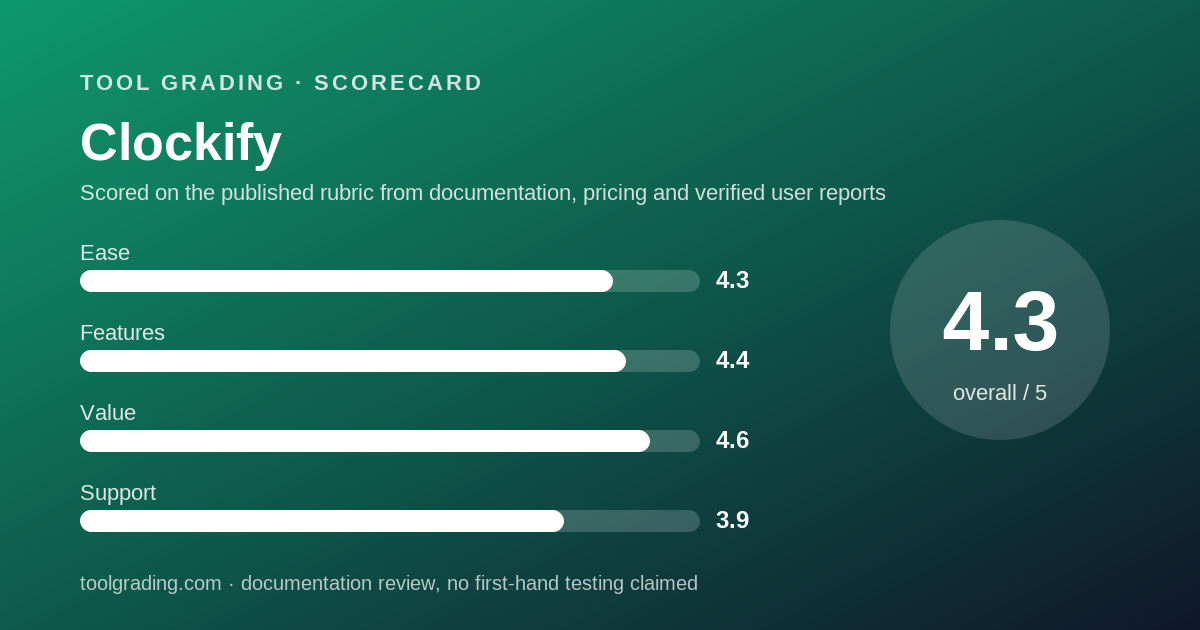
Clockify wins the value sub-score in this category on arithmetic rather than opinion. Per the pricing page read October 12, 2026, BASIC is US$3.99 per seat per month billed annually, STANDARD is US$5.49, PRO is US$7.99 and ENTERPRISE is US$11.99, and each of those rates buys a feature set that rivals charge roughly twice as much for. The free tier is genuinely useful and genuinely capped: up to 5 users, a one-month reporting range, PDF-only export, 30 API requests per hour and up to 3 webhooks. The features sub-score of 4.4 reflects real breadth, including invoicing and approvals at STANDARD and scheduling, expenses, labor cost and GPS at PRO. Support is held to 3.9 because the vendor publishes channels but no response-time commitment, and the contact page itself was showing a technical-issues notice on the day it was read. This is a documentation review built from vendor pricing pages, help-centre articles and terms of service; no first-hand testing was run and none is claimed.
Visit Clockify
We have no affiliate relationship with this vendor. Link goes to the official site.
Where it is strong
- Lowest published per-seat rates of the four time trackers graded on this site: US$3.99 to US$11.98 per seat per month billed annually, per the pricing page read October 12, 2026
- The seat rule is written down in plain words on the pricing page, which is rarer than it should be: every active or invited user on the Team page occupies one paid seat, and deactivated users do not
- Invoicing, time off and approvals arrive at STANDARD (US$5.49), one or two rungs lower than most of the category places them
- Separate kiosk seats from US$0.79 per limited seat per month billed annually let a shift or site team clock in without paying full seats
- Free tier covers timer, timesheet, auto tracker, calendar sync, pomodoro, idle detection and reports for up to 5 users with no trial clock
Where it falls short
- The free tier's one-month reporting range is the limit that bites first: a quarterly or annual billing review is impossible without a paid seat
- Free API access is capped at 30 requests per hour against 50 requests per second on paid workspaces, so any real integration forces an upgrade
- SSO, SCIM provisioning and audit log sit at ENTERPRISE (US$11.99 per seat per month billed annually), the highest rung
- No response-time commitment is published on the contact page, which lists email, chat and a phone number but no service level
- A dedicated success representative requires at least 120 seats on BASIC, 90 on STANDARD, 60 on PRO or 40 on ENTERPRISE, per the pricing page, so small teams never qualify
At a glance
| Starting price | US$3.99 per seat per month billed annually (BASIC) |
|---|---|
| Free plan | Yes, for up to 5 users, with a one-month reporting range |
| Seat minimum | None published; every active or invited Team page user is one paid seat |
| Trial | Free tier available indefinitely; paid plans add a 30-minute onboarding session on upgrade |
| Support channels | Email, chat, phone +1-855-738-8741, help centre; no published response time |
| Top tier extras | SSO, custom subdomain, SCIM provisioning, audit log at ENTERPRISE |
What the product actually is
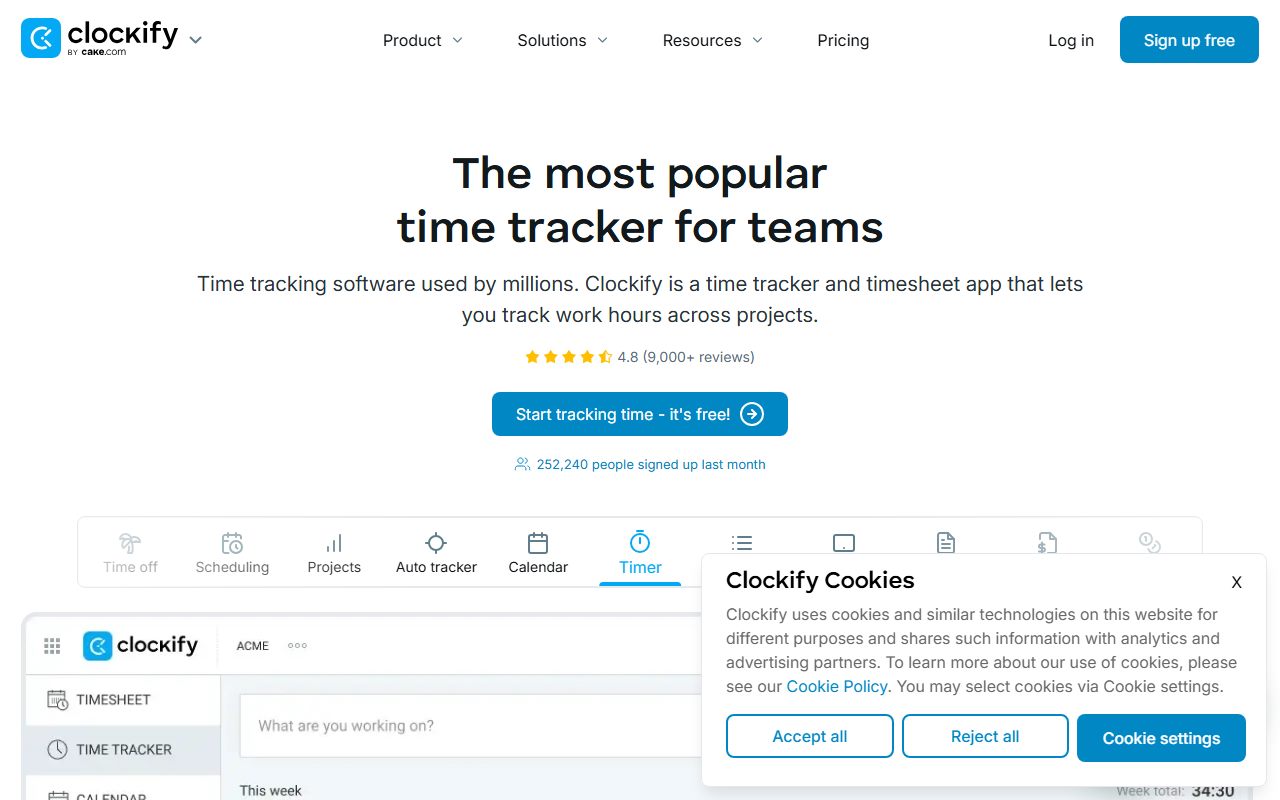
Clockify is a timesheet database with several front doors onto it. The stored object is a time entry: a duration attached to a project, an optional task, a description, optional tags and a billable flag.
Everything else in the product either creates that object or reads it. A running timer creates it. A weekly grid creates it. A shared tablet running kiosk mode creates it when someone clocks in. An auto tracker on the desktop app suggests it from app and window activity.
On the reading side sit reports, invoices, approvals, budgets and payroll exports. This matters for a buyer because the question is never whether the tool can store hours. It is which readers are unlocked at which price.
The product is published by CAKE.com Inc. of 2100 Geng Road, Suite 210, Palo Alto, California, per the terms of use read October 12, 2026. Customers outside North America contract with CAKE.com AG in Zug, Switzerland, acting as authorised agent. Clockify sits beside Pumble and Plaky in the same company's catalogue, which is why a bundle appears on the pricing page.
Who it is for, and who should skip it
The fit is strongest where hours turn directly into money or payroll, and where nobody wants to argue about the software budget.
- Agencies and consultancies billing clients by the hour who need billable rates, invoices and a report a client will accept
- Services firms of five to fifty people where the finance lead needs approvals before payroll runs
- Field, shift and site teams who can clock in from a shared device on a kiosk seat instead of a full seat
- Teams already paying for project software and unwilling to double the bill for a timer bolted on top
- Finance leads who want the seat definition in writing before signing, which this pricing page provides
Three groups should look elsewhere. A company that requires single sign-on across every application will pay the top rung here, because SSO is an ENTERPRISE feature at US$11.99 per seat per month billed annually. A buyer who needs a contractual response time will not find one published. And a team of two or three with simple needs may find the free tier of a rival more generous, since this free tier stops at five users.
Teams weighing a timer against the tracking already built into their project tool should read our grade of the project category first, because the honest answer is sometimes that no separate purchase is needed. Our best tools for a ten-person remote team guide sets out where the overlaps sit.
How the pricing is structured
Figures below were read from the Clockify pricing page on October 12, 2026, in US dollars, per seat per month. The first figure is the annual rate, the second the month-to-month rate.
- FREE: US$0, for up to 5 users
- BASIC: US$3.99 annually, US$4.99 monthly. Adds add time for others, required fields, bulk edit, kiosk, time audit, project templates, historical rates, imports, billable rates and shareable exports
- STANDARD: US$5.49 annually, US$6.99 monthly. Adds time off, invoicing, approvals and the QuickBooks integration
- PRO: US$7.99 annually, US$9.99 monthly. Adds activity monitoring, scheduling, forecasting, expenses, labor cost and profit, budgets and estimates, custom fields, multiple currencies, alerts, forced timer, GPS tracking and data region
- ENTERPRISE: US$11.99 annually, US$14.99 monthly. Adds single sign-on, custom subdomain, SCIM provisioning, account control and audit log
- CAKE.com Bundle: US$12.99 annually, US$15.99 monthly, for Clockify ENTERPRISE plus Pumble and Plaky
- Kiosk limited seats: US$0.79 on BASIC, US$1.19 on STANDARD, US$1.59 on PRO and US$2.39 on ENTERPRISE, each per limited seat per month billed annually
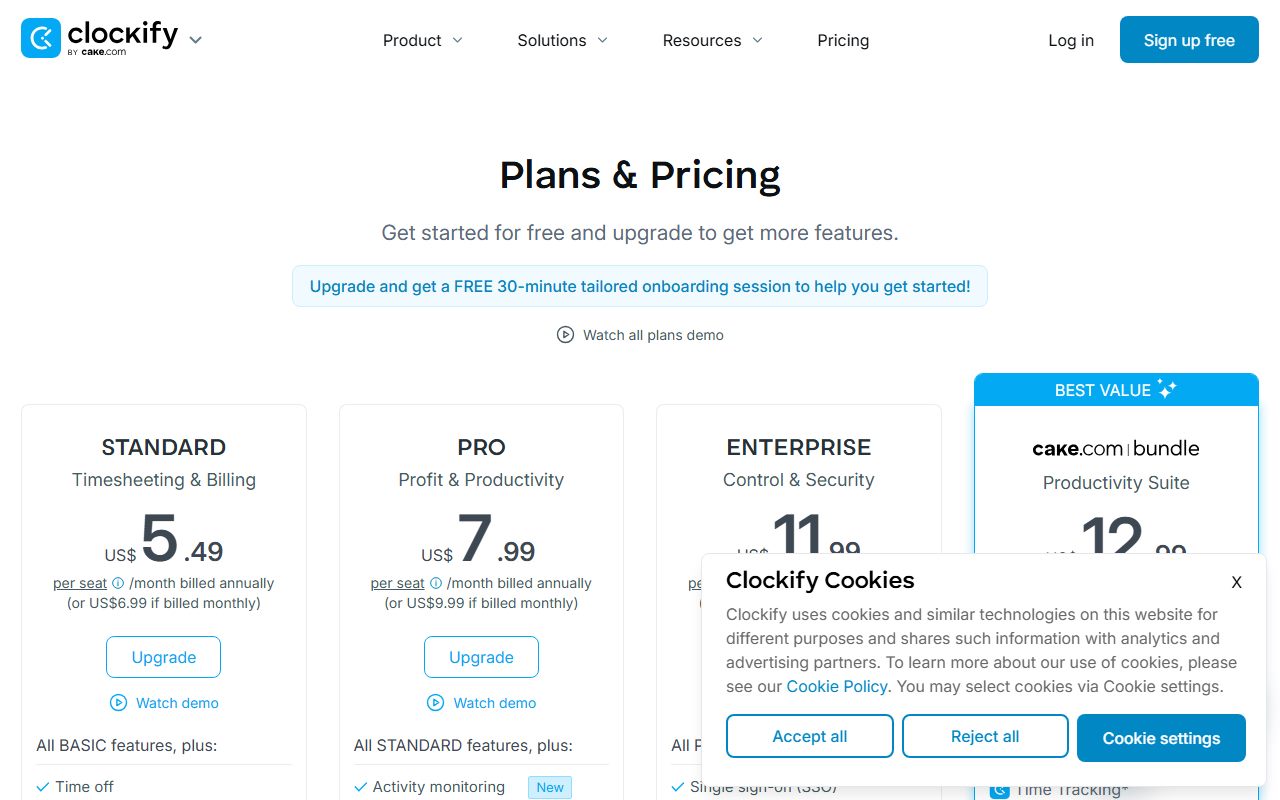
Two structural details are worth more than the headline rate. The first is the seat definition, printed next to every price: every active or invited user listed on your Team page occupies one paid seat, including the Owner, Admins, Managers and Members, and deactivated users do not occupy a seat.
An invitation that was never accepted is therefore billable, which is the kind of clause that produces a surprise in month three. Our note on how to read a per-seat pricing page covers why that sentence is the one to look for.
The second is the kiosk seat. A warehouse or site crew that clocks in and out on a shared tablet does not need a full seat, and at US$0.79 per limited seat per month on BASIC the arithmetic for a mixed workforce changes completely.
The gap between annual and monthly billing here is between US$1.00 and US$3.00 per seat per month depending on tier, which is a smaller penalty than most of this category applies. Our note on annual against monthly SaaS billing explains why a small team should still think twice before locking a year in.
What the free tier includes, and where it stops
The free tier is unusual in that the tracking itself is not crippled. Per the pricing page, it includes unlimited tracking, the timer, the timesheet grid, the auto tracker, calendar sync, mobile and desktop apps, a pomodoro timer, idle detection and reminders, tracking integrations, a team activity view and reports.
The caps are elsewhere, and they are specific. Up to 5 users. The data range on the free plan is one month, so the multi-year report view reads up to one month. Export is PDF only, with CSV and Excel behind a paid plan. The API allows 30 requests per hour against 50 requests per second on paid workspaces. Webhooks are capped at three against up to 100 per paid workspace.
Read together, those caps describe who the free tier is for: a five-person firm that looks at this month's hours in the browser and invoices from somewhere else. The one-month range is the wall most teams hit, because the first quarterly review is impossible. Our note on what free tiers are actually for treats that pattern as a design choice rather than an accident.
Ease of use: what the score is built from
The ease sub-score measures time to deploy and time to competence for a small team without outside help. Clockify scores 4.3.
It earns most of that on the shape of the product. There is one object to understand, and four ways to create it, so a new user who can start a timer is already productive. The weekly grid is familiar to anyone who has filled in a timesheet, and the desktop and mobile apps work offline.
It loses points on surface area. The feature list spans five tiers and well over a hundred toggles, and the settings a small team actually needs, required fields, forced timer, rounding, approvals, are spread across tiers rather than grouped. An administrator who wants clean data has to know which switches exist before finding them.
The free 30-minute onboarding session offered on upgrade is a sensible answer to that, and it is published on the pricing page rather than promised in a sales call.
Feature depth: what the score is built from
The features sub-score is 4.4, the second highest in this category on our rubric, and it rests on three things that are documented rather than inferred.
Billing and money. Billable rates arrive at BASIC, invoicing at STANDARD, and expenses, labor cost, profit, budgets and estimates at PRO. A firm that bills by the hour can run the whole cycle inside one product rather than exporting to a spreadsheet.
Workforce control. Required fields, bulk edit, time audit and forced timer give an administrator the tools to make the data trustworthy. Scheduling, forecasting and GPS tracking at PRO extend the product past timesheets into capacity planning.
Administration. SSO, custom subdomain, SCIM provisioning and audit log exist, which is more than several rivals offer at any price, but all four sit at ENTERPRISE.
The score is not higher because the depth is paywalled in a pattern that pushes a security-conscious small team to the top rung. Our page on how the Tool Grading rubric works explains why tier placement, not feature presence, drives this sub-score.
Value at a realistic team size
Take a ten-person team and use the annual figures read on October 12, 2026. The totals below are our arithmetic from the published per-seat rates, not vendor-quoted prices.
BASIC costs US$478.80 a year. STANDARD costs US$658.80. PRO costs US$958.80. ENTERPRISE costs US$1,438.80.
For most ten-person service firms STANDARD is the realistic tier, because invoicing and approvals are the two features that justify buying a tracker at all. At US$658.80 a year that is the cheapest complete billing-and-approval setup of the four products graded here.
The free tier is not an option at ten people, since it stops at five users. A team of five, however, can run the timer, the grid and this month's reports for nothing indefinitely.
The value sub-score of 4.6 is the highest on this site in the time tracking category. It is held below five for one reason: the security tier. A ten-person team that needs SSO pays US$1,438.80 a year, which is three times the BASIC bill for a feature its password manager arguably already covers. Teams in that position should read our grade of 1Password Business before upgrading.
Support and documentation
The support sub-score covers channels, published commitments and the quality of self-service material. Clockify scores 3.9.
Channels are plural and unusually concrete for this price band. The contact page read October 12, 2026 lists email at support@clockify.me, a chat entry point, a telephone number, +1-855-738-8741, and the help centre. A published phone number at a US$3.99 entry price is not common.
What is missing is a commitment. No response window is stated for any channel or tier. The dedicated success representative described on the pricing page requires at least 120 seats on BASIC, 90 on STANDARD, 60 on PRO, 40 on ENTERPRISE or 30 on the Bundle, so no ten-person team qualifies at any tier.
One detail is worth recording because it is the kind of thing a buyer should weigh rather than ignore: on the day the contact page was read it was displaying a notice that the vendor was having temporary technical issues. A single notice is not a pattern, and we are not presenting it as one.
The help centre itself is well structured and current, with the plan contents and the free-tier caps documented at article level rather than only on the marketing page. Our note on what priority support actually means explains why a published number beats an unpublished promise.
What this grade does not include
Two things are missing from this grade and should be stated rather than glossed over.
There is no first-hand testing here. The sub-scores come from the pricing page, the help centre, the terms of use and the published feature matrix, all read on October 12, 2026. How the mobile app behaves on a weak connection in a warehouse is not something a documentation review can grade.
There is also no third-party rating figure in this review. The public review aggregator pages for this category returned an HTTP 403 response when requested on October 12, 2026, so no star average or review count is printed. We would rather show a gap than quote a number we could not read at its source.
Alternatives on this site
Three alternatives are worth naming, and each wins on a different axis.
Choose a tracker with a stronger stance on surveillance if your team objects to activity monitoring on principle, because activity monitoring, forced timers and GPS all live inside this product at PRO. Otherwise choose Clockify if the budget line is the binding constraint.
Choose the tracking inside your existing project tool if hours are only a rough signal. Asana and the rest of the field graded in our best project management software for small teams guide can carry light time data without a second subscription. Otherwise choose Clockify if anyone is going to invoice from those hours.
Choose your accounting package's own timesheet if the only consumer of the data is the invoice. QuickBooks Online is graded separately on this site. Otherwise choose Clockify if the hours also feed approvals, budgets or payroll.
Bottom line
Clockify is the arithmetic answer in this category. At US$3.99 to US$11.99 per seat per month billed annually it undercuts the field while shipping invoicing and approvals at the second rung and a free tier that works, within limits, for five people.
The two reservations are specific and both sit at the edges. Security administration is concentrated at the top rung, and the vendor publishes channels rather than commitments for support.
For a ten-person services team that bills by the hour and does not need SSO, STANDARD at US$658.80 a year is the cheapest complete setup graded on this site. That is why the value sub-score is 4.6 and the overall grade sits where it does.
Buy it if
- Your team is between five and fifty people and the per-seat line item has to stay under US$1,000 a year
- You need invoicing and timesheet approval but do not need single sign-on
- Part of your workforce clocks in from a shared device and can use kiosk seats instead of full seats
- You want a free tier that works for a five-person team without a countdown
Skip it if
- You need single sign-on or an audit log at a mid-tier price rather than at the top rung
- A written response-time commitment from the vendor is part of your purchasing checklist
- Your reporting requirement starts at a full fiscal year and you intend to stay on the free tier
Frequently asked
Is Clockify really free?
Yes, for up to 5 users, per the pricing page read October 12, 2026. The free tier includes the timer, timesheet, auto tracker, calendar sync and reports, but the reporting range is one month, export is PDF only, the API allows 30 requests per hour and webhooks are capped at three.
How much does Clockify cost for a team of ten?
Using the annual rates on the pricing page read October 12, 2026, ten seats cost US$478.80 a year on BASIC, US$658.80 on STANDARD, US$958.80 on PRO and US$1,438.80 on ENTERPRISE. Those are our arithmetic from the published per-seat figures, not vendor-quoted totals.
Who counts as a paid seat?
The pricing page states that every active or invited user listed on your Team page occupies one paid seat, including the Owner, Admins, Managers and Members, and that deactivated users do not occupy a seat. Invited but not yet active people therefore cost money.
What is the CAKE.com Bundle?
It is US$12.99 per seat per month billed annually, or US$15.99 monthly, and includes the ENTERPRISE version of Clockify plus Pumble and Plaky. The page prints a combined value of US$27.97 per seat per month and a 53 percent saving, and notes the bundle excludes data regions for Clockify.
Which tier has single sign-on?
ENTERPRISE, at US$11.99 per seat per month billed annually or US$14.99 monthly, per the pricing page. SSO arrives with a custom subdomain, SCIM provisioning, account control and the audit log, so a team buying SSO is buying the top rung and everything on it.
Does Clockify publish a support response time?
No. The contact page read on October 12, 2026 lists email at support@clockify.me, a chat entry point, the phone number +1-855-738-8741 and the help centre, without a stated response window. That absence is why the support sub-score sits at 3.9 rather than higher.
Sources
- Clockify plans and pricing - checked October 12, 2026
- Clockify subscription plans, help centre - checked October 12, 2026
- Clockify contact and support channels - checked October 12, 2026
- CAKE.com terms of use - checked October 12, 2026
Visit Clockify
We have no affiliate relationship with this vendor. Link goes to the official site.