 Tool
ToolThe best project management software for small teams in 2026, ranked on the Tool Grading rubric
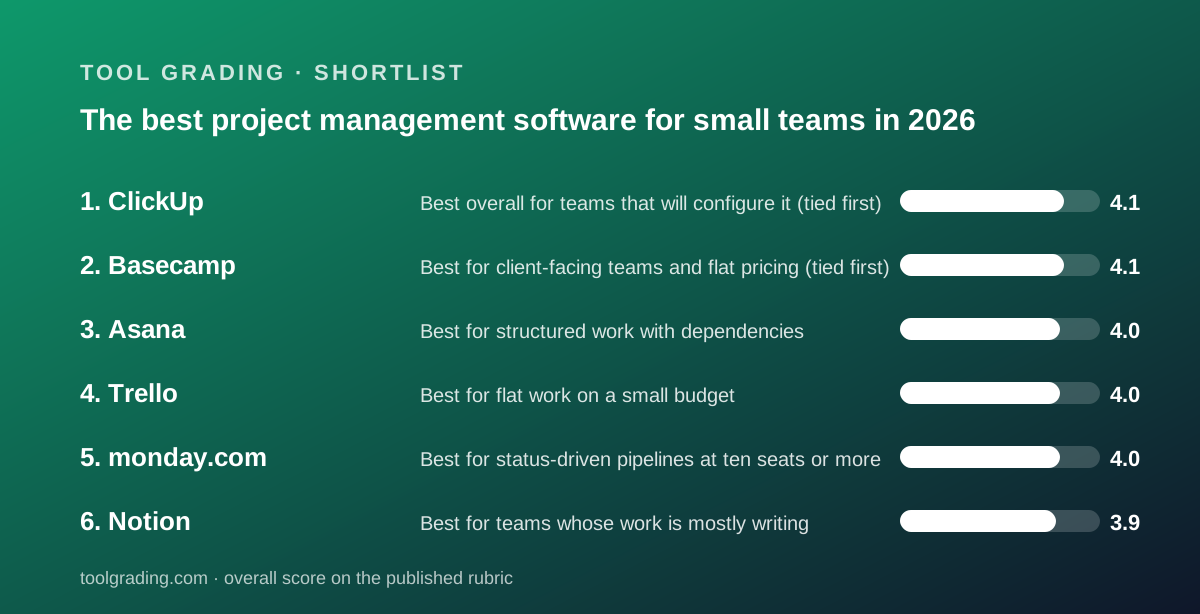
Six work-management tools graded on this site, ranked by their total score on the published rubric: ease, features, value at a ten-person team, and support. ClickUp and Basecamp tie at the top with opposite strengths, Asana sits one tenth of a point behind, and Trello, monday.com and Notion follow in that order. Every figure below comes from the vendors' pricing pages as checked on October 7, 2026, or from the underlying review on this site.
Our picks
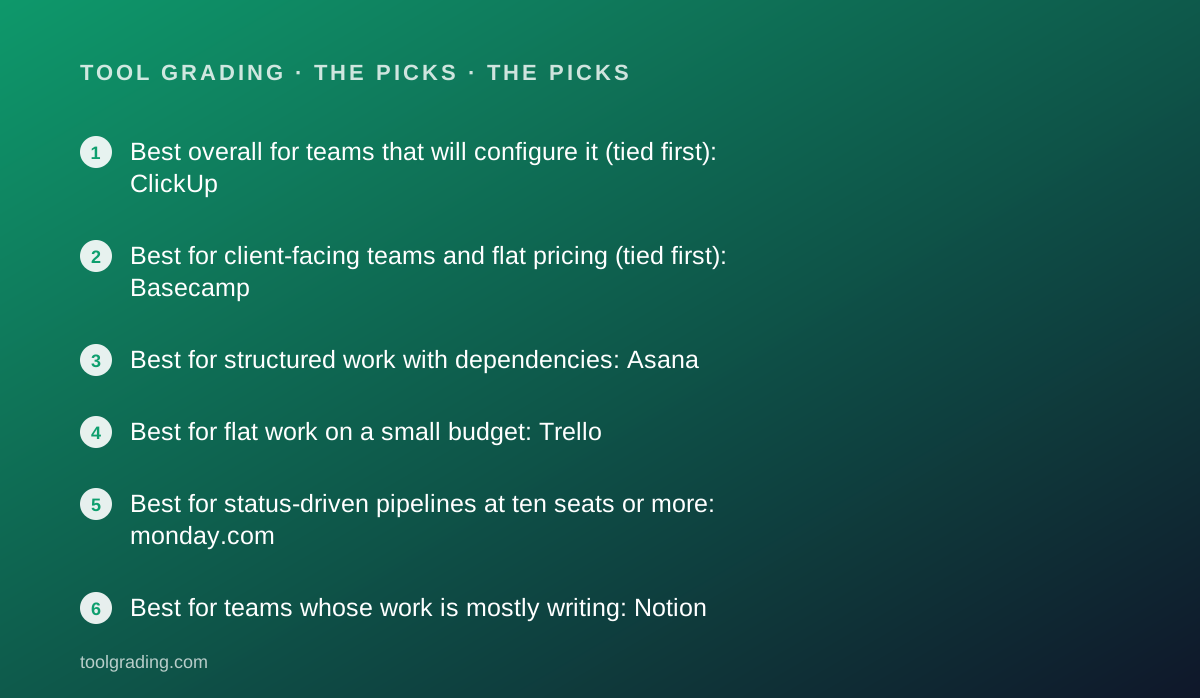
- Best overall for teams that will configure it (tied first): ClickUp
- Best for client-facing teams and flat pricing (tied first): Basecamp
- Best for structured work with dependencies: Asana
- Best for flat work on a small budget: Trello
- Best for status-driven pipelines at ten seats or more: monday.com
- Best for teams whose work is mostly writing: Notion
This is a ranking built from documentation and verified user reports, not from a trial. Each of the six products has a full review on this site, and each review grades four things on the rubric described at the method page: how fast a small team reaches a configuration it can rely on, how deep the features go against real need, what the bill looks like for ten people, and what the vendor documents about support. The ranking below is those four sub-scores added together, with one tie at the top broken by argument rather than arithmetic. No first-hand testing was run for any of the six and none is claimed; where a review could not read a vendor's live pricing page, this guide prints no price for that product either. The reason to rank at all, rather than list, is that the six products are not interchangeable, and the order says something about what a typical five-to-fifty-person team gets for its money across the category.
The category divides by data model, and the data model predicts most of what a team will like or dislike. Asana treats a task as an object with an owner, a date, a parent and dependencies. monday.com and Trello are boards: rows or cards in columns, with monday.com adding typed columns and automation on top. ClickUp is a seven-level hierarchy with every adjacent module bolted on. Basecamp is a fixed set of six communication tools per project, priced flat. Notion is a page editor with a database engine, where a task tracker is one database among many. A team whose work is a pipeline of status changes will be happier on a board; a team whose work has dependencies will outgrow a board inside a year; a team whose work is mostly writing should look at Notion before any of the others. The scores reward depth and fairness of pricing, so the order below does not always match the order a given team should buy in.
First place is shared, and the tie is real: ClickUp and Basecamp both total 16.3 on the rubric. ClickUp is listed first because its feature sub-score of 4.6 and value sub-score of 4.3 are the highest of any product in this category on this site, and the rubric is written for teams choosing a work-management tool rather than a communication tool. The pricing page, checked October 7, 2026, lists Unlimited at $7 per user per month billed annually and Business at $12, so ten people cost $840 or $1,440 per year, with time tracking, Gantt and integrations at the first paid rung and dashboards at the second. The free tier has no member cap but only 60MB of storage and 5 Spaces. The cost is the ease sub-score of 3.4, the lowest here: the review's reading of verified reports is uniform that the interface is dense, the settings tree is long, and teams that succeed had someone who owned the configuration for weeks. Performance complaints recur across years of public reviews. The AI add-ons at $9 or $28 per user per month can double the seat price for a team that adopts them.
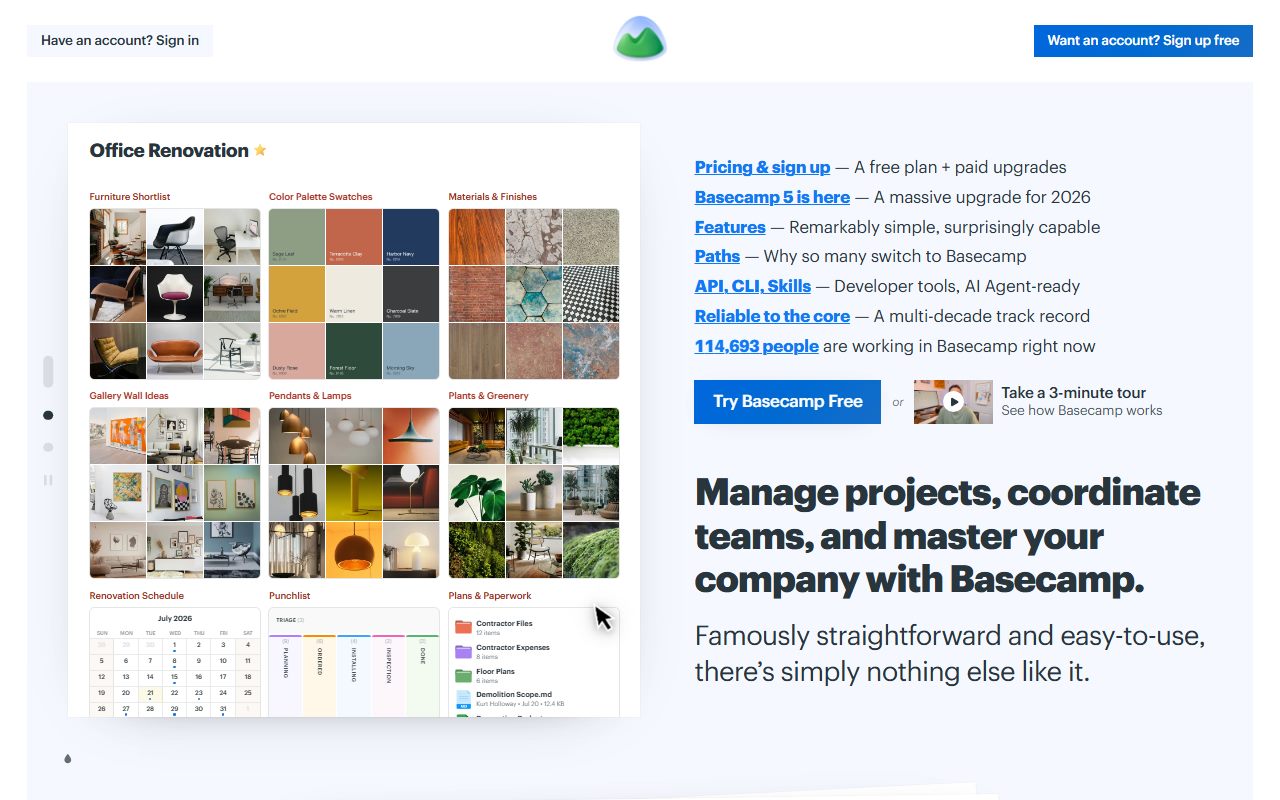
Basecamp earns the same total from the opposite direction: ease 4.5, support 4.3, value 4.1 and features 3.4. The pricing page, checked October 7, 2026, lists flat monthly tiers with no per-user fees: Studio at $59 per month for up to 10 active projects and unlimited users, Pro at $99 for up to 25 projects, and an Unlimited Edition at $299 per month billed annually. For ten people, Studio is $708 per year and Pro is $1,188, and the figure does not move when the team hires or invites a client. Every paid tier lists 24/7/365 support, which no other product in this ranking matches below its enterprise tier. The feature score is low because the review found a to-do with an assignee, a date and notes, and nothing else: no dependencies, no custom fields, no workload view, no cross-project timeline, and a vendor that has declined to add them for years. Integrations are the most common functional complaint in verified reports. The right buyer is an agency or a team with clients in the loop; the wrong buyer is a team of three, which pays the same as a team of thirty.
Asana is third at 16.0, with features 4.5, ease 4.0, support 4.0 and value 3.5. The review found the most structurally coherent product in the category: because a task is one object, every view renders the same thing and reports reconcile, which is why Asana scales past the point where boards fall apart. Timeline and dependency handling are where it is clearly ahead of the lighter tools, and rules, templates and forms-to-task intake automate recurring process without scripting. The price was not verified against the live pricing page for the Asana review, so this guide prints no figure; the structure is a free tier with a seat cap and per-seat paid tiers above it, with the first paid tier being where timeline, custom fields and reporting live. That is also why the value sub-score is the lowest of its four: the free tier deliberately omits the three things the product is best at, and the per-seat rate at the useful tier sits toward the high end of the category, billed for people who only read. Verified reports name price at scale as the most common reason for leaving and praise clarity of accountability most often.
Trello is fourth at 15.9, and it is the cheapest paid tool here. The pricing page, checked October 7, 2026, lists Standard at $5 per user per month billed annually and Premium at $10, so ten people cost $600 or $1,200 per year. The ease sub-score of 4.7 is the highest on this site: board, list and card need no configuration, and verified reports are unanimous that whole teams adopt it rather than a subset. The feature sub-score of 3.3 is the lowest here for the same reason. There is no native hierarchy beyond a checklist, no dependencies, no workload view, and Calendar, Timeline, Table and Dashboard views are listed only at Premium, so the Standard tier is a board and little else. Butler automation runs are capped at 250 per month on Free and 1,000 on Standard. The review's honest summary is that Trello is the best deal in the category for flat work and a poor one for structured work, because structured work leaves within two years and migration never appears on a pricing page. Support below Enterprise runs through Atlassian's portal and community, which holds that sub-score at 3.7.
monday.com is fifth at 15.8: ease 4.3, features 4.2, support 3.9, value 3.4. The product is a board engine whose typed columns and plain-language automation recipes are the reason non-technical staff keep it updated, which verified reports cite as its dominant positive. The pricing page, checked October 7, 2026, lists Basic at $9, Standard at $12 and Pro at $19 per seat per month billed annually, with a 10-seat minimum on all three for the Work Management product. Timeline and Gantt are at Standard, and the automation quota is 250 actions per month on Standard and 25,000 on Pro, a gap that pushes growing teams to Pro. For ten people, Standard is $1,440 per year and Pro is $2,280. The value sub-score is pulled down by two things the review names directly: a team of five on Standard still pays for ten, and the feature that makes the board do work is the one most likely to force the 58 percent step from Standard to Pro. Verified reports also raise notification volume and the limits of a flat model when work becomes nested. 24/7 support is listed only on Enterprise.
Notion is sixth at 15.6, and sixth place understates it for the right team. The review scored ease 4.0, features 4.1, value 3.7 and support 3.8, and its central finding is that Notion is a document tool that grew a database: the writing and reading experience is the best in the category and the task tracker is a database pattern without native dependency enforcement, workload views or single-source reporting. The pricing page, checked October 7, 2026, displays Plus at $10 and Business at $20 per member per month, so ten members cost $1,200 or $2,400 per year, and Business is the most expensive tier of any product in this ranking for ten people. The guest model is the lever: guests are unlimited from Plus, so a ten-person team working with fifteen contractors pays for ten. The Free tier caps uploads at 5 MB and page history at 7 days. Verified reports praise flexibility and consolidation and complain about sprawl, search and mobile editing. A team whose work is mostly specs, notes and policies with light tracking alongside should weigh this product above its rank; a team running deadline-driven projects should not.
Put the ten-person figures side by side and the category sorts into three price bands on annual billing, excluding Asana, whose price this site has not verified. The low band is Trello Standard at $600, Basecamp Studio at $708 and ClickUp Unlimited at $840. The middle band is Trello Premium, Basecamp Pro, Notion Plus, ClickUp Business and monday.com Standard, all between $1,188 and $1,440. The high band is monday.com Pro at $2,280 and Notion Business at $2,400. The spread between the cheapest and the most expensive working configuration is four to one, and the feature difference is not four to one. Three structural variables move a team between bands more than the headline rate does: whether the tool bills for people who only read, which Basecamp does not and every per-seat tool does; whether a seat minimum applies, which only monday.com lists; and which tier the one feature the team needs sits on, which is usually a timeline view or an automation quota.
The verified reports across all six products repeat the same three complaints in different proportions, and they are worth knowing before any of these tools is bought. The first is notification volume, which every product permits by default and every help centre documents how to tame; Basecamp is the only one whose design treats it as a problem to solve rather than a setting to find. The second is price at renewal, nearly always expressed as per-seat cost multiplied by people who rarely post, and the two products that escape it are Basecamp through flat pricing and Notion through free guests. The third is the ceiling: Trello users describe the month work needed dependencies, Basecamp users describe the month it needed custom fields, and Notion users describe the month the tracker needed to be a tracker. ClickUp and Asana are where those teams tend to migrate, and ClickUp users then describe the configuration burden. None of this is converted into a number on this site; it is the pattern behind the sub-scores.
The practical order, then, is by work shape rather than by rank. A team of five to fifty with one person willing to own configuration, and a budget that rewards consolidation, should start with ClickUp and expect to spend weeks on setup. An agency or a team with clients in every project should start with Basecamp and accept the feature ceiling knowingly. A team whose work has owners, dates and dependencies and whose budget can carry the useful tier should start with Asana. A team with flat work and ten minutes to spare should start with Trello, and a team running visible status pipelines with ten or more seats should look at monday.com Standard or Pro. A team whose work is mostly writing should start with Notion Plus. Whatever the choice, read the live pricing page on the day of purchase, because every figure here was true on October 7, 2026 and tier contents in this category move often.
Best overall for teams that will configure it (tied first): ClickUp
Total 16.3: ease 3.4, features 4.6, value 4.3, support 4.0. The widest feature surface in the category, with a seven-level hierarchy, docs, whiteboards, goals, time tracking and dashboards in one account, at the lowest entry rate among full-featured tools: Unlimited at $7 and Business at $12 per user per month billed annually per the pricing page checked October 7, 2026, so $840 or $1,440 per year for ten people. The ease sub-score is the lowest here because verified reports consistently describe a dense interface and a learning curve that stalls teams without a dedicated configurer, and performance complaints recur. Budget the setup weeks alongside the seat price.
Visit ClickUp
We have no affiliate relationship with this vendor. Link goes to the official site.
Best for client-facing teams and flat pricing (tied first): Basecamp
Total 16.3: ease 4.5, features 3.4, value 4.1, support 4.3. Six fixed communication tools per project, client access as a documented first-class feature, and flat monthly pricing with no per-user fees on every paid tier: Studio at $59 per month for 10 active projects and Pro at $99 for 25, per the pricing page checked October 7, 2026. Ten people pay $708 or $1,188 per year and thirty pay the same. 24/7/365 support is listed on every paid tier. The to-do has no dependencies, custom fields, time estimates or cross-project reporting, and the vendor has declined to add them, so a team that needs structure will outgrow it and a team of three overpays.
Visit Basecamp
We have no affiliate relationship with this vendor. Link goes to the official site.
Best for structured work with dependencies: Asana
Total 16.0: ease 4.0, features 4.5, value 3.5, support 4.0. The most structurally coherent product here: a task is one object with an owner, a date and dependencies, every view renders that same object, and reports reconcile as a result. Timeline and dependency handling are where it leads the lighter tools, and the help centre is unusually complete. The live pricing page was not verified for the review, so no figure is printed; the structure is a free tier with a seat cap and per-seat paid tiers above it, with timeline, custom fields and reporting gated to the first paid tier. Verified reports name per-seat cost for people who only read as the most common reason for leaving.
Visit Asana
We have no affiliate relationship with this vendor. Link goes to the official site.
Best for flat work on a small budget: Trello
Total 15.9: ease 4.7, features 3.3, value 4.2, support 3.7. Board, list and card, understood in minutes, at the lowest per-user rate of any paid tool here: Standard at $5 and Premium at $10 per user per month billed annually per the pricing page checked October 7, 2026, or $600 and $1,200 per year for ten people. The Free tier caps boards and collaborators at 10 per Workspace. Calendar, Timeline, Table and Dashboard views are Premium-only, Butler runs are capped at 1,000 per month on Standard, and there are no dependencies or hierarchy beyond a checklist. Verified reports describe teams outgrowing it within a year or two once work needs structure.
Visit Trello
We have no affiliate relationship with this vendor. Link goes to the official site.
Best for status-driven pipelines at ten seats or more: monday.com
Total 15.8: ease 4.3, features 4.2, value 3.4, support 3.9. A board engine with typed columns and automation recipes written as sentences, which verified reports credit for staff actually keeping it updated. The pricing page checked October 7, 2026 lists Basic at $9, Standard at $12 and Pro at $19 per seat per month billed annually with a 10-seat minimum on each, Timeline and Gantt from Standard, and 250 automation actions per month on Standard against 25,000 on Pro. Ten people pay $1,440 on Standard or $2,280 on Pro per year. The seat minimum doubles the effective rate for a team of five, and the automation quota is the usual reason for the step to Pro.
Visit monday.com
We have no affiliate relationship with this vendor. Link goes to the official site.
Best for teams whose work is mostly writing: Notion
Total 15.6: ease 4.0, features 4.1, value 3.7, support 3.8. A page editor with a database engine, so a spec, a meeting note, a task and a customer record all link to each other, and the writing experience is the best in the category. The tracker half is a database pattern without native dependency enforcement or workload views. The pricing page checked October 7, 2026 displays Plus at $10 and Business at $20 per member per month, or $1,200 and $2,400 per year for ten members, with guests unlimited from Plus and the Free tier capped at 5 MB uploads and 7 days of page history. Verified reports praise flexibility and complain about sprawl and search in workspaces without an agreed structure.
Visit Notion
We have no affiliate relationship with this vendor. Link goes to the official site.
How we chose
Six products with a full review on this site were ranked by the sum of their four rubric sub-scores, ease, features, value and support, each scored from 1 to 5 as described on the method page. The sub-scores were built from vendor documentation, pricing pages read on October 7, 2026, and patterns in verified user reports on public review platforms; no first-hand testing was run and none is claimed. Where a review could not read a vendor's live pricing page, no price is printed here for that product. The one tie, between ClickUp and Basecamp, is listed with ClickUp first because the rubric is written for teams choosing a work-management tool and ClickUp's feature and value sub-scores are the highest in the category.
Frequently asked
Why are ClickUp and Basecamp tied, and why is ClickUp listed first?
Both total 16.3 across the four rubric sub-scores, from opposite directions: ClickUp scores highest on features and value and lowest on ease, Basecamp scores high on ease, value and support and low on features. ClickUp is listed first because the rubric is written for teams choosing a work-management tool and its feature and value sub-scores are the highest in the category. A team that mostly needs project communication with clients should read the order the other way.
Why does this guide print no price for Asana?
The Asana review on this site did not verify current figures against the live pricing page, and this site does not print a price it has not checked. The documented structure is a free tier with a seat cap and per-seat paid tiers above it, with timeline, custom fields and reporting at the first paid tier. Read the vendor's pricing page for the current rate.
What is the cheapest working configuration for ten people?
On annual billing per the pricing pages checked October 7, 2026: Trello Standard at $600 per year, Basecamp Studio at $708, and ClickUp Unlimited at $840. Of the three, ClickUp Unlimited includes the most, with time tracking, Gantt and integrations at that tier, and Basecamp is the only one whose figure stays flat as the team grows.
Did this site test any of these products?
No. Every grade on this site is a documentation review built from vendor documentation, pricing pages and patterns in verified user reports, against the published rubric. No first-hand testing was run and none is claimed. The method page describes how each sub-score is built.