 Tool
Tool
Notion
A page-and-database workspace where tasks are one database among many - best for teams whose work is mostly writing things down.
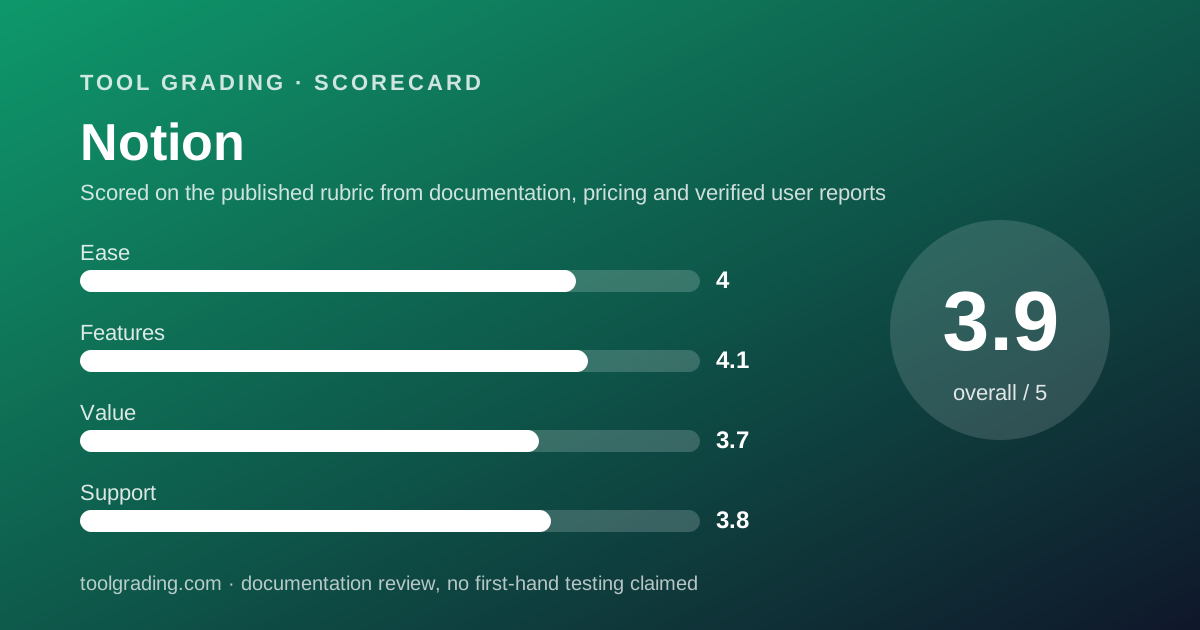
Scored on the published rubric, from documentation, pricing and verified user reports.
Best for: Teams of five to fifty whose work centres on documents, knowledge and lightweight tracking, and who want tasks to live next to the notes that explain them.
Verdict
Notion is a document tool that grew a database, and every judgement about it follows from that order. A page can contain text, embeds and databases; a database is a table whose rows are pages; and a project tracker, a CRM, a wiki and a meeting-notes archive are all the same two primitives arranged differently. For a team whose work is largely written - product specs, client notes, policies, research - that unification is the whole point and nothing else in this category matches it. For a team whose work is a pipeline of dated, owned tasks with dependencies, the database is adequate rather than strong, and the structure that [Asana](/review/asana/) or [ClickUp](/review/clickup/) enforces must be built and policed by hand. The pricing page, checked October 7, 2026, lists Plus at $10 and Business at $20 per member per month, with guest limits, file upload size and page history as the tier gates. This grade comes from vendor documentation, pricing structure and verified user reports, against the published rubric; it is a documentation review, no first-hand testing was run and none is claimed.
Visit Notion
We have no affiliate relationship with this vendor. Link goes to the official site.
Where it is strong
- Pages and databases are one model, so a task, a spec, a meeting note and a customer record can link to each other without leaving the tool
- The writing and reading experience is the best in the category, which matters because most team knowledge is prose, not tasks
- Database views (table, board, timeline, calendar, gallery, list) with filters, sorts, relations and rollups cover most small-team tracking needs
- The template ecosystem, both official and community, means almost any workflow has a starting point
- Guest access is unlimited from the Plus tier per the pricing page checked October 7, 2026, which keeps client and contractor collaboration off the member bill
Where it falls short
- Task management is a database pattern rather than a product: no native dependency enforcement, single-source reporting or workload view in the way dedicated trackers provide
- The Free tier limits file uploads to 5 MB and page history to 7 days per the pricing page, and verified user reports describe hitting both quickly
- Workspaces built without an information architecture decay into unfindable pages, and public user reports cite search and sprawl as the most common long-term complaint
- Offline behaviour and mobile editing are recurring complaints across public reviews, which matters for teams away from a desk
- AI features above the trial are sold separately or gated to higher tiers, so the headline per-member price is not the full price for teams that want them
What the product actually is
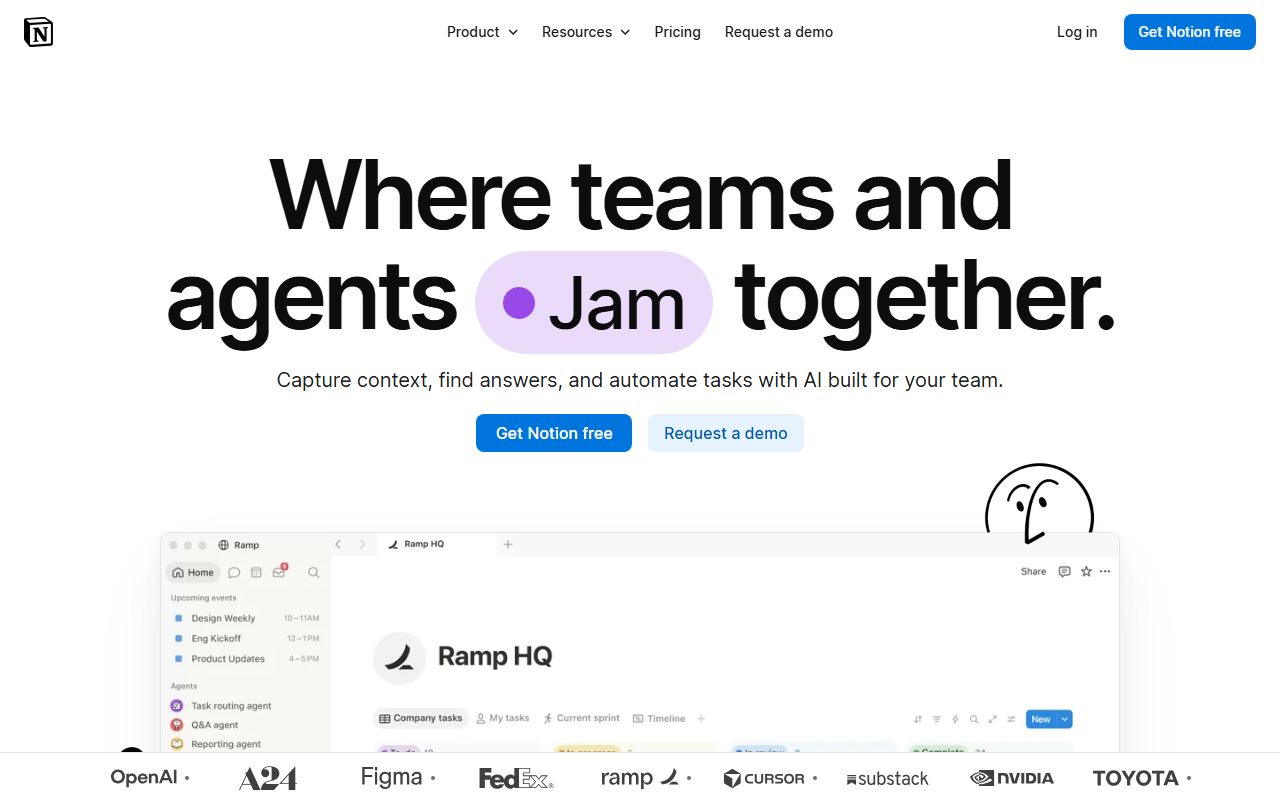
Notion has two primitives, and understanding both explains everything the product can and cannot do. The first is the page: a document made of blocks, where a block can be text, a heading, a list, an image, an embed, a toggle, or another page. The second is the database: a collection of pages that share a set of properties - text, number, select, multi-select, date, person, checkbox, relation, rollup, formula - and that can be rendered as a table, a board, a timeline, a calendar, a gallery or a list.
The critical fact is that a database row is itself a page. Open a task in a Notion project tracker and you are looking at a full document with the task's properties at the top. That is why a Notion workspace can hold a wiki, a project tracker, a CRM, a content calendar and a meeting archive, and why all of them can link to each other: they are all pages, some of which happen to live in databases.
It also explains the product's limits as a work-management tool. A dedicated tracker enforces a schema - one owner, one date, dependencies that block - because its data model only knows tasks. Notion's model knows pages with properties, and a task is a convention the team adopts rather than a rule the tool enforces.
So the evaluation question is which half of the team's work is larger: the written half or the tracked half.
Who it is for, and who it is not
The team Notion fits best is one whose work is mostly knowledge. A product team writing specs and decision records, a consultancy keeping client notes and deliverables, a startup documenting processes while they form, a content team planning and drafting in one place, an operations team whose handbook is the real asset. For those teams the tracker is a side benefit of the wiki, and having tasks sit beside the pages that explain them is worth more than any dependency feature.
It also fits a small team that wants one surface for everything and is willing to accept adequacy in each part rather than excellence in one. A five-person company can run its wiki, its roadmap, its hiring pipeline and its meeting notes in Notion and pay for one tool.
It fits poorly for two kinds of team. The first is any team whose work is a dated, owned pipeline with real dependencies: an agency delivering on deadlines, a team running a monthly close, a product team coordinating a multi-function launch. Those teams want enforced structure and cross-project reporting, and they will be better served by Asana, ClickUp or monday.com. The second is a team without a librarian. A Notion workspace is as organised as its most disciplined contributor, and public user reports are unanimous that unmanaged workspaces become sprawling and hard to search within a year.
How the pricing is structured
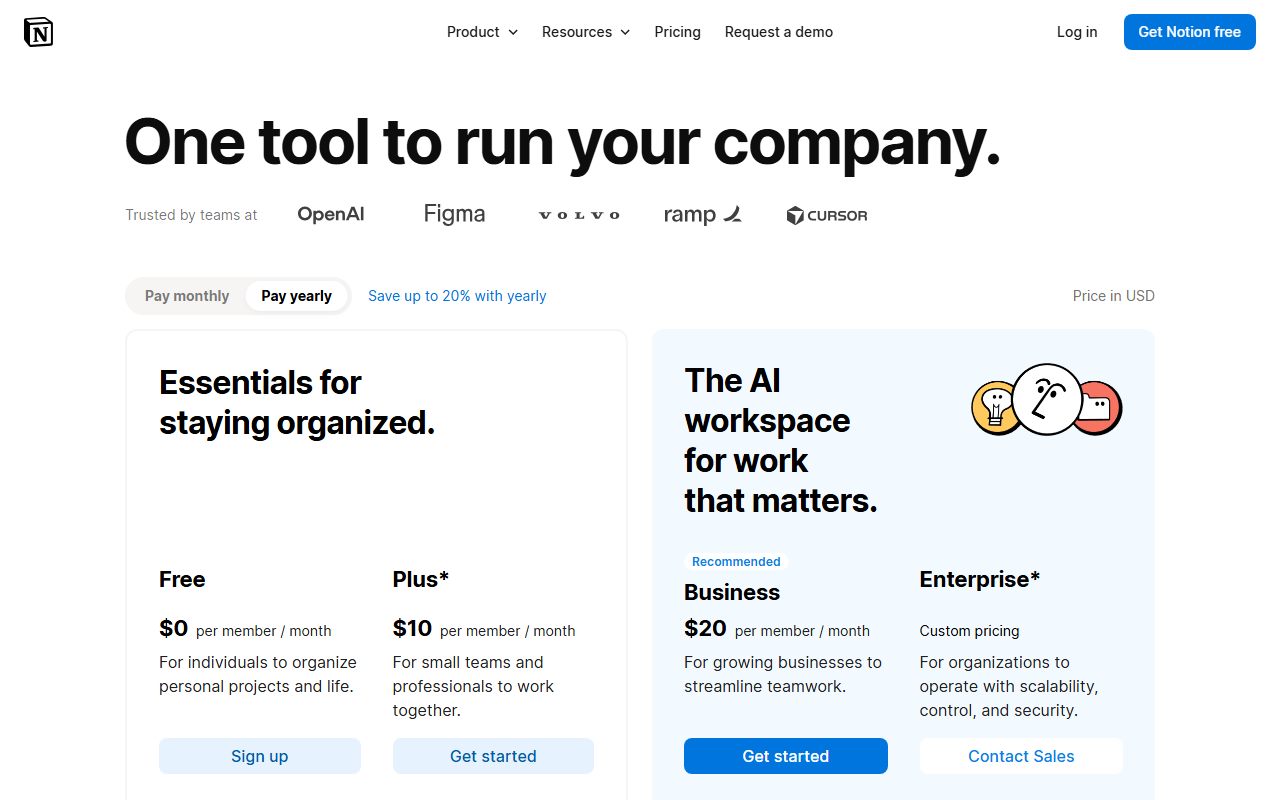
The figures below come from the Notion pricing page, checked October 7, 2026. The page displays prices per member per month; confirm the billing basis on the live page, because the vendor shows annual and monthly rates with a toggle and the structure may change before this review is updated.
The structure has three gates that matter more than the per-member rate. The first is guests versus members: a member is billed, a guest is not, and the Free tier caps guests at 10 while the paid tiers list them as unlimited. For a team working with clients or contractors, that distinction determines the bill. The second is file upload size: the Free tier lists a 5 MB cap per upload, which is below a single high-resolution image or a short recording, so a team attaching anything is on a paid tier. The third is page history: 7 days on Free, 30 on Plus, 90 on Business, unlimited on Enterprise, which matters the moment someone deletes a section of a shared document and needs it back.
AI is a separate line. The page lists a trial on the lower tiers, more AI capability at Business, and custom agents sold by credit at $10 per 1,000 monthly credits after the trial.
- Free: $0 per member, up to 10 guests, 5 MB file uploads, 7 days of page history, blocks limited for workspaces of 2+ members (pricing page, October 2026)
- Plus: $10 per member per month as displayed, unlimited guests, unlimited blocks, 30 days of page history, custom forms and sites, unlimited charts
- Business: $20 per member per month as displayed, 90 days of page history, SAML SSO, granular database permissions, Notion Agent and AI meeting notes included
- Enterprise: custom pricing, unlimited page history, audit logs, SCIM provisioning, dedicated customer success manager, 24/7 support listed
- Custom agents: $10 per 1,000 monthly credits after the free trial
Ease of use: what the score is built from
The ease sub-score is built from the documented simplicity of the two primitives, discounted for the architecture decision the tool leaves entirely to the buyer.
The simplicity is genuine. A new user opens a page and types, and the block model means formatting, embedding and nesting all follow the same gesture. Creating a database is a block type, and switching its view is a menu. The vendor's help centre, which was readable for this review, organises its material around exactly those concepts - basics, pages and blocks, databases, sharing and permissions - and the template gallery provides a starting workspace for most common uses, including a project tracker with tasks and sprints.
The discount comes from what the product does not decide. There is no enforced hierarchy of projects and tasks, no required set of properties, no rule about where meeting notes go. A team that adopts a convention and keeps it gets a workspace where everything is one click from everything else. A team that does not gets a workspace where the same information exists in four places and search returns all four. Verified user reports describe both outcomes, and the second is the most common long-term complaint.
The score measures how fast a team of ten reaches a reliable workspace: very fast for the writing half, and dependent on a self-imposed architecture for the tracking half.
Feature depth: what the score is built from
The feature sub-score is built from the documented depth of the page editor and the database engine, discounted for the gap between a database and a dedicated work tracker.
The editor is the strongest element in the category and it is not close. Block-level structure, synced blocks across pages, toggles, callouts, embeds of most external content, and a page model where any page can hold any other page produce a writing environment that no task-first competitor approaches. For a team whose knowledge is prose, that is the feature that matters most.
The database engine is the second input, and it is capable: relations between databases, rollups that aggregate across relations, formulas, filtered and sorted views, timeline and calendar renderings, and templates for new rows. The vendor's help material documents all of these in depth. A small team can build a project tracker, a CRM or a content calendar from those parts and it will work.
The discount is the distance between that database and a product like Asana. No native dependency enforcement where a blocked task cannot be closed; no workload view across people; reporting that depends on the team having built consistent databases rather than a tool that reconciles by design; automations that exist but are thinner than the recipe engines of monday.com or ClickUp. Integrations cover the mainstream systems, with the deeper connections listed at Business tier per the pricing page.
The AI layer is the newest input and the hardest to grade from documentation: the vendor lists meeting notes, enterprise search and agents, with most of it at Business or sold separately, and this review does not score capabilities it has not read documentation for.
Value at a realistic team size
Take a team of ten and apply the figures displayed on the pricing page checked October 7, 2026.
On Plus, ten members at $10 per member per month is $100 per month, or $1,200 per year, with unlimited guests, unlimited blocks and 30 days of page history. On Business, ten members at $20 per member per month is $200 per month, or $2,400 per year, with 90 days of history, SSO, granular database permissions and the included AI capabilities.
The comparison depends on what the team is replacing. Against a dedicated work tracker, Plus at $1,200 per year is level with monday.com Standard and above ClickUp Unlimited, while doing less as a tracker and far more as a wiki. Against a wiki tool plus a tracker, Notion Plus is usually cheaper than the pair. Business at $2,400 per year is the most expensive tier of any tool reviewed here for a team of ten, and the question is whether the team needs SSO, 90-day history or the AI features, because those are the gate.
The guest model is the hidden lever. A ten-person team working with fifteen clients and contractors pays for ten members on Plus, where a per-seat tracker would bill all twenty-five or force them into a limited guest role.
The value sub-score sits in the middle because the price is fair for what the product is and unremarkable for what a buyer might think it is. Verified user reports describe the Plus tier as good value and the step to Business as hard to justify for a small team.
Support and documentation
The support sub-score covers channels by tier, documented commitments and self-service material, and the self-service part is the strongest.
The help centre, which was readable for this review, is organised by concept rather than by feature list: basics, workspace settings, pages and blocks, databases, sharing and permissions, automation and connections, AI, agents, and admin and security. It is supported by a product-tour library, webinars, a template gallery, an academy with badges and certifications, a community forum and a consultant directory. For a product whose main risk is a badly organised workspace, a consultant directory is a meaningful resource rather than an upsell.
Channels by tier are thinner. The pricing page lists in-app chat support on the lower tiers and premium 24/7 support only at Enterprise; no response commitment is published for Free, Plus or Business. Verified user reports describe chat support as responsive for account and billing questions and slower for anything technical.
A public status page exists.
What cannot be graded from documentation is the response time for a Plus-tier team with a data-loss question on a weekend, and this page does not estimate it. The 30-day page history on Plus is the practical safety net, and buyers should understand it before they need it.
What verified users report
Public review platforms carry a very large volume of Notion reviews, and the patterns are stable across years.
The dominant positive is flexibility combined with a pleasant editor: reviewers describe building exactly the workspace they wanted and enjoying the act of writing in it. The second positive is consolidation, replacing a wiki, a notes app and a light tracker with one subscription.
The dominant complaint is sprawl and search: as a workspace grows, pages become hard to find and duplicates appear, and reviewers who raise it usually attribute it to a missing structure rather than to the tool. The second complaint is offline and mobile editing. The third is that the tracker half is weaker than a dedicated tool, raised most often by teams that tried to run deadline-driven projects in it. A smaller theme is performance on very large pages and databases.
These reports are weighed as pattern and not converted to a number. They explain why the feature sub-score is strong but not the highest, and why the ease sub-score depends so much on the team's own discipline.
Alternatives on this site
Asana is the alternative for a team that realises its work is a pipeline of owned, dated tasks and wants a tool that enforces that. ClickUp is the alternative for a team that wants Notion's breadth with a stronger task spine, at a lower per-seat rate but with a denser interface; its Docs are the closest thing to Notion pages in a tracker. Airtable is the alternative when the database half is what the team wants and the writing half is secondary; it is a far stronger database and a far weaker document tool. monday.com and Trello are board tools and are not substitutes for the wiki. Basecamp overlaps on documents and message boards for a team that wants communication structure rather than a flexible workspace.
The decision rule: count the pages. If the team writes more than it tracks, Notion is probably right. If it tracks more than it writes, start elsewhere and link to Notion for the documents.
Bottom line
Notion earns a strong feature score for the editor and database, a fair value score at the Plus tier, and ease and support scores that depend on the team bringing its own structure. The product is the best place in this category to write, and an adequate place to track, and buyers who understand which of those they are paying for are the ones who stay.
Buy it if the team's work is mostly written, if someone will own the information architecture, and if guest collaboration matters to the bill. Do not buy it as a replacement for a dedicated tracker on a deadline-driven team, and do not evaluate it on the Free tier for a team of ten, because the 5 MB upload cap and 7-day history make that tier a demonstration rather than a product.
What would move the grade up: native dependency and workload handling in the task database, or a lower-priced path to longer page history. What would move it down: more capability moving from Plus to Business. Prices and tier contents carry a checked date; open the live pricing page before you sign.
Visit Notion
We have no affiliate relationship with this vendor. Link goes to the official site.