 Tool
Tool
Basecamp
A fixed set of communication tools at a flat monthly price - the only product here that gets cheaper per person as the team grows.
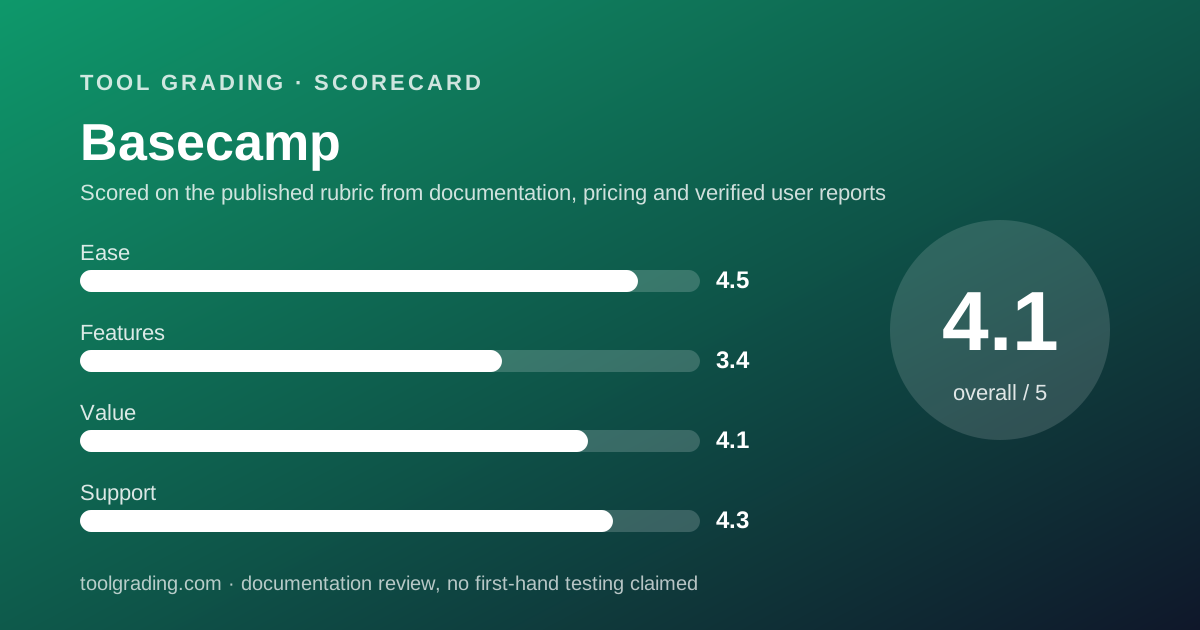
Scored on the published rubric, from documentation, pricing and verified user reports.
Best for: Teams of ten to fifty, especially those including clients or contractors, who want calm project communication more than detailed task tracking.
Verdict
Basecamp is organised around the project as a container for conversation, and its tools - message board, to-dos, schedule, docs and files, chat, card table - are fixed rather than configurable. That is a deliberate design stance, not a gap, and it produces a product that a whole team including clients will use without training. The pricing is the second stance: the pricing page, checked October 7, 2026, lists flat monthly tiers from $25 to $299 with no per-user fees on any of them, which makes Basecamp the only product here whose cost per person falls as the team grows. The feature sub-score is low because the to-do list is simple, there are no dependencies, custom fields or cross-project reporting, and the vendor will not add them. The support sub-score is high because the pricing page lists 24/7/365 support on every paid tier and the vendor's record on documentation and status transparency is long. This grade comes from vendor documentation, pricing structure and verified user reports, against the published rubric; it is a documentation review, no first-hand testing was run and none is claimed.
Visit Basecamp
We have no affiliate relationship with this vendor. Link goes to the official site.
Where it is strong
- Flat monthly pricing with no per-user fees on every paid tier per the pricing page checked October 7, 2026, so clients, contractors and read-only stakeholders cost nothing extra
- The project-as-container model with message board, to-dos, schedule, docs, chat and card table is understood in minutes and used by whole teams rather than a subset
- Client access is a documented first-class feature, with control over what clients see, which matters to agencies and consultancies more than any tracking feature
- 24/7/365 support is listed on every paid tier of the pricing page, and the vendor publishes its support and status practices openly
- Notification design (digests, work-hours settings, one place for all activity) is the product's answer to the volume complaints that follow every competitor
Where it falls short
- To-dos have an assignee, a date and notes and little else: no dependencies, no custom fields, no time estimates, no workload view, and the vendor has declined to add them for years
- No cross-project reporting beyond the built-in activity and assignment reports, so a manager running twenty projects cannot see a consolidated timeline or status roll-up
- Active project caps on the lower tiers (3 on Freelancer, 10 on Studio, 25 on Pro per the pricing page) can bite an agency that runs many small concurrent projects
- Integrations are fewer and shallower than the category norm, and verified user reports raise this as the most common functional complaint
- Flat pricing is a poor fit for very small teams: a team of three on Studio pays the same as a team of thirty
What the product actually is
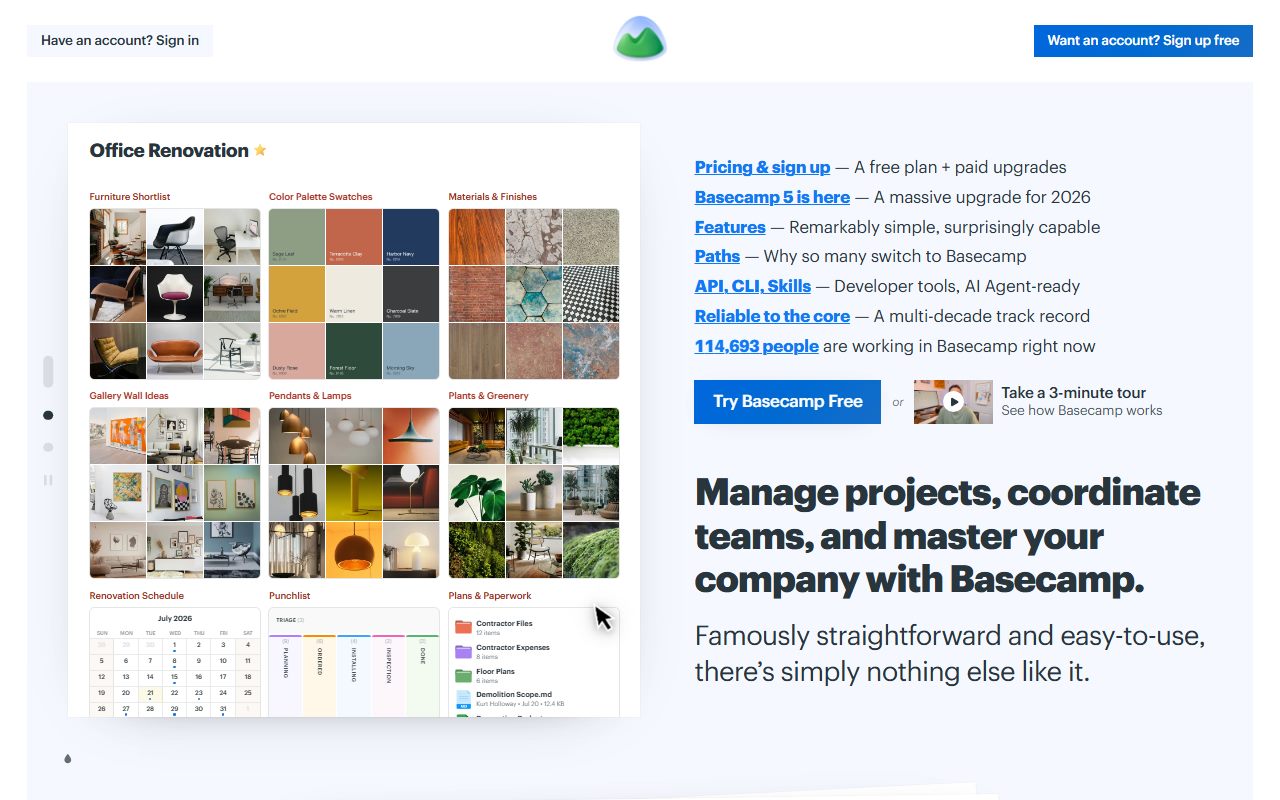
Basecamp is a set of fixed tools attached to a project. The project is the unit: a client engagement, an internal initiative, a department's standing work. Inside each project the same tools appear - a message board for announcements and discussion, to-do lists, a schedule, a docs and files area, a group chat called Campfire, and a card table for simple kanban - and a project owner switches tools on or off but does not configure what they are.
The design philosophy, documented at length by the vendor over many years, is that most project failure is communication failure and not tracking failure. So the product is built around threads with context: a message has a subject and replies, a to-do has comments, a document has a discussion, and every notification arrives in one place with digest and work-hours controls. The to-do is deliberately simple - an item, an assignee, a date, notes and comments - because the vendor's stated position is that richer task objects produce busywork.
The practical consequence is that Basecamp stores conversation very well and structure very little. There is no status field, no dependency, no custom field, no formula and no cross-project roll-up beyond the built-in reports. Teams that want those have asked for years and the vendor has said no.
So the evaluation question is whether the team's problem is coordination or tracking. Basecamp solves the first and declines the second.
Who it is for, and who it is not
Basecamp fits a team of ten to fifty that works in projects with clients, contractors or stakeholders who need to see and comment but should not be billed as seats. Agencies, consultancies, small professional services firms and nonprofits are the archetypes, and the vendor's own marketing names them. It fits a team that has tried a heavier tracker and found that half the staff stopped updating it, because the Basecamp model asks very little of each person.
It fits poorly in three cases. The first is a team whose work needs structure the tool refuses to provide: dependencies, time estimates, resource planning, cross-project Gantt or status roll-ups. Those teams should look at Asana, ClickUp or monday.com. The second is a very small team of two to five, for whom a flat fee buys more than they use and the Free tier, capped at 1 project and 5 users per the pricing page, is too narrow. The third is a team that needs deep integrations with a CRM, a billing system or an engineering tracker, because verified user reports are consistent that this is Basecamp's thinnest area and the vendor's integration catalogue is small by category standards.
How the pricing is structured
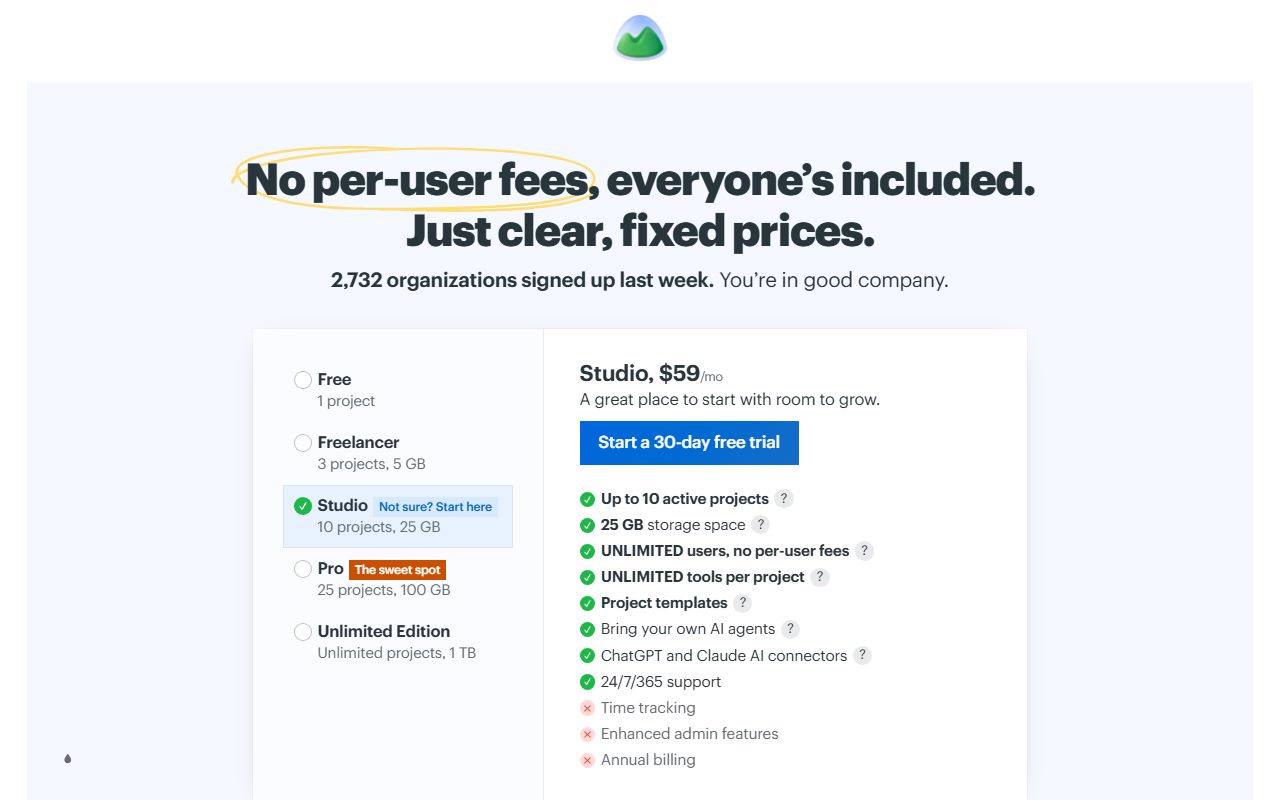
The figures below come from the Basecamp pricing page, checked October 7, 2026. Every paid tier is a flat monthly price with no per-user fees; the page shows an annual billing option and lists the top tier as billed annually. Open the live page before signing.
The structure is unlike every per-seat competitor, and three features of it determine the bill. The first is the user count: the page lists a cap of 5 on Free and 20 on Freelancer, and unlimited users on Studio and above, with clients, contractors and guests explicitly included in that count rather than charged separately. The second is active projects: 1 on Free, 3 on Freelancer, 10 on Studio, 25 on Pro and unlimited on the top tier. For an agency that runs one project per client, the project cap is the real gate between tiers rather than the user cap. The third is storage: 1 GB on Free rising to 1000 GB on the top tier.
The top tier is distinct in two ways: the page lists it as billed annually, and it adds priority support, personalised onboarding and an extended 45-day trial.
- Free: $0, 1 project, up to 5 users, 1 GB storage, standard support (pricing page, October 2026)
- Freelancer: $25 per month, up to 3 active projects, up to 20 users, 5 GB storage, project templates, time tracking, 24/7/365 support
- Studio: $59 per month, up to 10 active projects, unlimited users with no per-user fees, 25 GB storage, unlimited tools per project, 24/7/365 support
- Pro: $99 per month, up to 25 active projects, unlimited users, 100 GB storage, 24/7/365 support
- Unlimited Edition: $299 per month billed annually, unlimited projects and users, 1000 GB storage, priority 24/7/365 support, personalised onboarding, 45-day trial
Ease of use: what the score is built from
The ease sub-score is high, and it is built from the fixed-tools design, the documented client-access model and the consistency of verified user reports about adoption.
The fixed tools are the first input. A new project comes with the same six tools, each of which does one obvious thing, and there is nothing to configure beyond switching tools off and naming lists. A new user sees a message board, a to-do list and a schedule and already understands all three. The vendor's support site, readable for this review, points to learning materials, free live classes, published guides and help documentation, and the vendor's own position is that most teams need none of them.
The client-access model is the second input. Inviting a client to a project and controlling what they see is documented as a core feature rather than a permission workaround, and for the agencies the product targets that removes the single most awkward part of adopting a work tool.
The discount is for what cannot be configured. A team that wants a status field, a custom field or a different to-do shape cannot have one, and the ease that comes from fixed tools is the same property that frustrates a team whose process does not fit. The score measures time to a reliable setup, which here is an afternoon, and discounts for the cases where the setup can never be made to fit.
Feature depth: what the score is built from
The feature sub-score is low, and it is built from the documented depth of the to-do, the absence of structural features, and the strength of the communication tools that the score cannot fully credit under a work-management rubric.
The to-do is the first input. An item has a title, one or more assignees, a due date or range, notes, attachments and a comment thread, and lists can be grouped. Per the pricing page, time tracking is listed on the paid tiers, and project templates let a recurring engagement start pre-built. There are no dependencies, no custom fields, no priorities beyond ordering, no time estimates and no workload view, and the card table adds a kanban view without adding any of those.
The absence of cross-project structure is the second input. The built-in reports cover who is assigned what, what is overdue and what happened recently, across projects. There is no consolidated timeline, no portfolio view and no dashboard builder. A manager running twenty client projects sees twenty projects.
The communication tools are the third input and the product's real strength: threaded message boards with categories, a schedule that holds events and dated to-dos, docs with discussion, a chat per project, automatic check-in questions, and a notification system with digests and work hours. Under a rubric that weighted communication equally with tracking this would score higher; under this site's feature definition, which measures depth against the needs of a team choosing a work-management tool, it scores as written.
Integrations are the fourth input and the weakest: the vendor's catalogue is small, the API exists, and verified user reports raise integration gaps more than any other functional complaint.
Value at a realistic team size
Take a team of ten and apply the figures from the pricing page checked October 7, 2026.
On Studio, which is the first tier with unlimited users, the team pays $59 per month, or $708 per year, for up to 10 active projects and 25 GB of storage. On Pro, which lifts the project cap to 25, the team pays $99 per month, or $1,188 per year.
For a team of ten, Studio at $708 per year sits between Trello Standard and ClickUp Unlimited, and below every other paid tier reviewed here. Pro at $1,188 per year is level with Trello Premium and Notion Plus. The comparison shifts sharply with headcount: at twenty users on Pro, Basecamp is still $1,188 per year while monday.com Standard is $2,880 and Asana's comparable tier is higher, and at thirty the gap is wider again.
Two factors shape the value score. The first is the project cap: an agency with fifteen small concurrent clients is on Pro regardless of headcount, which is the tier the vendor intends them to buy. The second is the feature ceiling: the money buys communication and simple to-dos, and a team that needs more will add a second tool, at which point the flat price is no longer the whole bill.
The honest summary: for a team of ten to fifty whose work fits the model, Basecamp is among the best value in the category, and the value improves with every person added. For a team of three it is overpriced and for a team that needs structure it is the wrong tool at any price.
Support and documentation
The support sub-score is the highest of Basecamp's four, and it is built from the pricing page's support listings, the vendor's support site and its long public record on transparency.
Channels by tier are unusually clear. The pricing page lists 24/7/365 support on every paid tier, standard support on Free, and priority 24/7/365 support with personalised onboarding on the top tier. The support page, readable for this review, offers a contact form with categories for account access, pre-sales, feature requests, billing, email delivery and general questions, states that every message is read and answered, and notes that response times may currently be longer than usual - a disclosure most vendors would not print. No response-time commitment is published as a number on the pages read.
Self-service material is the second input: learning materials, community forums, free live classes, help documentation and the vendor's published guides on communication and decision-making. The last of these is unusual: the vendor documents how it believes a team should work, not just how its buttons work, and for a product whose value depends on a team adopting a communication style, that documentation is part of the product.
What cannot be graded from documentation is the actual response time behind a 24/7 promise on a Freelancer-tier account, and this page does not estimate it. Verified user reports describe support as fast and human, more consistently than for any other vendor reviewed here.
What verified users report
Public review platforms carry a long history of Basecamp reviews, and the pattern is stable and polarised in a way that is itself informative.
The dominant positive is calm: reviewers describe less noise, fewer tools and a team that actually reads the message board. The second positive is price at scale, with agencies and nonprofits citing the flat fee as the reason they chose it. The third is support, described as fast and personal.
The dominant complaint is the feature ceiling: no dependencies, no custom fields, no cross-project views, and a vendor that says no to requests. Reviewers who raise it usually moved to a heavier tracker and describe Basecamp as something they outgrew. The second complaint is integrations, specifically the lack of native connections to the CRM, billing or engineering tools a growing company uses. The third is the opinionated design, which some reviewers experience as the product telling them how to work.
These reports are weighed as pattern and not converted to a number. They explain why the ease, value and support sub-scores are high and the feature sub-score is low, and why the gap is the product's design rather than its failure.
Alternatives on this site
Asana is the alternative when the team needs the structure Basecamp refuses: owned, dated tasks with dependencies and cross-project reporting, at a per-seat rate that grows with headcount. ClickUp is the alternative for a team that wants maximum capability per dollar and will configure it; it includes chat and docs, but the calm is not included. monday.com is the alternative for a visual pipeline with automations, with a 10-seat minimum that makes it comparable in cost at ten users and more expensive above. Trello is the alternative for a team that wants a simple board rather than a simple project, and it is cheaper below about twelve users. Notion overlaps on documents and message-like pages for a team that wants a flexible workspace rather than fixed tools. Airtable is not a substitute; it is a database.
The decision rule: if the team's problem is that people do not know what is going on, Basecamp fixes it. If the problem is that tasks are not tracked precisely enough, it does not.
Bottom line
Basecamp earns high ease, value and support scores and a low feature score, and the gap is the product's stated philosophy rather than an oversight. It is a communication tool with to-dos attached, priced so that adding people costs nothing, and it is the best product in this category for a team whose problem is coordination.
Buy it if the team is ten or more, works with clients or contractors who should not be billed, and wants calm over control. Do not buy it for a team that needs dependencies, custom fields or portfolio reporting, because the vendor has said for years that it will not add them, and do not buy it for a team of three unless the Free tier's 1 project and 5 users is genuinely enough.
What would move the grade up: a richer to-do with even a simple dependency, or a consolidated cross-project view. What would move it down: per-user pricing, which would remove the product's main structural advantage. Prices and tier contents carry a checked date; open the live pricing page before you sign.
Visit Basecamp
We have no affiliate relationship with this vendor. Link goes to the official site.