 Tool
Tool
monday.com
A board-and-column engine sold as four products - strongest when a team can name its columns before it starts.
Scored on the published rubric, from documentation, pricing and verified user reports.
Best for: Teams of ten to fifty running visible, status-driven pipelines who want a colourful board that non-technical staff will actually update.
Verdict
monday.com is a board engine: every workspace is a set of boards, every board is a set of rows, and every row has typed columns that drive status, people, dates, numbers and the automations built on top of them. That model is the product's whole strength and its whole constraint. It is unusually easy for a non-technical team to adopt, because a board looks like a spreadsheet and behaves like one until you add automations, at which point it starts doing work for you. The constraint is commercial rather than technical. The pricing page, checked October 7, 2026, lists a 10-seat minimum on the Work Management paid tiers, caps automation runs by tier, and places Timeline and Gantt views at the Standard tier, so a five-person team pays for ten and the useful views sit one step above the entry price. The grade reflects a well-built, well-documented product with a pricing structure that works against very small teams. This grade comes from vendor documentation, pricing structure and verified user reports, against the published rubric; it is a documentation review, no first-hand testing was run and none is claimed.
Visit monday.com
We have no affiliate relationship with this vendor. Link goes to the official site.
Where it is strong
- Board, group, item and typed-column model is simple enough that non-technical staff keep it updated, which is the failure point of most tools in this category
- Automation recipes are plain-language sentences (when status changes to X, notify Y), and the pricing page publishes the run quota per tier so the ceiling is knowable before purchase
- Timeline, Gantt, dashboards across boards and a large template library mean most small-business pipelines can be built without custom work
- Four product lines (Work Management, CRM, Dev, Service) share one data model, so a team that outgrows one surface does not need to migrate
- Annual billing discount is stated plainly on the pricing page (18% per the page, October 2026) rather than hidden in a sales call
Where it falls short
- A 10-seat minimum on Basic, Standard and Pro for Work Management, per the pricing page checked October 7, 2026, means a team of four is billed for ten
- Automation and integration runs are capped per month and per tier (250 on Standard, 25,000 on Pro per the pricing page), and verified user reports repeatedly describe hitting the Standard cap faster than expected
- Timeline and Gantt views are listed at Standard and above, so the Free and Basic tiers lack the views most project teams buy the tool for
- The data model is a flat board with groups; nested hierarchy and cross-board dependency are weaker than in task-object tools, which users on public forums raise when work has many levels
- Primary support channels below Enterprise are self-service and ticket based, and 24/7 support is listed only on the Enterprise tier of the pricing page
What the product actually is
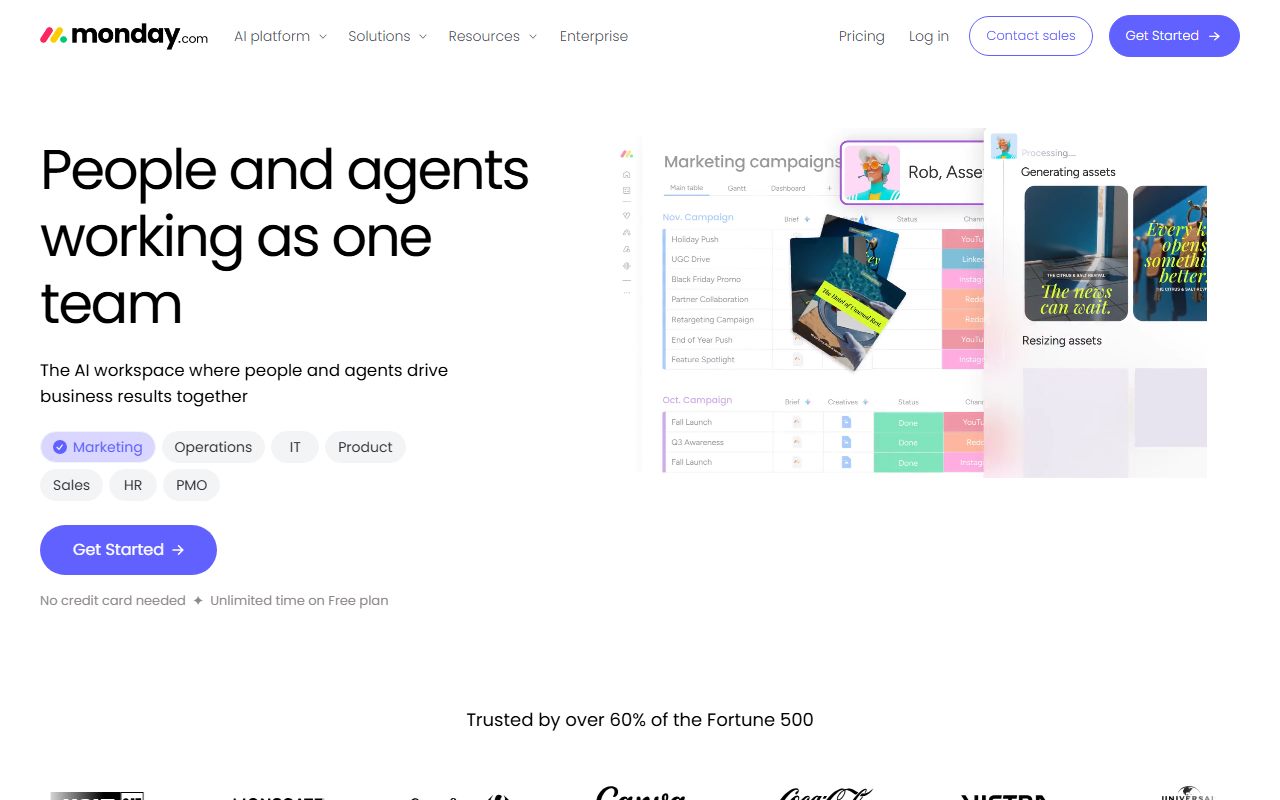
monday.com calls itself a Work OS, which is marketing language for a configurable board engine. Underneath every product the company sells there is one structure: a workspace holds boards, a board holds groups, a group holds items, and each item is a row with typed columns. The column types are the real product. A status column has coloured labels, a people column holds assignees, a date column holds a date, a timeline column holds a range, a numbers column sums, and a formula column computes. The pricing page lists 8 column types on the free tier and more above it.
Everything else is a rendering of that row-and-column table or a trigger attached to it. Kanban, calendar, timeline, Gantt and chart views are projections of the same rows. Automations are rules written as sentences that fire when a column changes. Dashboards are widgets reading columns across several boards.
The practical consequence is that monday.com is closest in spirit to a shared spreadsheet that has learned to act. That is why it is adopted quickly by operations, marketing and sales teams who already live in spreadsheets, and why it is sometimes frustrating for engineering teams who want deep hierarchy and dependency logic as first-class objects. The vendor has responded by selling four flavours of the same engine - Work Management, CRM, Dev and Service - each with preset columns, templates and pricing. The data model does not change between them.
Who it is for, and who it is not
The team that fits best is one whose work is a pipeline with visible stages: content moving from idea to published, deals moving from lead to closed, hires moving from applied to onboarded, client projects moving from kickoff to delivered. Those teams want a wall of colour that tells them at a glance what is stuck, and they want the people doing the work to update it without being nagged.
It also fits a business that wants one vendor for several functions. A ten-person agency can run project boards, a lightweight CRM board and a request-intake board on one account, and the dashboards can read across all three.
Two teams it fits poorly. The first is anything under ten people on the Work Management product, because the pricing page, checked October 7, 2026, lists a 10-seat minimum on the Basic, Standard and Pro tiers. A four-person team pays for ten seats or stays on the free tier, which is capped at 2 seats and 3 boards per the same page. The second is a team whose work is deeply nested - epics containing stories containing tasks containing subtasks, with dependencies between branches. monday.com supports subitems and dependency columns, but public user discussion is consistent that these are bolted on to a flat model rather than native to it, and teams with that shape tend to end up in ClickUp or a dedicated engineering tracker instead.
How the pricing is structured
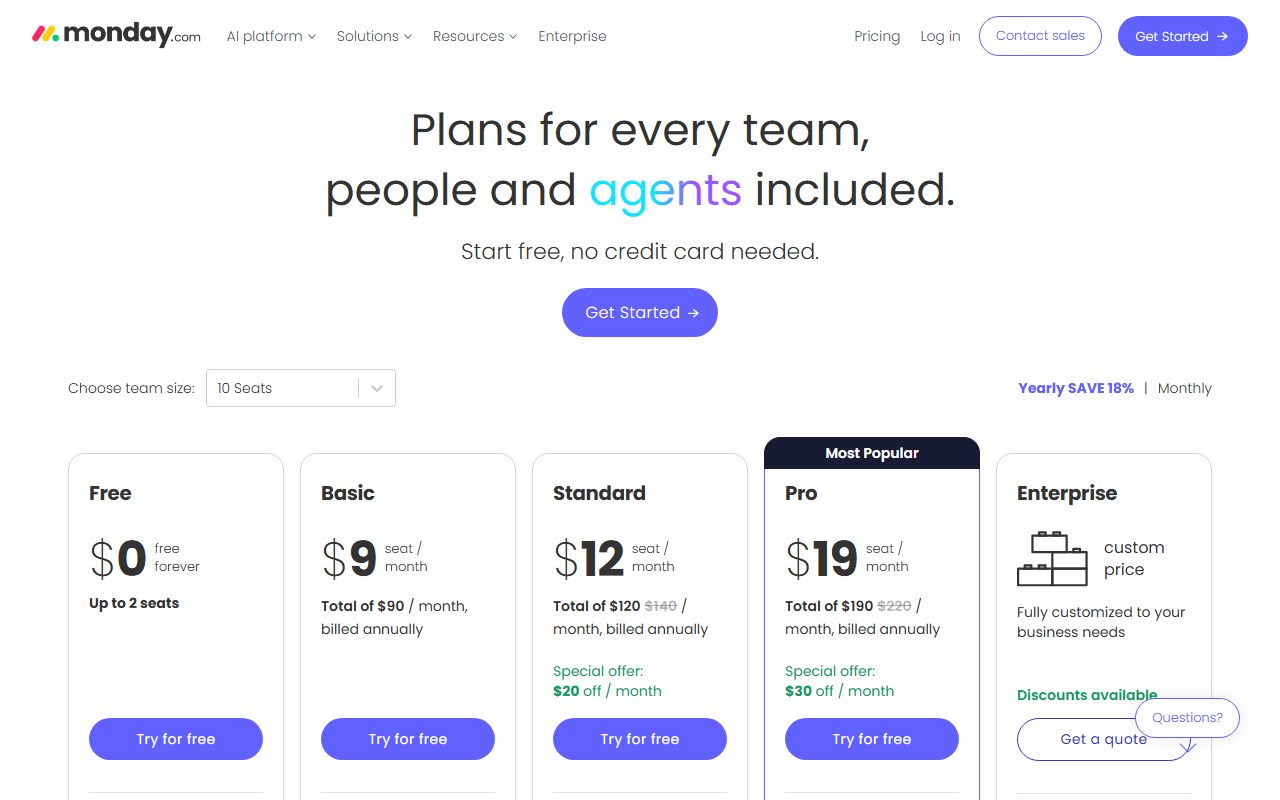
The figures below come from the monday.com pricing page, checked October 7, 2026, for the Work Management product. Prices are per seat per month billed annually; the page states an 18% discount for annual over monthly billing. Open the live page before signing, because the tier contents move more often than this review will be updated.
The structure has four features that determine the bill more than the headline rate. First, the seat minimum: the three paid tiers list a minimum of 10 seats. Second, the view gate: Timeline and Gantt are listed at Standard, not Basic, so a project team that needs a schedule starts at the second paid rung. Third, the automation and integration quota: Standard lists 250 automation actions per month and Pro lists 25,000, and that gap is the reason most growing teams end up on Pro rather than Standard. Fourth, the AI credits: each tier lists a monthly credit allowance for AI features, which matters only if the team intends to use them.
The CRM, Dev and Service products have separate price lists on the same page with a 3-seat minimum and different per-seat rates, so a team buying the CRM should not assume the Work Management numbers apply.
- Free: $0, up to 2 seats, up to 3 boards, 200+ templates, 8 column types (pricing page, October 2026)
- Basic: $9 per seat per month billed annually, 10-seat minimum, unlimited viewers and items
- Standard: $12 per seat per month billed annually, 10-seat minimum, Timeline and Gantt views, 250 automation actions per month
- Pro: $19 per seat per month billed annually, 10-seat minimum, private boards, 25,000 automation actions per month
- Enterprise: custom pricing, 250,000 automation actions per month, 24/7 support listed
Ease of use: what the score is built from
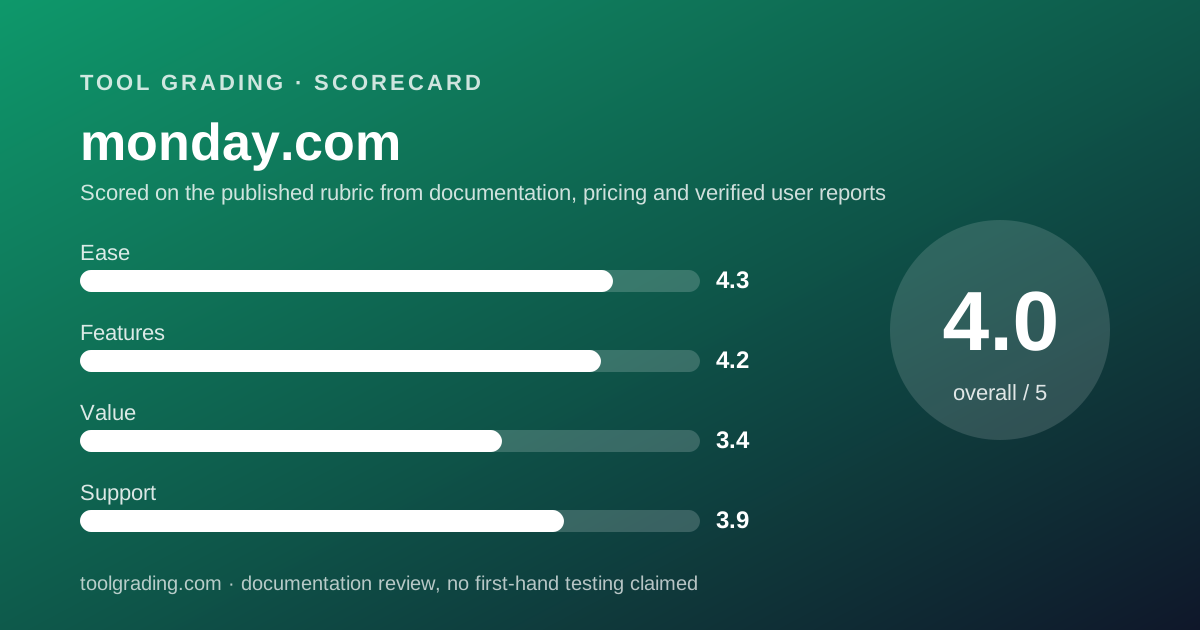
The ease sub-score is the highest of the four, and it is built from three documented properties of the product.
The first is that a board is legible without training. Rows, columns and coloured status labels are a vocabulary that anyone who has opened a spreadsheet already has. The vendor's own onboarding leans on this: the pricing page advertises 200+ templates, and a template is a pre-built board with columns already named, which means a team's first board can be a copy rather than a design.
The second is that automations are written as sentences. The recipe format - when a status changes to something, then notify someone or move the item - is readable by the person who will be affected by it, which is not true of rule builders that expose conditions and actions as forms. That readability is why operations staff build their own automations on monday.com and ask IT to build them on other tools.
What holds the score below the top is the opposite side of the same simplicity. Because a board is flat, a team whose work has structure must decide early how to represent it - one board per project, or one board with a project column, or boards with subitems - and the documentation offers options rather than a rule. Teams that choose badly rebuild later. The score measures how fast a small team reaches a working board, which is fast, and discounts for the structural decision the tool leaves to the buyer.
Feature depth: what the score is built from
The feature sub-score is built from the documented breadth of column types, views, automations and dashboards, discounted for the depth of hierarchy and dependency handling.
Columns are the strongest element. The typed-column library covers the cases a small business meets: status, people, date, timeline, numbers with aggregation, formula, dropdown, files, link, and connect-boards for cross-board references. The formula column is what lets a board replace a spreadsheet rather than sit beside one.
Views are complete at the Standard tier and above. Kanban, calendar, timeline, Gantt, chart and workload views are all documented, and a dashboard can read widgets from multiple boards, which is what a manager needs to see across projects. The pricing page lists dashboard board limits rising by tier.
Automations and integrations are broad and quota-bound. The recipe library is large, and the integrations list covers the mainstream systems a small business uses. The quota is the governing constraint: 250 actions per month on Standard, per the pricing page, is a figure that a ten-person team with three or four active recipes can exhaust in a busy week, and verified user reports describe exactly that.
The discount is for hierarchy and dependency. Subitems exist but are documented as a nested row rather than a full item with its own board context, and dependency columns exist but public user reports describe them as weaker than the dependency model in Asana. A team whose work is deeply structured will feel that difference within a month.
Value at a realistic team size
Take a team of ten, which is the smallest team the paid Work Management tiers are priced for, and apply the figures from the pricing page checked October 7, 2026.
On Standard, which is the first tier with Timeline and Gantt, ten seats at $12 per seat per month billed annually is $120 per month, or $1,440 per year. On Pro, which is where the automation quota becomes comfortable, ten seats at $19 per seat per month billed annually is $190 per month, or $2,280 per year. Monthly billing is higher by the stated 18%.
For a team of ten that figure sits in the middle of the category: above Trello at Premium, roughly level with ClickUp at Business on annual billing, and below the Business tier of Notion. The value sub-score is pulled down for two reasons that have nothing to do with that comparison. The first is the seat minimum: a team of five on Standard still pays for ten, which makes the effective rate per real user double the printed figure. The second is the automation quota: the feature that makes the board do work is the feature most likely to push a team from Standard to Pro, and the step between those two tiers is a 58% increase in the seat price.
The honest summary is that monday.com is reasonably priced for a team of ten to twenty that will use Pro, and expensive for a team of four to eight that only needs Standard. Verified user reports on public review sites say the same thing in less precise language.
Support and documentation
The support sub-score covers channels by tier, documented response commitments and the quality of self-service material, and the three parts are uneven for this vendor.
Self-service material is substantial. The vendor maintains a help centre, a community forum, a template centre and an academy with recorded courses, and the pricing page points to these as the primary resource for every tier below Enterprise. For this review the help centre refused automated reading, so the assessment of its depth rests on the pricing page, the product pages and the public descriptions of it in verified user reports, which are generally favourable about coverage and less favourable about the speed at which articles keep up with interface changes.
Channels and commitments by tier follow the category pattern. The pricing page lists 24/7 support explicitly on the Enterprise tier and does not list a response commitment on Basic, Standard or Pro. Verified user reports describe ticket-based support on the mid tiers with response times measured in hours to a day for ordinary questions, which is unremarkable for a vendor of this size.
A public status page exists and is linked from the vendor's site, which is the minimum for a tool a business runs its daily operations on.
What cannot be graded from documentation is actual response time on a bad day, and this page does not estimate it.
What verified users report
Across the public review platforms, the pattern of praise and complaint for monday.com is consistent enough to be useful as evidence of what buyers experience, and it is weighed here as pattern rather than measurement.
The dominant positive is adoption. Reviewers repeatedly say that staff who refused to use previous tools keep monday.com boards updated, and they attribute it to the visual status model. The second positive is the automation recipe format, which non-technical users describe as something they built themselves.
The dominant complaint is price structure rather than price: the seat minimum, the per-seat charge for people who mostly read, and the automation quota that forces an upgrade. The second complaint is notification volume, which is configurable but arrives loud by default. The third is the limits of the flat model when work grows nested, and reviewers who raise it tend to be in engineering or product roles.
None of these reports is converted into a number. They explain why the value sub-score is the lowest of the four while the ease sub-score is the highest.
Alternatives on this site
Asana is the closest competitor for teams whose work has single owners, dates and dependencies; it models a task as a richer object than a monday.com row and handles dependency chains better, at the cost of a steeper structural setup. ClickUp competes on breadth and on price per seat, with a lower entry rate on annual billing and no seat minimum on the pricing page, but with a correspondingly larger surface to configure. Trello is the lighter option for teams who want a board and nothing else, at a fraction of the per-seat rate. Airtable is the choice when the spreadsheet half of the comparison matters more than the board half, because it is a database first. Notion and Basecamp solve adjacent problems - documents and communication respectively - and are not direct substitutes for a board engine.
The decision rule: if the team already lives in a spreadsheet and wants it to act, monday.com is the most natural step. If the team's work is nested or dependency-heavy, look at Asana or ClickUp first.
Bottom line
monday.com earns a high ease score and a middling value score, and the distance between them is the review. The product is the easiest board engine in the category for a non-technical team to adopt and keep updated, and the automation recipe format is a genuine advantage over form-based rule builders. The pricing structure - a 10-seat minimum, Timeline and Gantt one tier up, and an automation quota that pushes busy teams to Pro - is what holds the grade.
Buy it if the team is ten or more, the work is a visible pipeline, and someone will decide the board structure in the first week. Do not buy it on the free tier expecting the paid product, and do not buy it for a team of five expecting to pay for five.
What would move the grade up: removal of the seat minimum on the entry tiers, or a materially larger automation quota on Standard. What would move it down: further gating of views upward. Prices and tier contents carry a checked date for a reason; open the live pricing page before you sign.
Visit monday.com
We have no affiliate relationship with this vendor. Link goes to the official site.