 Tool
ToolTrello
The original card-on-a-board tool at the lowest per-user rate in the category - and exactly as deep as a board.
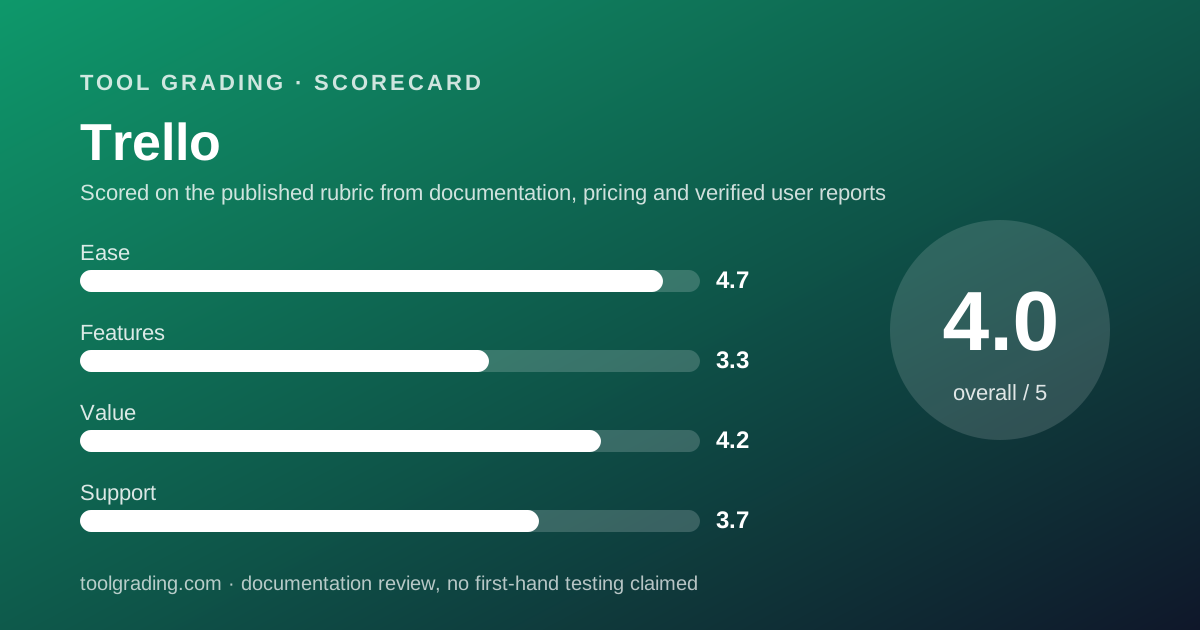
Scored on the published rubric, from documentation, pricing and verified user reports.
Best for: Teams of two to twenty whose work is flat - cards moving through stages on one or a few boards - and who want to be productive in ten minutes.
Verdict
Trello is the simplest product in this category and it is honest about it. A board holds lists, a list holds cards, and a card moves left to right as work progresses. That model requires no training, which is why the ease sub-score is the highest on this site, and it stores almost nothing about the work beyond its column, which is why the feature sub-score is the lowest. The pricing page, checked October 7, 2026, lists Standard at $5 and Premium at $10 per user per month billed annually, with the Free tier capped at 10 boards and 10 collaborators per Workspace, and automation command runs quota-limited by tier. At those rates Trello is the cheapest paid tool reviewed here for a team of ten, and it is cheap because it is small. The grade is for a tool that does one thing well and should not be bought for anything else. This grade comes from vendor documentation, pricing structure and verified user reports, against the published rubric; it is a documentation review, no first-hand testing was run and none is claimed.
Visit Trello
We have no affiliate relationship with this vendor. Link goes to the official site.
Where it is strong
- Board, list and card model is understood by anyone in minutes, with no configuration required before the first card
- Lowest per-user rate among the paid tools reviewed here, per the pricing page checked October 7, 2026, with unlimited boards from the Standard tier
- Unlimited Power-Ups per board on every tier including Free, per the pricing page, which extends a board with calendars, custom fields and integrations
- Butler automation is built in and its monthly command-run quota is published per tier, so the ceiling is knowable
- Atlassian ownership brings a public status page, documented security practices and an Enterprise tier with Atlassian Guard, for teams that need that assurance
Where it falls short
- The model is flat: no native hierarchy beyond card and checklist, no dependencies, no workload view, and cross-board reporting only through Workspace views at Premium per the pricing page
- Free tier is capped at 10 boards and 10 collaborators per Workspace, with 250 command runs per month and 10MB per file, which rules it out for most teams beyond a trial
- Calendar, Timeline, Table, Dashboard and Map views are listed only at Premium, so the Standard tier is a board and little else
- Verified user reports describe teams outgrowing Trello within a year or two once work needs structure, and migrating to a heavier tool
- Support below Enterprise is community and ticket based through Atlassian's portal; the pricing page lists 24/7 support only at Enterprise
What the product actually is
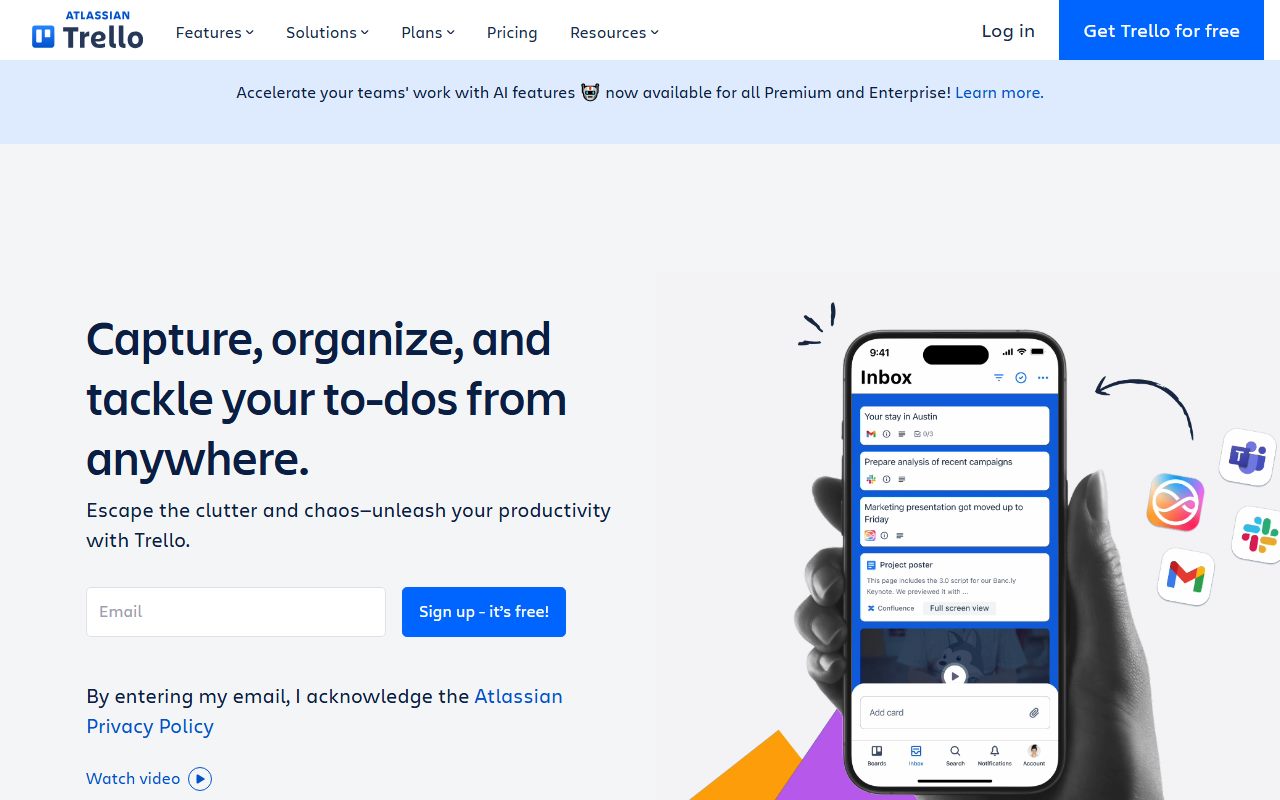
Trello is a kanban board, and the entire data model fits in one sentence: a Workspace holds boards, a board holds lists, a list holds cards, and a card has a title, a description, members, labels, a due date, checklists, attachments and comments. The list a card sits in is its state. There is no separate status field, no project object above the board, and no task object richer than the card.
Everything added since - Power-Ups that bolt features onto a board, Butler automation that moves cards by rule, the Premium views that render cards as a calendar, timeline or table, and the card mirroring and Inbox features listed on the current pricing page - is an extension of the board rather than a replacement of it. A card is still a card, and a board is still the unit of work.
The practical consequence is that Trello stores less about the work than any other tool reviewed here. A card knows which list it is in and what is written on it. It does not know, in a way the tool can act on, which other card it is waiting for, how long it should take, or how it relates to a card on another board. Those things can be written in the description, tracked in a Power-Up or approximated with labels, and verified user reports describe teams doing all three until the approximations break.
The right evaluation question is therefore not what Trello can do but whether the work is flat enough that a board is all it needs.
Who it is for, and who it is not
Trello fits a team whose work is a sequence of stages with no dependencies between items: a content pipeline from idea to published, a hiring funnel, a support queue, a personal or small-team to-do system, a simple client-delivery board. It fits a team of two to twenty who want to open a tool and start, who do not need to report across projects, and who would resent spending a week configuring anything.
The Free tier, per the pricing page checked October 7, 2026, allows up to 10 boards and 10 collaborators per Workspace with unlimited cards, which is a workable home for a very small team with flat work, and a trial for anyone larger.
It fits poorly for any team whose work has structure that must be enforced. An agency juggling fifteen client projects with shared resources, a product team coordinating a launch across engineering and marketing, an operations team with recurring multi-step processes that depend on each other: all of these need an object richer than a card and reporting that reads across boards. Trello can be stretched toward them with Power-Ups and Premium Workspace views, and verified user reports are consistent that the stretch holds for a while and then the team migrates to Asana, ClickUp or monday.com. The migration is not a failure of Trello; it is Trello being used past its design.
How the pricing is structured
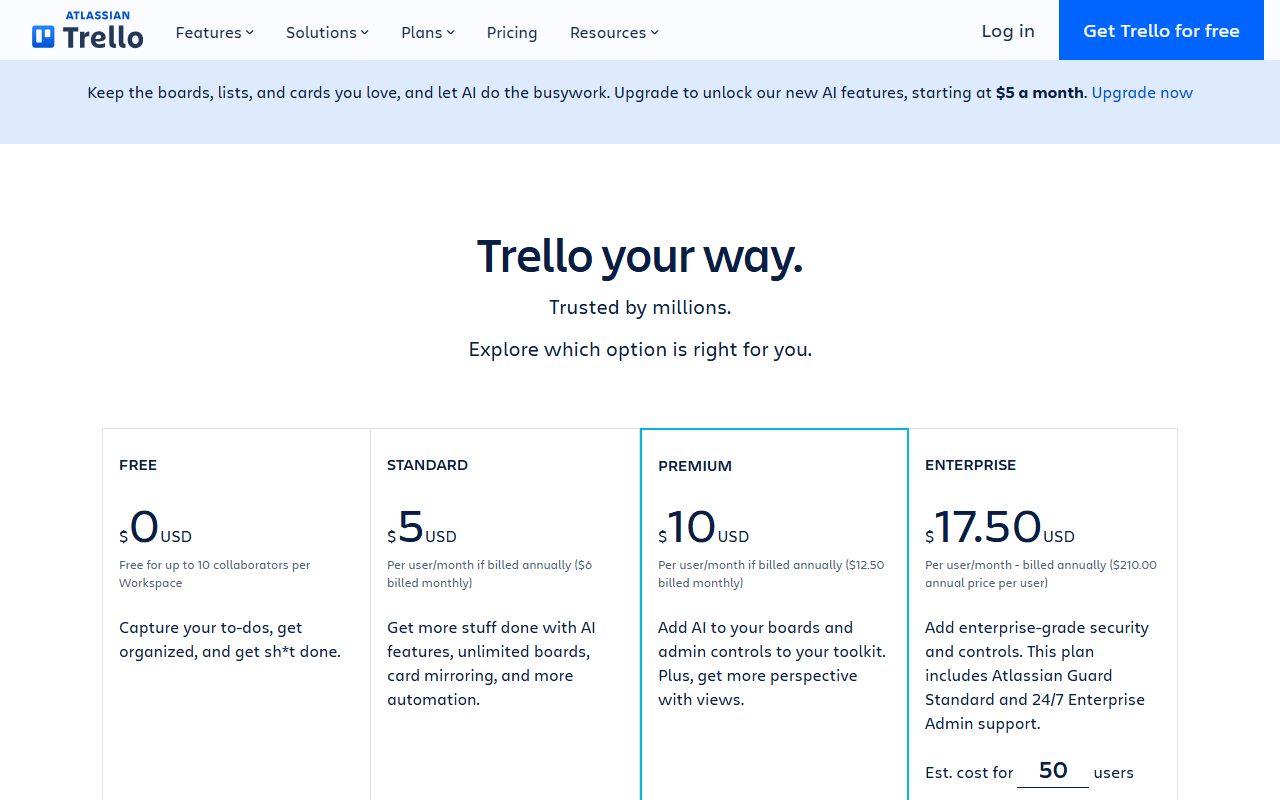
The figures below come from the Trello pricing page, checked October 7, 2026. Prices are per user per month; the page lists both annual and monthly rates. Open the live page before signing, because Atlassian revises tier contents periodically.
The structure has three gates. The first is boards and collaborators: the Free tier caps both at 10 per Workspace, and Standard removes the board cap. For a team that creates a board per client or per project, that is the gate that forces the first upgrade. The second is views: Calendar, Timeline, Table, Dashboard and Map views, plus Workspace-level Table and Calendar views that read across boards, are listed only at Premium. A team that wants to see work as anything other than a board is on Premium. The third is automation: Butler command runs are capped at 250 per month on Free, 1,000 on Standard and unlimited on Premium per the page, and a team with a few active rules will meet the Standard cap.
File attachment size also steps by tier: 10MB per file on Free and 250MB on Standard per the page, with unlimited total storage on both.
- Free: $0, up to 10 boards and 10 collaborators per Workspace, unlimited cards, unlimited Power-Ups per board, 10MB per file, 250 Workspace command runs per month (pricing page, October 2026)
- Standard: $5 per user per month billed annually or $6 billed monthly, unlimited boards, custom fields, card mirroring, 250MB per file, 1,000 command runs per month
- Premium: $10 per user per month billed annually or $12.50 billed monthly, Calendar, Timeline, Table, Dashboard and Map views, Workspace views, unlimited command runs, admin controls, Collections
- Enterprise: $17.50 per user per month billed annually ($210 per user per year), unlimited Workspaces, organisation-wide permissions, Atlassian Guard Standard, 24/7 Enterprise Admin support
Ease of use: what the score is built from
The ease sub-score is the highest on this site in the category, and it is built from the documented size of the model and the absence of required configuration.
The model is three nouns: board, list, card. The vendor's getting-started guide, which was readable for this review, is organised as a nine-chapter walk from board basics to automation, and the first chapter is enough for a new user to be productive. There are no required fields, no project hierarchy to define, no statuses to configure, because the lists are the statuses and the user names them by typing. A template gallery exists, but a blank board is usable without one.
The second input is the consistency of verified user reports, which are unanimous that Trello is the easiest tool in its class to adopt and that the whole team uses it rather than a subset. For a tool whose main competitors suffer from partial adoption, that is a real advantage rather than a consolation.
The small discount is for the moment the model runs out. When a team needs to express a dependency or a cross-board view, the answer is a Power-Up or a Premium view, and the simplicity that made the first day easy becomes a set of workarounds. The score measures time to a reliable configuration, which for flat work is minutes, and it does not penalise the tool for refusing to be something else.
Feature depth: what the score is built from
The feature sub-score is the lowest on this site in the category, and it is built from the documented depth of the card, the capabilities of Power-Ups and Butler, and the views available at Premium.
The card is the first input. Title, description, members, labels, due date with reminders, checklists with assignable items, attachments, comments, and custom fields at Standard and above per the pricing page. That is enough for flat work and not enough for structured work. There is no native dependency relationship, no time estimate or tracked time, no parent-child beyond a checklist, and a checklist item is not a card.
Power-Ups are the second input, and they are how Trello compensates. The pricing page lists unlimited Power-Ups per board on every tier, and the catalogue includes calendars, custom fields, time tracking, integrations with the mainstream tools and many third-party extensions. A Power-Up extends a board; it does not change the model, and a team relying on several Power-Ups for core function is building a tool out of parts.
Butler automation is the third. Rules, buttons and scheduled commands can move cards, set dates, add members and post to other tools without code, and the per-tier run quota is published. Within its quota it is capable.
Premium views are the fourth: Calendar, Timeline, Table, Dashboard and Map on a board, and Table and Calendar across a Workspace, which is the only native way to see across boards.
The score reflects a tool that is complete for its model and thin outside it.
Value at a realistic team size
Take a team of ten and apply the figures from the pricing page checked October 7, 2026.
On Standard, ten users at $5 per user per month billed annually is $50 per month, or $600 per year, for unlimited boards, custom fields and 1,000 command runs. On Premium, which is where the non-board views and unlimited automation live, ten users at $10 per user per month billed annually is $100 per month, or $1,200 per year. On monthly billing the same tiers cost $60 and $125 per month.
For a team of ten those are the lowest figures among the paid tools reviewed here. Standard at $600 per year is below ClickUp Unlimited, and Premium at $1,200 per year sits level with Notion Plus and monday.com Standard while doing less than either as a tracker and nothing as a wiki. Basecamp on flat pricing is competitive at Studio for ten users and overtakes Trello above roughly twelve.
The value sub-score is high rather than top because of what the money buys. A team that genuinely needs only a board gets excellent value at Standard. A team that needs Premium for Timeline and Dashboard views is paying the same as a fuller tool for a thinner one, and the reason to do so is simplicity, which has real value and is also the thing most likely to run out.
The honest summary: per dollar, Trello is the best deal in the category for flat work and a poor deal for structured work, because structured work will leave it within two years and migration is the cost that never appears on a pricing page.
Support and documentation
The support sub-score covers channels by tier, documented commitments and self-service material. Trello is an Atlassian product and inherits both the strengths and the shape of Atlassian support.
Self-service material is good. The getting-started guide, readable for this review, is a structured nine-chapter path that covers boards, cards, teams, views, Power-Ups and automation, supplemented by a remote-work guide, free webinars and Atlassian's support portal with articles and FAQs. Developer documentation for building Power-Ups lives on Atlassian's developer platform. A product this simple does not need a large documentation set, and the set it has is proportionate and current.
Channels by tier are where the score is held. The pricing page indicates tiered support but names channels explicitly only at Enterprise, where it lists 24/7 Enterprise Admin support with Atlassian Guard Standard. Below that, support runs through Atlassian's portal and community, and verified user reports describe it as adequate for account and billing questions and slow for anything else, which is the common pattern for a mass-market product owned by a large vendor.
Atlassian maintains a public status page covering Trello, which is a strength.
What cannot be graded from documentation is how quickly a Standard-tier customer gets a human, and this page does not estimate it.
What verified users report
Public review platforms carry a very large volume of Trello reviews accumulated over many years, and the pattern is among the most stable in the category.
The dominant positive is simplicity: reviewers describe onboarding a whole team in an afternoon and never having to explain it. The second positive is price, particularly the Free tier for very small teams and Standard for small businesses. The third is reliability; outages and bugs are rarely raised.
The dominant complaint is the ceiling. Reviewers describe the moment the work needed dependencies, cross-board visibility or reporting, and the sequence of Power-Ups and workarounds that followed before migrating. The second complaint is the view gating: Calendar and Timeline at Premium are mentioned as the reason for an upgrade that otherwise felt unnecessary. The third is notification and email volume on busy boards. A smaller theme is the Free tier limits tightening over time, raised by long-standing users.
These reports are weighed as pattern and not converted to a number. They explain why the ease and value sub-scores are high and the feature sub-score is low, and why the gap is not a contradiction.
Alternatives on this site
Asana is the tool teams most often migrate to when the board runs out; its task object carries the owner, date and dependency data a card lacks, at a higher per-seat rate. monday.com is the alternative for a team that wants the visual board feel with typed columns and automations, at the cost of a 10-seat minimum. ClickUp is the alternative for a team that wants the most capability per dollar and will configure it; its board view is a rendering of a far deeper model. Basecamp is the alternative for a team that likes simplicity and wants communication tools and flat pricing instead of a board. Notion and Airtable both offer a board view over a database and suit teams whose work is more document or data than pipeline.
The decision rule: if the work can be drawn as cards moving left to right on one board, Trello is probably the right tool and the cheapest. If drawing it needs arrows between cards, it is not.
Bottom line
Trello earns the highest ease score and the lowest feature score on this site in its category, and the two numbers describe the same fact from two sides. It is a board, it is the best board, and it is only a board.
Buy it if the team's work is flat, if the team is small, and if simplicity and price matter more than capability. Standard is the tier most small teams need; Premium is worth it only for the views. Do not buy it for structured, dependency-heavy or cross-project work, and do not plan to stay on the Free tier with more than a handful of boards or collaborators.
What would move the grade up: native dependencies or a richer card model at Standard, or the Calendar and Timeline views moving down a tier. What would move it down: further tightening of the Free and Standard limits, which is the direction the pricing page shows over time. Prices and tier contents carry a checked date; open the live pricing page before you sign.
Visit Trello
We have no affiliate relationship with this vendor. Link goes to the official site.