 Tool
ToolThe best tools for a 10-person remote team in 2026: one stack, graded on the Tool Grading rubric
Six products that together cover what a ten-person remote team needs to run: messaging, meetings, scheduling, signatures, shared credentials and a written workspace. Each has a full review on this site and each is awarded by role, with the list ordered by total rubric score: 1Password Business first, then Slack, Calendly, Zoom Workplace, Docusign and Notion. The full stack on the tiers most ten-person teams would buy costs roughly $5,830 per year on annual billing, per the pricing pages read October 7, 2026.
Our picks
- Best for shared credentials and offboarding: 1Password Business
- Best for day-to-day messaging: Slack
- Best for external scheduling: Calendly
- Best for meetings, billed by host: Zoom Workplace
- Best for contracts and signatures, sized by envelope volume: Docusign eSignature
- Best for the written record a remote team needs: Notion
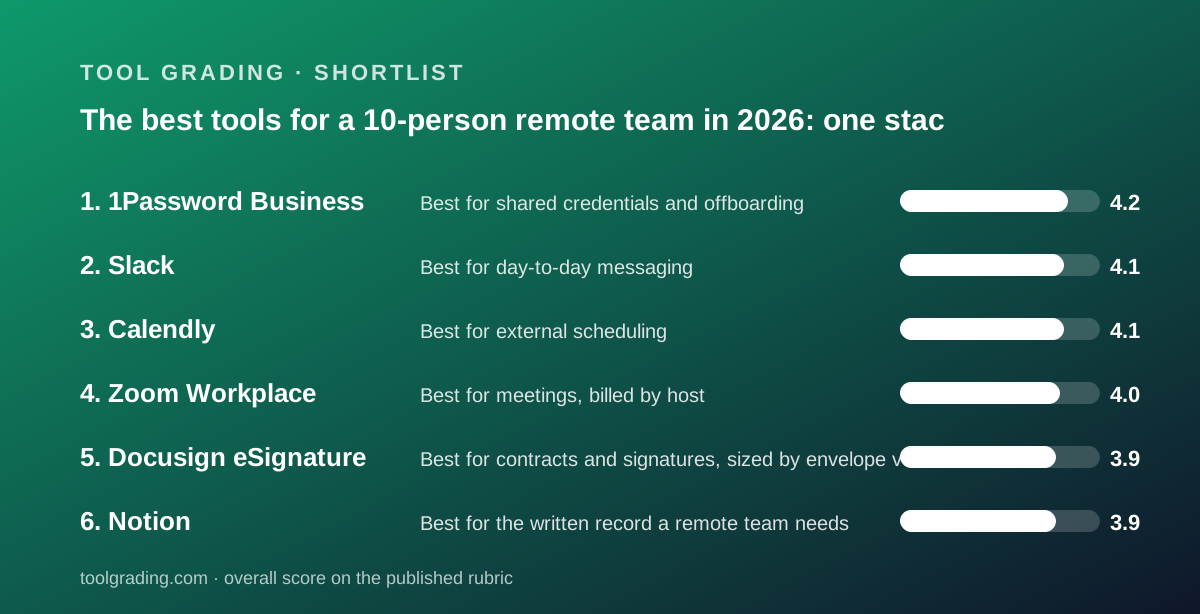
This is a ranking built from documentation and verified user reports, against the rubric on the method page, and it is a different kind of list from the others on this site. The six products are not competitors; they are six roles in one stack, and the question is not which to choose but what each costs and where each one's documented weakness will show up at ten people. The order is still by total rubric score, because the score says something about how well each product serves a small team on ease, features, value and support: 1Password Business at 16.9, Slack at 16.5, Calendly at 16.4, Zoom Workplace at 16.2, Docusign at 15.7 and Notion at 15.6. No first-hand testing was run for any of them and none is claimed. Every price is from the vendor's pricing page as read on October 7, 2026, on annual billing unless stated.
One structural fact recurs through all six reviews and decides most of the stack's cost: who needs a paid seat. Slack and Notion bill every member, so ten people is ten seats, though Notion's guests are unlimited from Plus. Zoom bills hosts, and participants join free, so a team where four people run meetings pays for four. Calendly bills people who need their own booking link, so a team with six customer-facing people pays for six. Docusign bills senders and meters envelopes, and signers never need a seat, so two or three senders is the norm. 1Password bills everyone who needs a vault, which in a company that shares logins is everyone. Counted that way, the stack below assumes ten Slack members, ten 1Password users, ten Notion members, four Zoom hosts, six Calendly seats and three Docusign senders, which is the review's own ten-person model in each case. Each review runs that model explicitly in its value section, and the stack totals below are those figures added together rather than new arithmetic.
1Password Business is first at 16.9 and takes the credentials role: ease 4.3, features 4.5, value 4.1, support 4.0. The review describes a vault system whose administration layer is the product: thirteen vault permission levels, custom groups, account policies that enforce password strength and two-factor authentication, an audit trail with timestamps and IP addresses, and sign-in through Okta, Microsoft Entra ID, OneLogin and Duo. Per the pricing page read October 7, 2026, Business is $8.99 per user per month billed yearly, or $107.88 per user per year, with a one-user minimum, so ten people cost $1,078.80 per year and each gets a free Families membership. The Teams Starter Pack at $2.49 per user per month covers 10 to 20 users for $298.80 per year at ten, without SSO, policies or business reporting. The value sub-score is the highest in this batch because Business bundles controls that competitors sell as add-ons. The risk is behavioural: verified reports name browser-extension and autofill friction as the dominant complaint, and the product only works if every person uses it for every login. The Insights dashboard combines breach exposure, password health and team usage with recommended actions, which for a company without a security team is the security team.
Slack is second at 16.5 and takes the messaging role: ease 4.6, features 4.4, support 4.1, value 3.4. The review's model is simple: a workspace holds channels, a channel holds a searchable permanent stream, and every integration posts into it. Per the pricing page, the Free tier hides messages older than 90 days and caps apps at 10, and the help centre states data older than a year on free workspaces may be deleted. Pro is $7.25 per user per month billed annually, or $8.75 monthly, so ten people cost $870 per year, or $1,050 billed monthly, for unlimited history, unlimited apps and group huddles. Business+ at $15 annually is $1,800 for ten and the step is about admin and compliance, not daily features. Support commitments are stated on the pricing page, 24/7 on all tiers with a 4-hour first response from Pro, which is clearer than most vendors publish. The value sub-score is the lowest of its four because every member is billed, including people who only read announcements, and verified reports name noise as the dominant complaint.
Calendly is third at 16.4 and takes the scheduling role: ease 4.7, features 4.0, support 3.9, value 3.8. The ease sub-score is the highest on this site: an individual can be live in minutes with a calendar connection, an event type and a link, and the help centre documents Zoom, Google Meet and Teams hand-offs. Per the pricing page, Free allows one event type and one calendar; Standard is $10 per seat per month billed monthly with a 17 percent annual saving; Teams is $16 billed monthly with a 20 percent annual saving and adds round-robin, routing forms and the Salesforce, Marketo and Pardot integrations. The review's six-seat model gives $720 per year on Standard billed monthly, or roughly $600 annually, and $1,152 on Teams billed monthly, or roughly $920 annually. The review's advice is to license the customer-facing people and leave the rest on the calendar they already have, because seats are easy to over-buy. Verified reports describe double-booking and timezone confusion that trace back to a user connecting fewer calendars than they use. Enterprise starts at $15,000 per year with a 50-seat minimum, which puts SSO and dedicated support out of reach for a team of ten.
Zoom Workplace is fourth at 16.2 and takes the meetings role: ease 4.5, features 4.2, support 3.8, value 3.7. The structural fact is the licence model: paid seats are for hosts and participants join free, which the review says is why Zoom can be cheaper for a given headcount than any product that bills every member. Per the pricing page, Basic is free with a 40-minute meeting limit and 100 participants; Pro is $14.16 per user per month billed annually, or $16.99 monthly, for 30-hour meetings, 10 GB of cloud recording per user and unlimited AI Companion summaries; Business is $18.33 annually for 300 participants. The review's four-host model gives $679.68 per year on Pro, or $1,699.20 if all ten host regularly. The AI meeting notes are included on paid tiers without an add-on fee, which the review notes because several competitors charge for the equivalent. The chat and whiteboard around the meeting are serviceable rather than deep, and most verified reports describe leaving them off in favour of a dedicated chat tool.
Docusign eSignature is fifth at 15.7 and takes the agreements role: features 4.5, ease 4.3, support 3.7, value 3.2. The review's finding is that the product most counterparties recognise signs faster, and that the self-serve plans are priced per seat and metered per envelope. Per the pricing page on annual terms, Standard is $30 per user per month and Business Pro is $45, each with 100 envelopes per user per year and a cap of 50 users; Business Pro adds bulk send, web forms and payment collection. Personal is $11 per month for one user and five envelopes a month. The review's three-sender model gives $1,080 per year on Standard with 300 envelopes of allowance, or $1,620 on Business Pro. The value sub-score is the lowest in this guide because a company sending ten agreements a week sends roughly 500 a year, which exceeds three seats' allowance, and the documented remedies are more seats at $360 per user per year or an Enhanced plan. 24/7 support is listed only on Enhanced plans, and the public support site returned loading errors on the day of the review. Identity verification and SMS delivery are one-time bonuses of five each on Standard, after which they are paid add-ons.
Notion is sixth at 15.6 and takes the written workspace role: features 4.1, ease 4.0, support 3.8, value 3.7. The review found a page editor with a database engine whose writing and reading experience is the best in its category, and whose task tracker is a database pattern without native dependency enforcement or workload views. For a remote team, the point is the written record: specs, meeting notes, policies and decisions that otherwise get lost in a chat stream, which the Slack review names as the structural weakness of a stream model and the reason teams pair Slack with a document tool. Per the pricing page, Plus is $10 per member per month as displayed, so ten members cost $1,200 per year, with unlimited guests, unlimited blocks and 30 days of page history; Business at $20 is $2,400 with 90 days of history and SSO. The Free tier caps uploads at 5 MB and history at 7 days. Verified reports praise flexibility and complain about sprawl and search in workspaces without an agreed structure, which a remote team should settle in the first week.
Add the roles up on the tiers a ten-person team would typically buy, annual billing where offered, and the stack is: 1Password Business $1,078.80, Slack Pro $870, Calendly Teams for six seats roughly $920, Zoom Pro for four hosts $679.68, Docusign Standard for three senders $1,080, and Notion Plus $1,200. That is roughly $5,830 per year, or about $485 per month, for ten people, before any work-management tool, CRM or ledger from the other guides on this site. A leaner version is possible: Teams Starter Pack at $298.80, Slack Free with its 90-day window, Calendly Standard for six at roughly $600, Zoom Pro for four hosts at $679.68, one Docusign Standard seat at $360 and Notion Free, which comes to roughly $1,940 per year. The lean stack's costs are the documented ceilings: lost chat history after a quarter, no SSO or policies on the vault, no round-robin booking, 100 envelopes a year, and 5 MB uploads with 7 days of page history.
The verified reports across the six reviews share one theme that matters more to a remote team than to an office: each product's failure mode is a habit the tool permits rather than a defect. Slack's dominant complaint is noise and decisions lost in fast channels; the review's answer is a document tool beside it, which is why Notion is in this stack. 1Password's dominant complaint is autofill friction that tempts a user back to the browser's own store, and the product's usage reports exist to catch that. Calendly's double-bookings trace to unconnected calendars. Zoom's admin complaints trace to security defaults nobody set before the first client call. Notion's sprawl traces to a missing structure. Docusign's complaint is the envelope allowance discovered after it was exceeded. None of these is converted into a number on this site, but every one of them is a setup decision a ten-person team can make in its first week, and the reviews document where to find each setting.
The practical order of adoption is not the ranking order. Start with the vault, because every other tool's login goes into it and a company that shares credentials by chat has a problem the day someone leaves. Add messaging and the written workspace together, with an agreed rule about what goes where, since the Slack and Notion reviews describe the same failure from opposite sides. Add meetings with the hosts licensed and the security settings reviewed, and scheduling with only the customer-facing people licensed and every calendar they use connected. Add signatures last, sized by envelope volume rather than headcount, and read the reasonable-use terms the Docusign review could not reach. Every figure in this guide was true on October 7, 2026 on the tiers stated; the stack's cost moves most when a per-member tool is bought for people who only read, and least when the host, sender and seat counts above are kept honest.
Best for shared credentials and offboarding: 1Password Business
Total 16.9: ease 4.3, features 4.5, value 4.1, support 4.0. A vault system whose administration layer is the product: thirteen vault permission levels, groups, enforced policies, an audit trail and SSO with Okta, Entra ID, OneLogin and Duo. Business is $8.99 per user per month billed yearly with a one-user minimum, or $1,078.80 per year for ten people, each with a free Families membership, per the pricing page read October 7, 2026; the Teams Starter Pack at $2.49 covers 10 to 20 users for $298.80 without SSO or policies. Phone support is weekdays 9 to 5 Eastern. Verified reports name autofill friction as the main complaint, and the product depends on every person using it for every login.
Visit 1Password Business
We have no affiliate relationship with this vendor. Link goes to the official site.
Best for day-to-day messaging: Slack
Total 16.5: ease 4.6, features 4.4, value 3.4, support 4.1. Channels, threads and search over one stream that every integration posts into. Free hides messages older than 90 days and caps apps at 10, per the pricing page; Pro at $7.25 per user per month billed annually, or $870 per year for ten, lifts history, apps and group huddles in one step, and Business+ at $15 is $1,800 for admin and compliance. 24/7 support on all tiers and a 4-hour first response from Pro are stated on the pricing page. Every member is billed, including people who only read, which sets the value sub-score, and verified reports name noise and decisions lost in fast channels as the complaints, which is why a document tool belongs beside it.
Visit Slack
We have no affiliate relationship with this vendor. Link goes to the official site.
Best for external scheduling: Calendly
Total 16.4: ease 4.7, features 4.0, value 3.8, support 3.9. A booking link that shows real availability from connected calendars, live in minutes for an individual and an afternoon for a team. Free allows one event type and one calendar; Standard is $10 per seat per month billed monthly with 17 percent off annually; Teams is $16 with 20 percent off annually and adds round-robin, routing forms and Salesforce, per the pricing page read October 7, 2026. Six customer-facing seats cost roughly $600 per year on Standard or $920 on Teams, annual. License only the people who take outside meetings and connect every calendar each of them uses, since verified reports trace double-bookings to that step.
Visit Calendly
We have no affiliate relationship with this vendor. Link goes to the official site.
Best for meetings, billed by host: Zoom Workplace
Total 16.2: ease 4.5, features 4.2, value 3.7, support 3.8. The deepest meetings implementation in its category, with breakout rooms, recording, captions and AI Companion summaries included on paid tiers without an add-on fee. Licences are for hosts and participants join free: Basic is free with a 40-minute limit, Pro is $14.16 per user per month billed annually for 30-hour meetings and 10 GB of recording, Business is $18.33 for 300 participants, per the pricing page read October 7, 2026. Four hosts on Pro cost $679.68 per year; all ten hosting is $1,699.20. The chat and whiteboard around the meeting are secondary, and the support site is large and inconsistently organised.
Visit Zoom Workplace
We have no affiliate relationship with this vendor. Link goes to the official site.
Best for contracts and signatures, sized by envelope volume: Docusign eSignature
Total 15.7: ease 4.3, features 4.5, value 3.2, support 3.7. The signing experience most counterparties recognise, with templates, bulk send, web forms, payments and 1,100-plus integrations across Standard and Business Pro. Priced per sender and metered per envelope: Standard $30 and Business Pro $45 per user per month on annual terms, each with 100 envelopes per user per year, per the pricing page read October 7, 2026. Three senders on Standard cost $1,080 per year with 300 envelopes of allowance, which a company sending ten agreements a week exceeds. Signers never need a seat. 24/7 support is listed only on Enhanced plans, and the public support site returned loading errors on the day of the review.
Visit Docusign eSignature
We have no affiliate relationship with this vendor. Link goes to the official site.
Best for the written record a remote team needs: Notion
Total 15.6: ease 4.0, features 4.1, value 3.7, support 3.8. A page editor with a database engine, where specs, meeting notes, policies and light trackers live in one linked workspace, which is the answer to decisions getting lost in chat. Plus is $10 per member per month as displayed, or $1,200 per year for ten, with unlimited guests, unlimited blocks and 30 days of page history; Business at $20 is $2,400 with 90 days and SSO, per the pricing page read October 7, 2026. The Free tier caps uploads at 5 MB and history at 7 days. The tracker half lacks native dependencies and workload views. Verified reports praise flexibility and complain about sprawl and search without an agreed structure.
Visit Notion
We have no affiliate relationship with this vendor. Link goes to the official site.
How we chose
Six products with full reviews on this site were chosen because together they cover the roles a ten-person remote team needs, messaging, meetings, scheduling, signatures, shared credentials and a written workspace, and each is awarded by role rather than against the others. The list is ordered by the sum of each product's four rubric sub-scores, ease, features, value and support, as defined on the method page. Sub-scores were built from vendor documentation, pricing pages read on October 7, 2026, and patterns in verified user reports. Seat counts in the stack total follow each review's own ten-person model: ten Slack, 1Password and Notion seats, four Zoom hosts, six Calendly seats and three Docusign senders. No first-hand testing was run and none is claimed.
Frequently asked
What does the whole stack cost for ten people?
On the tiers most ten-person teams would buy, annual billing where offered, per the pricing pages read October 7, 2026: 1Password Business $1,078.80, Slack Pro $870, Calendly Teams for six seats roughly $920, Zoom Pro for four hosts $679.68, Docusign Standard for three senders $1,080 and Notion Plus $1,200, which is roughly $5,830 per year. A lean stack on free and starter tiers is roughly $1,940 per year with the documented ceilings on history, policies, routing, envelopes and uploads.
Why is 1Password ranked first on a list about remote team tools?
Because it has the highest total rubric score of the six, 16.9, with the highest value sub-score in its batch: the Business tier bundles SSO, policies, reporting and an audit trail that competitors sell as add-ons, at $8.99 per user per month billed yearly with a one-user minimum. The list is ordered by score, but each product is awarded by role, and the credentials role is the one a remote team should fill first.
Which of these bill every member and which do not?
Slack and Notion bill every member, though Notion's guests are unlimited from Plus. 1Password bills everyone who needs a vault. Zoom bills hosts only, Calendly bills people who need their own booking link, and Docusign bills senders and meters envelopes while signers never need a seat. Keeping host, seat and sender counts honest is what moves the stack's cost most.
Did this site test any of these products?
No. Every grade is a documentation review built from vendor documentation, pricing pages and patterns in verified user reports, against the published rubric. No first-hand testing was run and none is claimed. The method page explains how each sub-score is built.