 Tool
Tool
Slack
The channel-based messaging tool whose free tier is a 90-day window and whose paid tiers sell the archive back to you.
Scored on the published rubric, from documentation, pricing and verified user reports.
Best for: Teams of five to fifty whose daily coordination happens in text and who want chat, calls, file sharing and app notifications in one searchable place.
Verdict
Slack is the reference product for channel-based team messaging, and the structure that makes it so is simple: a workspace holds channels, a channel holds a searchable, permanent thread of messages and files, and every integration posts into that same stream. The product is immediately usable and the documentation is unusually complete, which is why the ease and support sub-scores sit high. The value sub-score sits lower for one documented reason: the free tier hides everything older than 90 days, so a team that has used Slack for a quarter is evaluating the paid tier whether it meant to or not, and the Pro tier at $7.25 per user per month billed annually (per the pricing page, October 7, 2026) is paid for every member, including people who mostly read. For a team that lives in text that cost is justified; for a team that mostly needs a few calls and an announcement channel it is not. This grade comes from vendor documentation, pricing structure and verified user reports, against the published rubric; it is a documentation review, no first-hand testing was run and none is claimed.
Visit Slack
We have no affiliate relationship with this vendor. Link goes to the official site.
Where it is strong
- Channels, threads and search are one coherent model: every message, file and app notification lands in a searchable stream rather than in separate inboxes
- The Pro tier removes the three free-tier ceilings that matter (history, app count, group huddles) in a single step, per the pricing page
- App directory and workflow builder let a small team wire in ticketing, calendars and CI alerts without engineering time
- Support commitments are stated on the pricing page: 24/7 support on all tiers, with a 4-hour first-response commitment from Pro upward
- Help centre is thorough and current, with retention and admin behaviour documented in detail
Where it falls short
- Free tier limits message history to 90 days and app integrations to 10, per the pricing page; the help centre states data older than one year on free workspaces may be deleted
- Per-user billing applies to everyone in the workspace, including people who only read announcements
- Verified user reports consistently cite notification overload and the loss of long-form context in fast channels
- Business+ at $15/user/mo annually roughly doubles the Pro rate, and the step is mostly about admin and compliance rather than daily features
What the product actually is
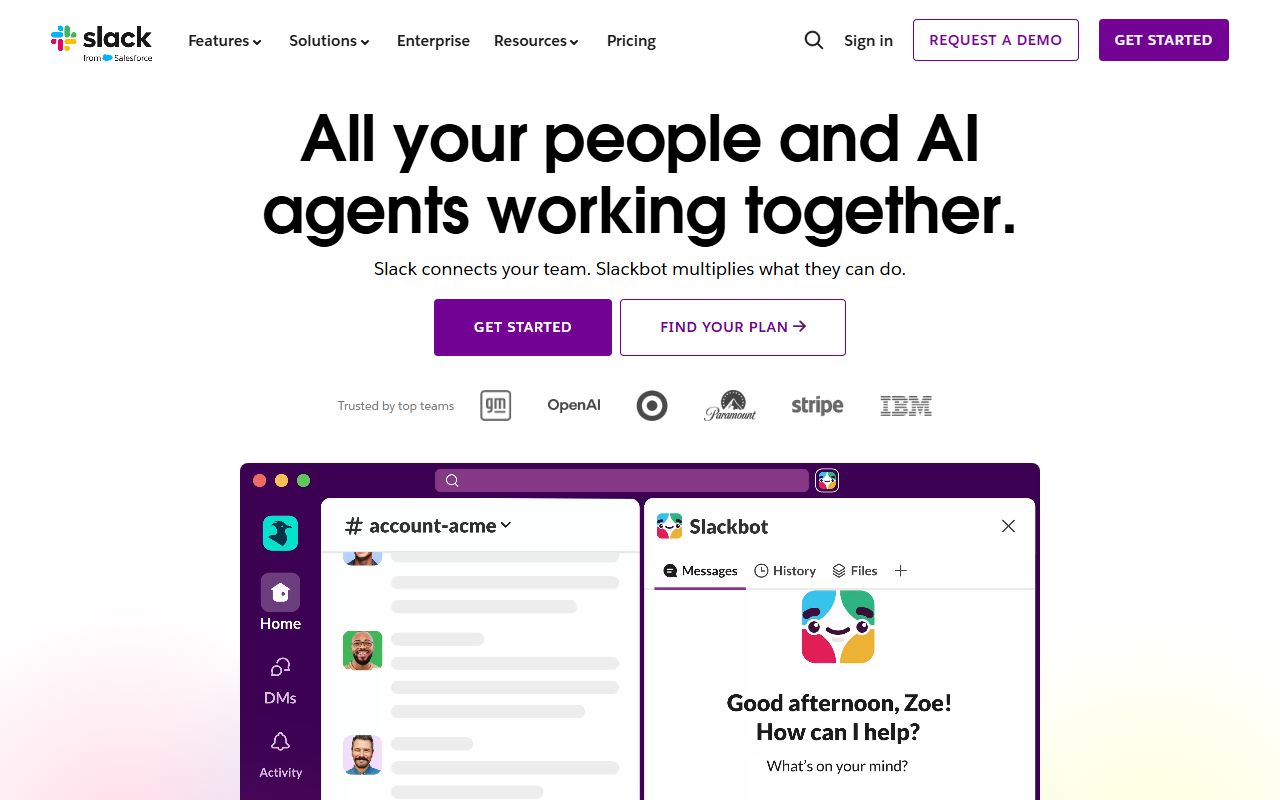
Slack is a messaging database with a chat interface on top. Strip away the branding and the model is small: a workspace contains channels, a channel contains messages in time order, a message can spawn a thread, and a message can carry files, reactions and content posted by an app. Direct messages are channels with a fixed membership. Huddles are voice or video calls started from inside a channel or a direct message. Search runs across all of it.
The important structural fact is that every integration, from a calendar to a build server to a help-desk, posts into that same message stream. Slack does not store a ticket or a calendar event; it stores a message about one, with a link back. That is why it works as a coordination layer across tools and why it is a poor system of record for anything. A decision made in a channel is findable later only if search finds it, and search is the feature the free tier restricts.
So the right way to evaluate Slack is to ask whether your team's coordination is mostly text. If it is, the product fits. If the team coordinates mostly by meetings and documents, Slack becomes an expensive notification feed, and Zoom Workplace or a document-first tool is the better centre of gravity.
Who it is for, and who it is not
The team this fits best is five to fifty people who work across more than one location or more than one timezone, and whose questions, decisions and status updates are short enough to live in a channel. Agencies, software teams, support teams and operations teams running shared queues are the usual cases. The common property is that work is interrupt-driven and the cost of a missed message is higher than the cost of noise.
It also fits teams that run many small tools and want one place where those tools report in. A ten-person company with a help-desk, a CRM, a build system and a shared calendar gets more from Slack's app directory than from any single feature in the chat itself.
Two teams it does not fit. A team that is co-located and meets in person all day, for which the product adds a second place to check. And a team that needs its communication to be the record, such as a firm with retention obligations, because the free tier deletes and the paid tiers charge per head for compliance features that are documented at the Business+ and Enterprise+ levels. That team should price the tier it actually needs, not the one on the headline.
How the pricing is structured
Figures below were read from the Slack pricing page on October 7, 2026, and are in US dollars. Prices change; treat the structure as the durable part and check the current page before buying.
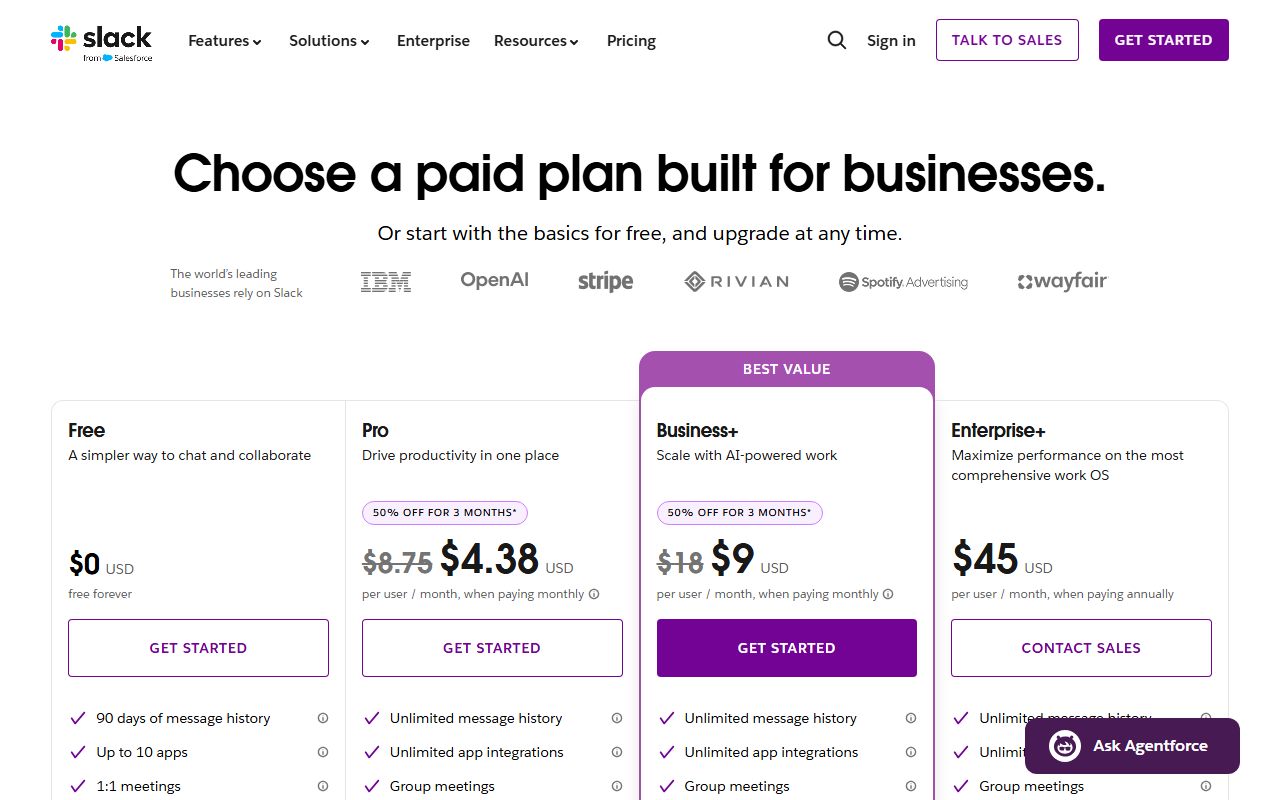
There are four tiers. Free costs nothing and caps three things: message history is 90 days, app integrations are capped at 10, and huddles and external messaging are limited to one-to-one. Pro is $8.75 per user per month billed monthly or $7.25 billed annually, and it lifts all three caps: unlimited history, unlimited apps, group huddles and group external messaging. Business+ is $18 monthly or $15 annually per user and adds administration, compliance and priority support. Enterprise+ is listed at $45 per user per month on annual billing only, with sales contact required.
The variable that drives the bill is the member count, because every active member is billed. The second variable is the tier forced by one requirement, usually a compliance or identity-management feature that lives in Business+. The third is monthly versus annual billing, a difference of roughly 17 percent at the Pro tier.
The help centre article on retention adds a detail the pricing page does not stress: on free workspaces, content older than 90 days is hidden, and data older than one year may be deleted on a rolling basis.
- Free: $0, 90 days of history, up to 10 apps, 1:1 huddles (as of October 2026)
- Pro: $8.75/user/mo monthly or $7.25/user/mo annually; unlimited history and apps, group huddles
- Business+: $18/user/mo monthly or $15/user/mo annually; admin, compliance, priority support
- Enterprise+: $45/user/mo, annual billing only, contact sales
Ease of use: what the score is built from
The ease sub-score measures how quickly a small team can deploy the tool and learn it without a consultant. Slack scores near the top of the category on both halves.
Deployment is a sign-up, an invitation list and a handful of channels. The documentation describes workspace creation, channel naming conventions and notification defaults in plain language, and the onboarding inside the product is competent. There is no schema to design, which is the main reason it is easier to roll out than a work-management tool such as Asana.
The learning curve is in habits rather than features. Threads, channel discipline and notification settings are what separate a workspace that stays readable from one that becomes a wall of pings, and the product does not enforce any of them. The help centre has guidance on all three, which is why the sub-score is not lower, but a team that skips it will experience the problem that verified reports describe most often: too much noise, too little signal.
One structural simplification deserves credit. Free, Pro and Business+ all expose the same interface; upgrading changes limits and admin features, not the daily experience. There is no re-training cost when a team moves tiers, and that is not true of every product in this category.
Feature depth: what the score is built from
Four capabilities carry the feature score, and each follows from the message-stream model described earlier.
Channels and threads. The ability to keep a long-running topic in one place, branch a discussion into a thread without losing it, and search the result is the core job. It is done well and it is done the same on every tier.
Huddles. Lightweight audio and video calls launched from inside a conversation. The pricing page states that free is limited to one-to-one huddles and paid tiers unlock group huddles, which makes this the feature most likely to push a small team off the free tier after the history limit.
Apps and workflow builder. The directory is large and the integrations are mostly one-directional: a tool posts into Slack, and Slack sometimes posts back. For a ten-person team the useful pattern is alerts in, approvals out, and that works without code. The free tier's cap of 10 apps, per the pricing page, is reached quickly by any team already running a modern tool stack.
External collaboration. Shared channels with outside organisations, limited to one-to-one on free and group on paid tiers, are the feature agencies and consultancies tend to value most.
What is thinner: Slack is not a document tool, not a task tracker and not a meeting platform in the sense that Zoom is. Canvases and lists exist, but they are adjuncts to the stream rather than systems of record.
Value at a realistic team size
Take a team of ten, and use the figures read from the pricing page on October 7, 2026.
On the free tier the bill is zero and the price is paid in history: after 90 days the team cannot search its own decisions, and the retention article states that data older than a year on free workspaces may be deleted. For a team that treats chat as disposable, this is fine. For a team that references past threads, it is a slow loss of institutional memory.
On Pro billed annually the bill is 10 users multiplied by $7.25 multiplied by 12 months, which is $870 per year. Billed monthly it is $1,050. That buys unlimited history, unlimited apps and group huddles, which is the complete small-team product.
On Business+ billed annually the bill is 10 multiplied by $15 multiplied by 12, which is $1,800. The step from Pro is about administration and compliance rather than daily features, so most ten-person teams have no reason to take it.
The comparison that sets the value sub-score at 3.4: the Pro bill is paid for every member, including people who read announcements and never post. Against meeting-first and document-first tools where only hosts or editors need a licence, the Slack model is more expensive for the same headcount, and verified reports reflect that as the most common reason teams reconsider at renewal.
Support and documentation
The support sub-score covers channels, documented response commitments and the quality of self-service material.
Channels and commitments are stated on the pricing page rather than hidden in a contract, which is to Slack's credit. All four tiers list 24/7 support. From Pro upward the page states a 4-hour first-response time, and Business+ and Enterprise+ describe it as priority handling. For a small business that is a clearer commitment than most vendors in this category publish, and it is one of the reasons the sub-score is above four.
Self-service is the strong part. The help centre covers administration, retention, security settings and billing in detail, and the retention article used for this review was specific enough to state the 90-day window, the one-year deletion policy for free workspaces and the date the policy took effect. Documentation that precise is rare and it is what lets a team configure the product correctly without a ticket.
A public status page exists for service health. What cannot be graded from documentation is real-world response quality on the Pro tier, and this page will not estimate it. Verified user reports describe support as adequate for billing and account questions and slower for anything that needs engineering, which is the same pattern seen across vendors of this size.
What verified users report
Across public review sites and forums the pattern of praise and complaint is stable enough to be useful as evidence.
The dominant positive is speed of coordination. Users consistently describe fewer internal emails, faster answers and a single place to find who is working on what. The second positive is the integration layer: notifications from other tools arriving in one stream is cited more often than any chat feature.
The dominant complaint is noise. Notification volume, channel sprawl and the pressure to respond immediately are the three forms it takes, and they are habits the tool permits rather than causes. The second complaint is the per-user price at renewal, especially the point at which the free tier's 90-day limit makes the archive inaccessible and the team feels obliged to upgrade. The third is that important decisions get lost in fast channels, which is the structural weakness of a stream model and the reason teams pair Slack with a document tool.
These reports are weighed as evidence of pattern, not as measurements, and they are not converted into a number. They are consistent with the documentation: the product is strong at what it stores and weak at what it does not.
Alternatives on this site
Within this category, Zoom Workplace is the natural comparison. Zoom started from meetings and added team chat; Slack started from chat and added huddles. A team that spends more time on calls than in text will find Zoom's licence model cheaper, since non-host participants do not need a paid seat. A team that lives in text will find Slack's chat deeper and its integrations broader.
For scheduling the meetings that chat generates, Calendly is graded separately and connects to Slack through the app directory. For the work that chat coordinates, Asana tracks tasks as objects with owners and dates, which is exactly what a channel cannot do, and the two are commonly used together rather than instead of each other.
The decision rule: choose the tool whose core object matches your team's main unit of coordination. If that unit is a message, Slack. If it is a meeting, Zoom. If it is a task, Asana.
Bottom line
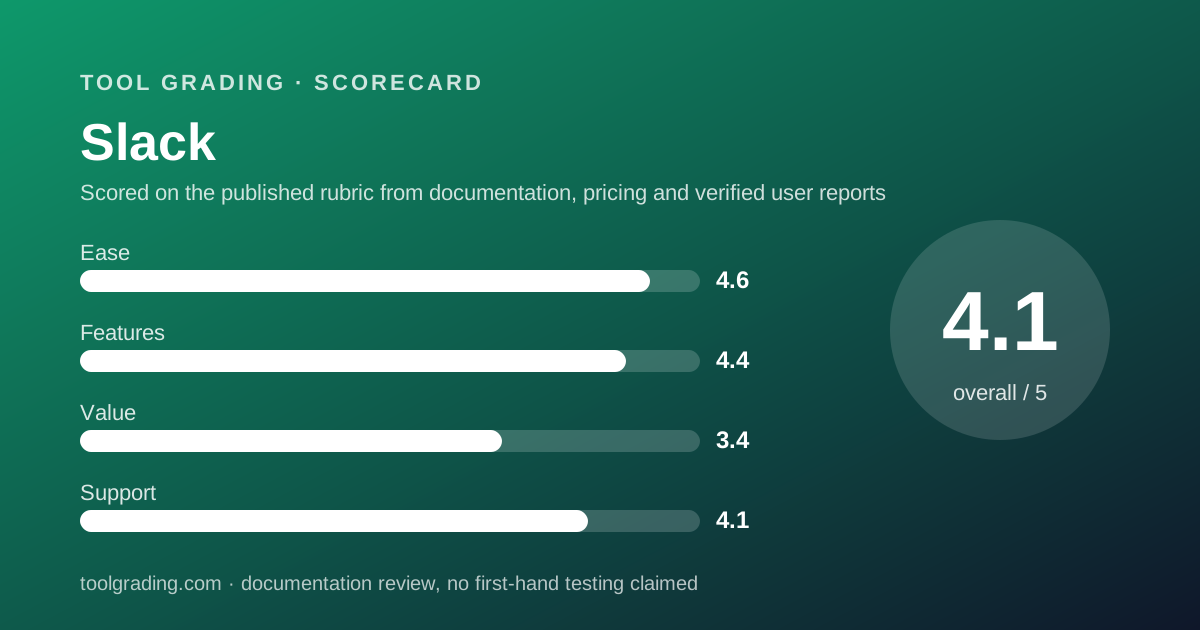
Slack earns a high grade on ease and features because the model is simple, the documentation is thorough and the paid tier removes every small-team limit in one step. It earns a lower grade on value because the free tier is a trial with a 90-day memory rather than a product, and the paid tier bills every member regardless of how much they use it. A ten-person team should expect roughly $870 a year on Pro billed annually, as of October 2026, and should check the current pricing page before relying on that figure.
Buy it if your team coordinates in text and runs several tools that benefit from one notification stream. Look elsewhere if your coordination is meetings and documents, or if most of your headcount only needs to read. This page earns no commission from the vendor, and the grade would be the same if it did.
Visit Slack
We have no affiliate relationship with this vendor. Link goes to the official site.