 Tool
Tool
Zoom Workplace
A meetings platform that bills by the host, not the participant, and bundles chat, whiteboard and AI notes around the call.
Scored on the published rubric, from documentation, pricing and verified user reports.
Best for: Teams whose coordination is meeting-first, with a small number of regular hosts and a larger number of people who only need to join.
Verdict
Zoom Workplace is the meetings product most people already know, with team chat, whiteboards, scheduling and AI meeting notes attached to it. The structural fact that decides whether it is good value is the licence model: paid seats are needed by the people who host meetings, and the pricing page (checked October 7, 2026) prices Pro at $14.16 per user per month billed annually and Business at $18.33, with the free Basic tier capped at 40 minutes per meeting and 100 participants. For a team where three people host and twelve attend, that is cheaper than any per-member chat tool. The feature score is held back because the chat and document layers around the meeting are serviceable rather than deep, and the support score reflects documentation that is broad but spread across a support site that is harder to navigate than the best in the category. This grade comes from vendor documentation, pricing structure and verified user reports, against the published rubric; it is a documentation review, no first-hand testing was run and none is claimed.
Visit Zoom Workplace
We have no affiliate relationship with this vendor. Link goes to the official site.
Where it is strong
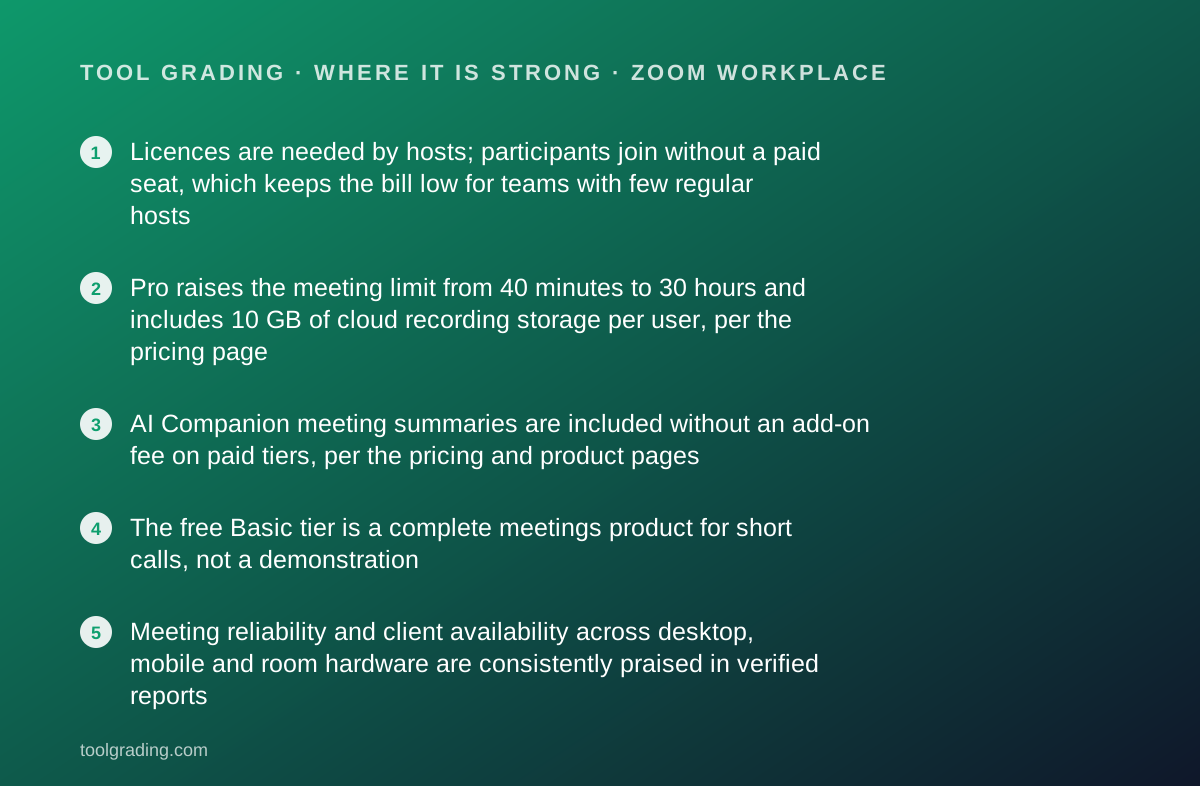
- Licences are needed by hosts; participants join without a paid seat, which keeps the bill low for teams with few regular hosts
- Pro raises the meeting limit from 40 minutes to 30 hours and includes 10 GB of cloud recording storage per user, per the pricing page
- AI Companion meeting summaries are included without an add-on fee on paid tiers, per the pricing and product pages
- The free Basic tier is a complete meetings product for short calls, not a demonstration
- Meeting reliability and client availability across desktop, mobile and room hardware are consistently praised in verified reports
Where it falls short
- Basic tier meetings end at 40 minutes, per the pricing page; this is the limit that pushes most small teams to pay
- Pro keeps the 100-participant cap; the 300-participant cap requires Business at a higher per-licence rate
- Team chat exists but verified reports and the documentation both position it as secondary to the meeting; teams that live in text tend to keep a separate chat tool
- The support site is large and inconsistently organised, and response commitments by tier are not stated as plainly as some competitors state them
What the product actually is
Zoom Workplace is the name the vendor now uses for the bundle around Zoom Meetings: the meeting client, team chat, a whiteboard, a scheduler, cloud recording and an AI assistant called AI Companion. The core object is the meeting. A meeting has a host, a start time, a join link, participants, an optional recording and, on paid tiers, an optional AI summary. Chat, whiteboards and notes are attached to meetings or to channels, but the meeting is the thing the whole product is built around.
That shapes how it should be evaluated. A chat-first product such as Slack stores a stream of messages and treats calls as something you start from inside the stream. Zoom stores meetings and treats chat as something that happens before, during and after one. The vendor's own product page describes the chat as continuous across those three phases, which is an honest description of its role: a companion to the call, not a replacement for a chat tool.
The second structural fact is the licence model. The pricing page prices Pro and Business per user per month, and notes that each plan has limits on how many users can be assigned meeting licences. In practice a licence belongs to a host. Participants, including those on free Basic accounts, join without one. That single fact is why Zoom can be cheaper for a given headcount than any product that bills every member.
Who it is for, and who it is not
The team this fits best is one whose coordination is meeting-first: sales teams running demos, consultancies running client calls, training businesses running sessions, distributed teams whose rhythm is a daily stand-up and a weekly review. The common property is that a small number of people host regularly and a larger number simply attend, which is the shape the licence model rewards.
It also fits teams that need reliability more than features. The verified reports summarised later consistently rate the client as stable across operating systems and on weak connections, and for a business whose revenue depends on a call connecting, that outweighs the depth of the chat.
Two teams it does not fit. A team whose work is mostly asynchronous text, because the chat layer is a companion to the meeting rather than a system in its own right, and such a team will end up paying for Zoom and a chat tool. And a team that needs long meetings on the free tier, because the pricing page states the 40-minute limit plainly and it applies to group meetings on Basic. A team that cannot justify Pro should not plan around Basic for anything longer than a check-in.
How the pricing is structured
Figures below were read from the Zoom pricing page on October 7, 2026, in US dollars. The structure is the durable part; check the current page before buying.
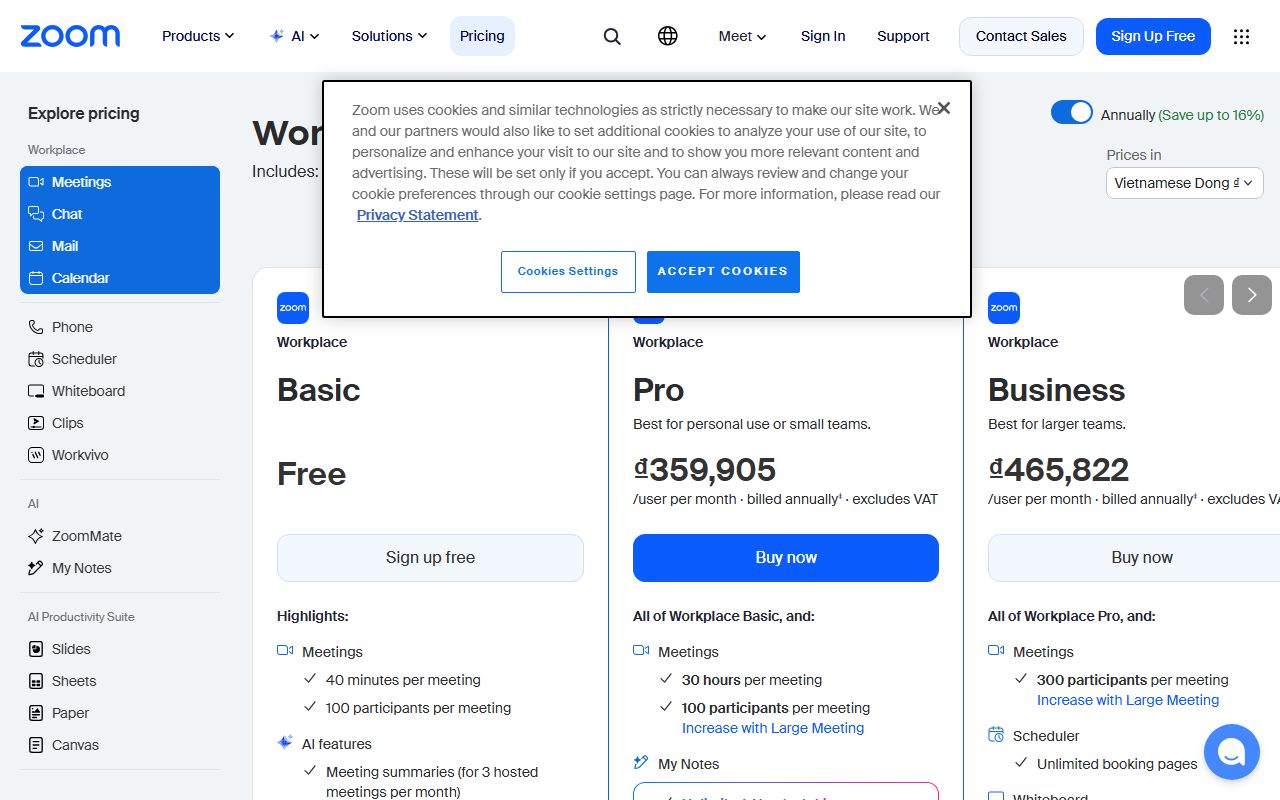
There are four tiers. Basic is free: meetings up to 40 minutes, up to 100 participants, and a limited AI Companion allowance that the page lists as three meeting summaries per month. Pro is $16.99 per user per month billed monthly or $14.16 billed annually: meetings up to 30 hours, 100 participants, 10 GB of cloud storage per user and unlimited AI Companion. Business is $21.99 monthly or $18.33 annually per user: 300 participants, 10 GB of cloud storage per licence, unlimited AI Companion. Enterprise is custom-priced through sales, with 500 or more participants and unlimited storage.
The variable that drives the bill is the number of hosts, not the number of people. The second variable is participant count, because the step from 100 to 300 is the step from Pro to Business. The third is annual versus monthly billing, a difference of roughly 17 percent. Webinars, phone and large-meeting capacity are separate products and are not included in the figures above.
- Basic: free, 40-minute meetings, 100 participants, 3 AI summaries per month (as of October 2026)
- Pro: $16.99/user/mo monthly or $14.16/user/mo annually; 30-hour meetings, 100 participants, 10 GB storage per user
- Business: $21.99/user/mo monthly or $18.33/user/mo annually; 300 participants, 10 GB storage per licence
- Enterprise: custom pricing, 500+ participants, unlimited storage, contact sales
Ease of use: what the score is built from
The ease sub-score measures time to deploy and time to competence for a small team without outside help. Zoom scores high on both because most of the learning has already happened: the join-a-link workflow is the most widely understood in business software, and a new participant needs no instruction.
Deployment for the host side is an account, a licence assignment and a calendar integration. The documentation covers the calendar connections for Google and Microsoft and the desktop and mobile clients, and the admin console for a small account is manageable without training.
Where effort is needed is in settings hygiene. Waiting rooms, passcodes, recording defaults and who may share a screen are account-level choices, and the defaults have changed over the years in response to security incidents. A team should spend an hour in the admin settings before its first client call. The documentation is adequate for that hour, though it is spread across many articles.
The chat and whiteboard layers add a second interface to learn. They are not difficult, but a team that already uses a chat tool will find them a duplicate rather than an improvement, and most verified reports describe leaving them switched off. The sub-score reflects the meeting experience, which is the product's reason for existing.
Feature depth: what the score is built from
Three capabilities carry the feature score.
The meeting itself. Screen sharing, breakout rooms, recording to the cloud, captions and translation, virtual backgrounds and a client that runs on every platform including room hardware. The product page confirms captions across multiple languages and the 30-hour duration on paid tiers. This is the deepest meetings implementation in the category and it is the reason to buy.
AI Companion. On paid tiers the pricing and product pages describe unlimited AI note-taking with summaries, next steps and the ability to query a meeting afterwards, included without an add-on fee. For a small team that cannot afford a note-taker on every call, this is a material feature, and the inclusion without surcharge is a pricing decision worth noticing because several competitors charge for the equivalent.
Cloud recording and storage. 10 GB per licence on Pro and Business, per the pricing page, is enough for a team that records client calls and clears them periodically, and not enough for one that archives training sessions indefinitely.
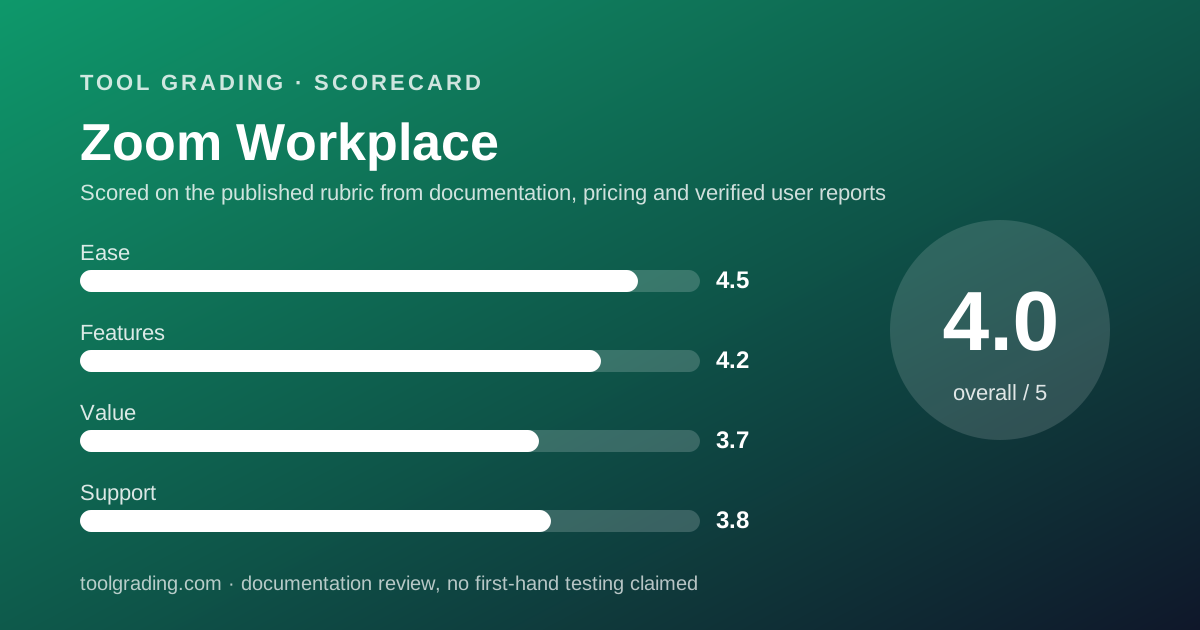
What is thinner: team chat is functional but shallow next to a dedicated tool, the whiteboard is adequate for a sketch and not a design surface, and the scheduler is a convenience next to Calendly. The feature score of 4.2 is a strong meetings product with serviceable extras, not a complete workspace.
Value at a realistic team size
Take a team of ten and use the pricing page figures from October 7, 2026.
First decide how many hosts there are. In a ten-person team it is common for three or four people to run client calls and internal meetings while the rest attend. Suppose four hosts.
On Pro billed annually the bill is 4 licences multiplied by $14.16 multiplied by 12 months, which is $679.68 per year. Billed monthly it is $815.52. The other six people join on free Basic accounts and pay nothing. If every one of the ten hosts regularly, the annual bill is $1,699.20.
On Business billed annually with four hosts it is 4 multiplied by $18.33 multiplied by 12, which is $879.84 per year. The step is justified only if a meeting will exceed 100 participants, which for most ten-person businesses means webinars, and webinars are a separate product.
The comparison that sets the value sub-score at 3.7: for a meeting-first team with few hosts, Zoom is cheaper per head than any per-member chat tool. For a team that needs every person licensed, the Pro rate is nearly double the Pro rate of a chat tool and the chat it buys is weaker. The score lands between those two cases because both are common. Before buying, confirm on the current pricing page how many licences your account level permits.
Support and documentation
The support sub-score covers channels, documented response commitments and the quality of self-service material.
Self-service is extensive. The support site covers client installation on every platform, admin settings, data routing, recording management and billing, and the articles reviewed for this entry were specific and current. The weakness is organisation: the site is large, article identifiers are opaque and several searches land on tangential pages before the right one. A small team will find what it needs, but it will take longer than on the best-organised help centres in this category.
Channels and response commitments are not stated as plainly on the pricing page as some competitors state them. The page lists support as a differentiator at higher tiers, and the Enterprise tier describes managed support through sales, but a documented first-response time for Pro customers was not found in the pages reviewed. That absence, rather than any reported failure, is what holds the sub-score below four.
A public status page exists for service health, and the client's built-in problem-report tool sends logs directly to the support team, which is documented in detail. What cannot be graded from documentation is real-world ticket quality for a Pro account, and this page will not estimate it. Verified reports describe support as adequate for account issues and slower for technical ones.
What verified users report
Across public review sites the pattern of praise and complaint is consistent enough to use as evidence.
The dominant positive is reliability. Users across industries describe the client as stable, forgiving of poor connections and familiar to external participants, which reduces the friction of every client call. The second positive is the breadth of the meeting feature set, particularly breakout rooms and recording. The third, more recent, is the AI summary feature being included rather than sold as an add-on.
The dominant complaint is the 40-minute limit on the free tier, which is less a product complaint than a pricing one and is exactly what the pricing page states. The second complaint is the accumulation of products: chat, whiteboard, phone, scheduler, events, each with its own settings, which verified reports describe as clutter for a team that only wanted meetings. The third is settings complexity in the admin console, where security defaults and recording permissions take time to get right.
These reports are weighed as evidence of pattern, not as measurements, and are not converted into a number. They are consistent with the documentation: the meeting is excellent, the bundle around it is uneven.
Alternatives on this site
Within this category, Slack is the natural comparison. Slack is chat-first with calls attached; Zoom is meeting-first with chat attached. A team that lives in text should start from Slack and accept that its huddles are lighter than a Zoom meeting. A team that lives in meetings should start from Zoom and accept that its chat is lighter than Slack. Many ten-person teams end up with both, and the licence model matters there: Zoom bills the hosts, Slack bills everyone.
For scheduling the meetings themselves, Calendly is graded separately and connects to Zoom as a conferencing provider, so a booked slot carries a join link automatically. For tracking the work that meetings generate, Asana is the task tool on this site.
The decision rule: count the hosts. If hosts are a minority of the team, Zoom's model is in your favour. If everyone needs to host, compare the Pro rate against a chat tool's Pro rate and decide which core object, the meeting or the message, your team actually runs on.
Bottom line
Zoom Workplace earns a high grade on ease because the meeting workflow is the most familiar in business software, and a solid grade on features because the meeting itself is the deepest in the category, with AI summaries included on paid tiers. The value grade reflects a licence model that is generous to teams with few hosts and ordinary for teams that need everyone licensed. The support grade reflects thorough but sprawling documentation and response commitments that are less plainly stated than the best in the category.
A ten-person team with four regular hosts should expect roughly $680 a year on Pro billed annually, as of October 2026, and should confirm the current pricing page and licence limits before relying on that figure. Buy it if your team is meeting-first. Pair it with a chat tool if your team is also text-first, and budget for both. This page earns no commission from the vendor, and the grade would be identical either way.
Visit Zoom Workplace
We have no affiliate relationship with this vendor. Link goes to the official site.