 Tool
Tool
Docusign eSignature
The e-signature product priced per seat and metered per envelope, where the annual envelope allowance decides the real cost.
Scored on the published rubric, from documentation, pricing and verified user reports.
Best for: Businesses that send contracts, offers and approvals to outside parties at a steady, moderate volume and need a signature that will hold up if challenged.
Verdict
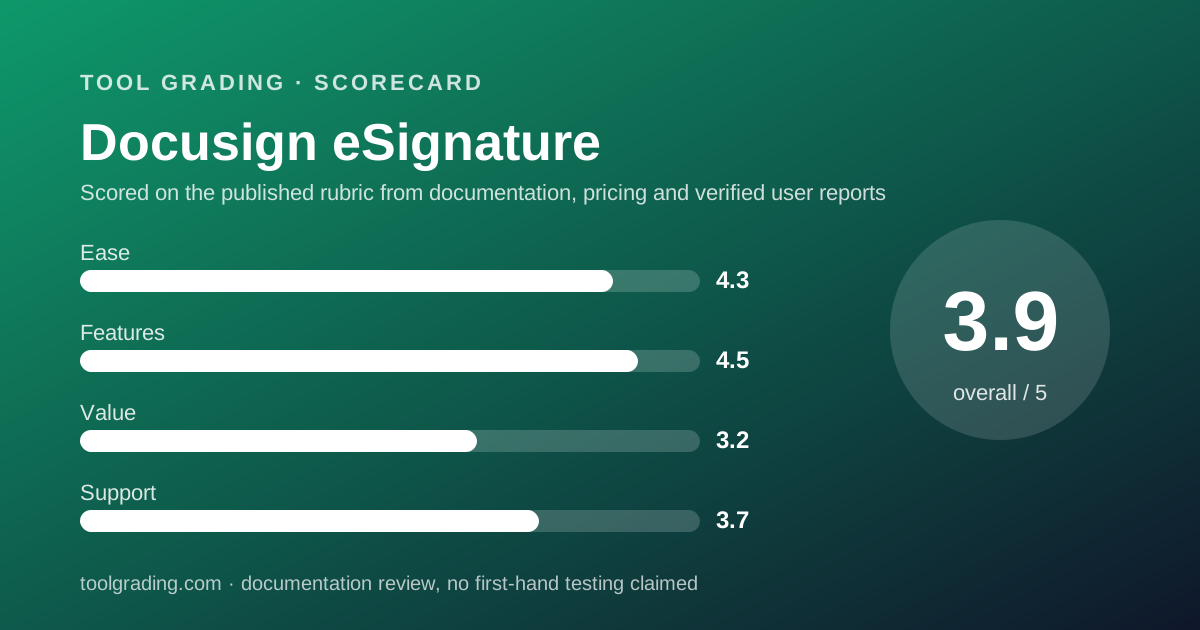
Docusign eSignature is the product most counterparties already recognise, and that recognition is worth something: a signer who has seen the interface before signs faster. The structural fact that decides whether it is good value is that the self-serve plans are priced per seat and metered per envelope. Per the pricing page (checked October 7, 2026), Standard is $30 per user per month and Business Pro is $45, both on annual terms with 100 envelopes per user per year and a cap of 50 users. A company that sends twenty contracts a month through one person will hit the envelope allowance long before it needs a second seat, which is the tension that sets the value sub-score at 3.2. The feature score is high because templates, bulk send, web forms, payments, identity verification and 1,100-plus integrations cover nearly every agreement workflow a small business runs. The support score reflects a trust centre and status page that are excellent and a support site that failed to load correctly on several attempts during this review. This grade comes from vendor documentation, pricing structure and verified user reports, against the published rubric; it is a documentation review, no first-hand testing was run and none is claimed.
Visit Docusign eSignature
We have no affiliate relationship with this vendor. Link goes to the official site.
Where it is strong
- The most widely recognised signing experience, which verified reports credit with faster completion by outside signers
- Templates, shared templates, bulk send, web forms and payment collection are documented across Standard and Business Pro, covering most small-business agreement flows
- The product page lists 1,100-plus pre-built integrations including Salesforce, Microsoft 365, Google Workspace and Workday
- Trust centre publishes ISO, SOC 2, PCI and BCR attestations alongside a live status page and advance maintenance notices
- Signers need no account and can complete on any device, per the product page
Where it falls short
- Self-serve plans meter envelopes: 100 per user per year on Standard and Business Pro, per the pricing page; a single heavy sender exhausts that quickly
- Standard at $30 per user per month is among the higher per-seat rates on this site, and the 50-user cap forces a sales conversation for larger teams
- Identity verification and SMS delivery are one-time bonuses of five each on Standard, per the pricing page, after which they are paid add-ons
- The public support site returned a loading error on several attempts during this review; the trust centre and product documentation loaded normally
What the product actually is
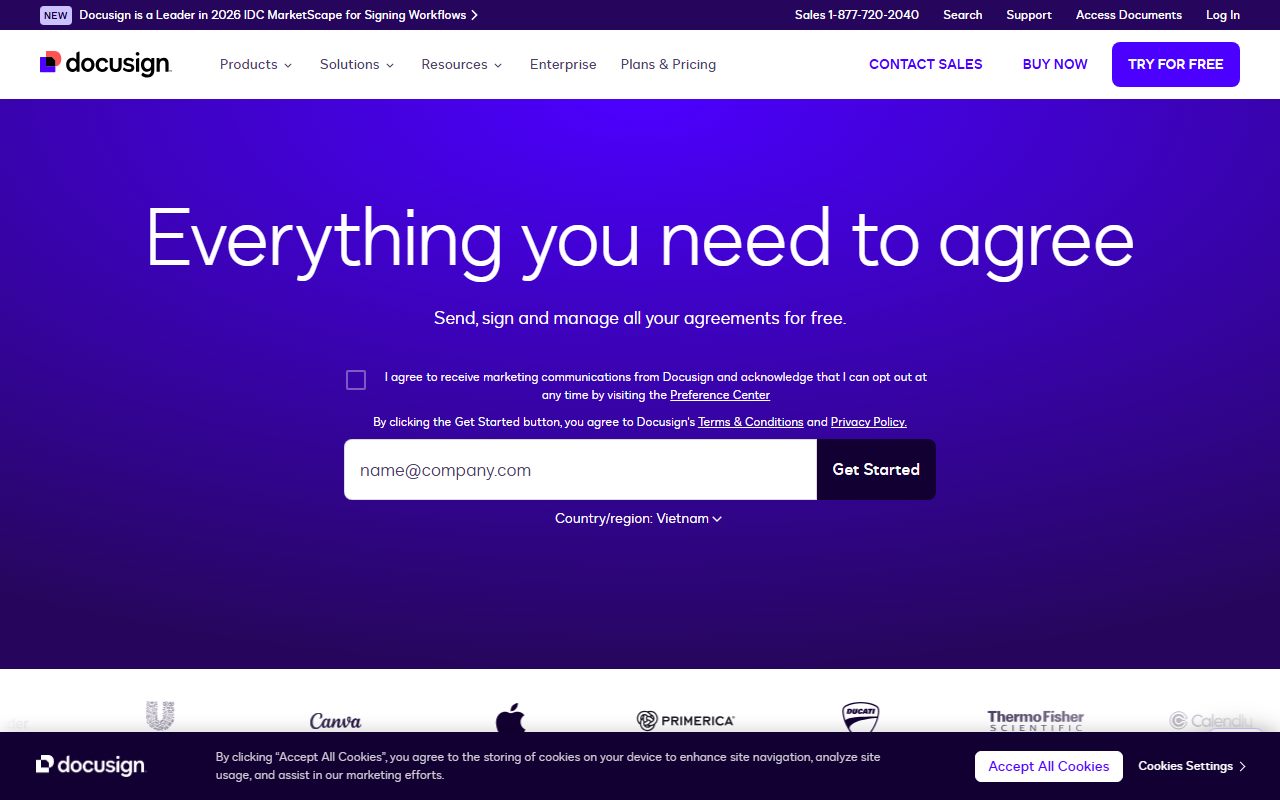
Docusign eSignature is an envelope engine. The core object is the envelope: a container holding one or more documents, a list of recipients with roles and a signing order, a set of fields placed on the documents, and an audit trail that records who opened, signed or declined, when, and from where. A sender prepares an envelope, often from a template, and sends it. Each recipient receives a link, signs in a browser or the mobile app without needing an account, and the completed document and its certificate of completion are stored.
Everything else in the product is an elaboration of that object. Templates are envelopes with the fields pre-placed. Bulk send is one template sent as many envelopes. Web forms are envelopes created by the signer rather than the sender. Payment collection is a field on an envelope that calls a payment processor. Identity verification is an extra gate before a recipient can open one.
The pricing follows the object. Self-serve plans are priced per seat for senders and metered per envelope, with the pricing page stating 100 envelopes per user per year on Standard and Business Pro. That is the number to understand first: it is a limit on the thing the product does, and it is set well below the volume of a busy sales or HR function.
Who it is for, and who it is not
The business this fits best sends agreements to outside parties at a steady, moderate volume: a consultancy sending proposals and statements of work, a property manager sending leases, an HR function sending offers and policy acknowledgements, a sales team closing a handful of contracts a month. The common property is that the signer is external, the agreement matters enough that an audit trail is wanted, and the volume per sender is in the range the envelope allowance covers.
It also fits businesses whose counterparties are large organisations, because those organisations already know the interface and often already use it, which removes a question from every deal.
Two businesses it does not fit. A high-volume sender, such as a business signing up hundreds of customers a month, because the self-serve envelope allowance is 100 per user per year, per the pricing page, and the alternative is a custom Enhanced plan negotiated with sales. And a business that needs a signature only occasionally and internally, for which the Personal plan at $11 per month for five envelopes is proportionate and the per-seat Standard tier is not.
A business sending agreements that require strict identity proofing should note that identity verification is sold as a bonus of five on Standard and thereafter as an add-on.
How the pricing is structured
Figures below were read from the Docusign eSignature plans page on October 7, 2026, in US dollars, and apply to annual terms billed monthly. The structure is the durable part; check the current page before buying, and expect regional variation.
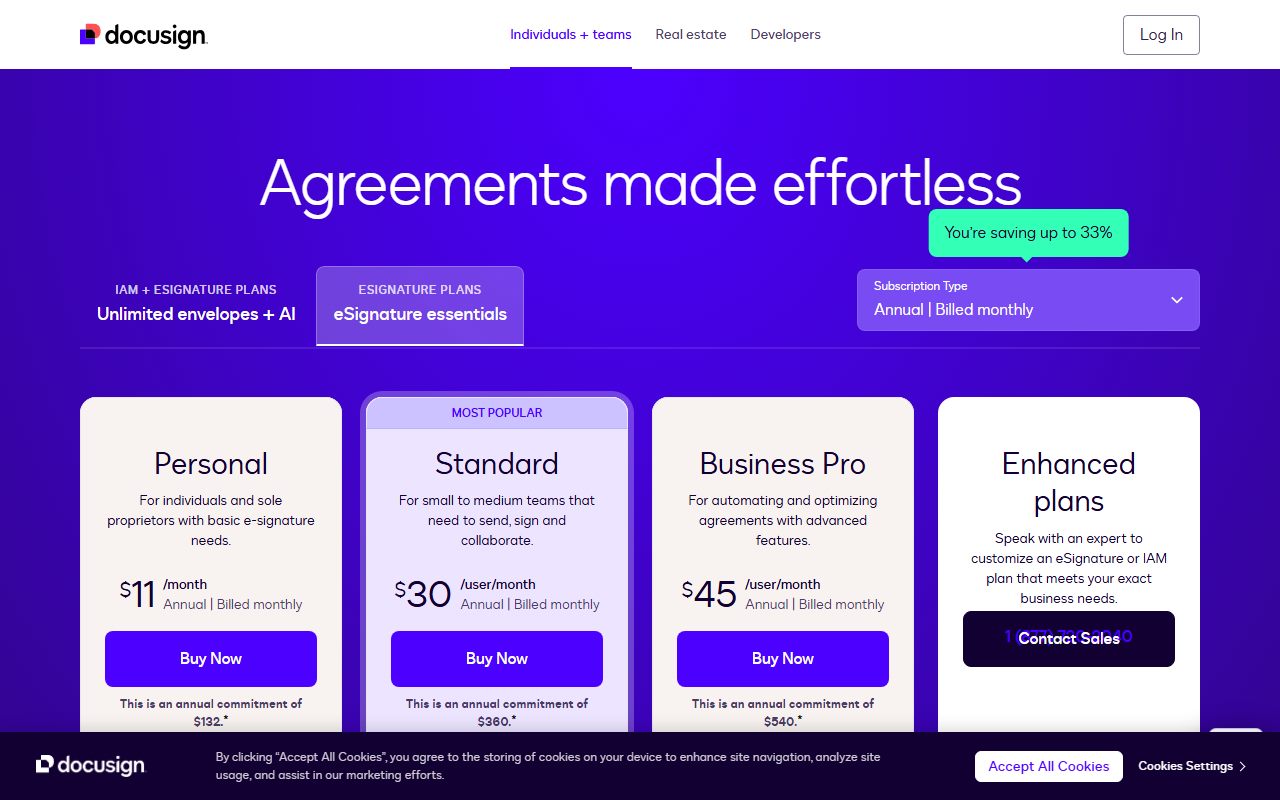
There are three self-serve tiers and a custom tier. Personal is $11 per month, $132 per year, for a single user and five envelopes per month, with templates, storage, an AI-assisted summary and the integration catalogue. Standard is $30 per user per month, $360 per user per year, for up to 50 users, with 100 envelopes per user per year, shared templates, commenting, branding, delegated signing, and one-time bonuses of five SMS deliveries and five identity verifications. Business Pro is $45 per user per month, $540 per user per year, for up to 50 users, also 100 envelopes per user per year, adding web forms, payment collection, interactive fields, data verification, bulk send, a developer account and eWitness. Enhanced plans are custom-priced for 50-plus users with custom envelope limits, SSO, 24/7 support and compliance configurations.
The variable that drives the bill is envelope volume, because it decides whether self-serve fits at all. The second is the feature that forces Business Pro, most often bulk send or payments. The third is the number of senders, since only senders need seats and signers never do.
- Personal: $11/mo on annual terms, 1 user, 5 envelopes per month (as of October 2026)
- Standard: $30/user/mo on annual terms, up to 50 users, 100 envelopes per user per year
- Business Pro: $45/user/mo on annual terms, up to 50 users, 100 envelopes per user per year, bulk send and payments
- Enhanced: custom pricing, 50+ users, custom envelope limits, SSO, 24/7 support
Ease of use: what the score is built from
The ease sub-score measures time to deploy and time to competence for a small business without a consultant. Docusign scores 4.3: easy for the signer, moderately easy for the sender, and more involved for the administrator.
For the signer it is the easiest product on this site. No account, any device, a guided path through the fields, and an interface most people have seen. The product page states that signers can complete on any device with no account required, and verified reports confirm that outside parties rarely need help.
For the sender, preparing a one-off envelope is straightforward: upload, add recipients, drag fields, send. The product page describes AI-assisted field suggestion that places signature and date fields automatically, which shortens the step that used to take longest. Building a template takes more care, because a template encodes recipient roles and field positions that every later envelope inherits, and a mistake is repeated a hundred times.
For the administrator, the work is in branding, signing settings, user roles and, on Business Pro, web forms and payment configuration. The product documentation is adequate for all of it, but the public support site returned errors on several attempts during this review, which is noted again under support. The sub-score reflects a product that is simple to use and somewhat harder to look things up for.
Feature depth: what the score is built from
Four capabilities carry the feature score of 4.5, the highest in this batch.
The envelope and its audit trail. Signing order, recipient roles, field types, reminders, expirations and a certificate of completion that records each action with a timestamp. The trust centre's compliance attestations, ISO, SOC 2, PCI and Binding Corporate Rules, are what give the audit trail its weight if an agreement is ever disputed. The product page also references PDF/A archiving and advanced signer authentication for regulated use.
Templates and bulk send. Shared templates on Standard mean a team sends the same offer letter the same way every time. Bulk send on Business Pro turns one template into many envelopes from a list, which is the feature that makes policy acknowledgements and renewal notices tolerable.
Web forms and payments. On Business Pro, a signer can start an agreement from a mobile-friendly form and pay inside it. For a service business taking deposits, that collapses three steps into one.
Integrations. The product page lists 1,100-plus pre-built integrations, including Salesforce, Microsoft 365, SAP, Workday, Google Workspace and ServiceNow. For a small business the ones that matter are the office suite and the CRM, and both are covered.
What is thinner: contract lifecycle management, redlining and clause libraries are separate Docusign products rather than part of eSignature, and the envelope allowance limits how far the features above can be used before a sales conversation is needed.
Value at a realistic team size
Take a company of ten and use the pricing page figures from October 7, 2026, on annual terms.
First decide how many people send. Signers never need a seat. In a ten-person company it is common for two or three people to send agreements: an owner, a sales lead, an office manager. Suppose three senders.
On Standard the bill is 3 seats multiplied by $30 multiplied by 12 months, which is $1,080 per year, and the allowance is 300 envelopes per year across the three. On Business Pro it is 3 multiplied by $45 multiplied by 12, which is $1,620 per year, same allowance, with bulk send, web forms and payments added.
Now check the allowance against reality. A company sending ten agreements a week sends roughly 500 a year, which exceeds three Standard seats' combined allowance. The documented options are more seats, which buys allowance at $360 per user per year each, or an Enhanced plan with a custom limit. That is the tension that sets the value sub-score at 3.2: the per-seat price is high for the category and the envelope cap means volume, not headcount, decides the bill.
If all ten people send, Standard is $3,600 per year and Business Pro is $5,400, with 1,000 envelopes of allowance. The reasonable-use terms behind the allowance were not reachable during this review, so confirm with the vendor how overage is handled before relying on the arithmetic above.
Support and documentation
The support sub-score covers channels, documented response commitments and the quality of self-service material, and the three parts diverge sharply for this product.
The trust centre is excellent. It publishes the compliance certifications, a live system status page with regional detail, and advance notices of planned maintenance and disaster-recovery exercises with dates. For a product whose value rests on the enforceability of a signature, that transparency is not decoration; it is evidence.
The product documentation on the main site loaded normally and was specific, including the integration count, the envelope allowances and the mobile app ratings.
The public support site is the weak part. On several attempts during this review the support centre and its article pages returned a CSS loading error rather than content. That may be transient, and it is reported here as observed on October 7, 2026, not as a permanent state. A small business that needs to look something up at the moment it matters should know that the self-service path was not reliable on that day.
Channels by tier are stated on the pricing page: 24/7 support is listed as an Enhanced-plan feature, which implies that Standard and Business Pro customers receive a lesser commitment the page does not spell out. That gap, combined with the support-site behaviour, holds the sub-score at 3.7. What cannot be graded from documentation is ticket quality, and this page will not estimate it.
What verified users report
Across public review sites the pattern is consistent and, unusually, the vendor publishes its own aggregate: the product page cites a G2 rating of 4.5 across 2,622 reviews, and App Store and Google Play ratings of 4.9 and 4.4. Those figures are the vendor's and are quoted as such.
The dominant positive is signer completion. Users describe outside parties signing quickly because the interface is familiar and needs no account, and that is the benefit that justifies the price for sales and HR teams. The second positive is the audit trail and the confidence it gives when an agreement is questioned. The third is template reuse.
The dominant complaint is price, specifically the per-seat rate combined with the envelope allowance, and reports describe businesses discovering the allowance only after exceeding it. The second complaint is that useful capabilities such as bulk send and payments sit on the higher self-serve tier, and that identity verification becomes a paid add-on after the bonus. The third is support responsiveness on the self-serve tiers, which is consistent with the pricing page reserving 24/7 support for Enhanced plans.
These reports are weighed as evidence of pattern, not as measurements, and are not converted into a number. They agree with the documentation: the product is strong and the commercial model is the objection.
Alternatives on this site
There is no second e-signature product graded on this site yet, so direct comparison is not yet possible. That is a limitation of this page and will be fixed as the category fills in.
The adjacent tools that a signature workflow touches are graded here. 1Password Business is the place to keep the shared credentials and API keys that an integration between Docusign and a CRM depends on, and its audit log complements the envelope audit trail for a business that cares about who did what. Asana is where the work before and after a signature, drafting, approval and onboarding, should be tracked, since eSignature stops at the completed envelope. Airtable is a reasonable register for agreements once signed, holding the metadata that the envelope stores but does not report on.
The decision rule: if your counterparties are outside the company and the agreement would matter in a dispute, buy a dedicated e-signature product and expect to pay for it. If the signature is internal and informal, the office suite you already own may be sufficient. If your volume is in the hundreds per month, start the conversation at the Enhanced tier rather than discovering the envelope cap on a self-serve plan.
Bottom line
Docusign eSignature earns the highest feature grade in this batch because the envelope model, templates, bulk send, web forms, payments and the integration catalogue cover nearly every agreement a small business sends, and because the trust centre backs the audit trail with published attestations. It earns the lowest value grade because the self-serve plans are priced per seat at $30 and $45 per user per month on annual terms, as of October 2026, and metered at 100 envelopes per user per year, so a single busy sender outgrows the allowance before the team outgrows its seats. The support grade is held down by a public support site that did not load correctly during this review.
A ten-person company with three senders should expect roughly $1,080 a year on Standard or $1,620 on Business Pro, with 300 envelopes of allowance, and should confirm those figures and the overage terms on the current pricing page before relying on them. Buy it if outside signers and enforceability matter and your volume fits the allowance. Negotiate an Enhanced plan if it does not. This page earns no commission from the vendor, and the grade would be the same if it did.
Visit Docusign eSignature
We have no affiliate relationship with this vendor. Link goes to the official site.