 Tool

Hubstaff
A proof-of-work tracker with screenshots, app and URL evidence and payroll, sold at a low headline rate that add-ons quietly double.
Scored on the published rubric, from documentation, pricing and verified user reports.
Best for: Distributed, contractor-heavy or field workforces where hours have to be evidenced and paid out, not just recorded.
Verdict
Hubstaff is built for the buyer whose problem is proof rather than paperwork. Screenshots, activity levels, app and URL tracking, GPS job sites and payroll all exist in the product, and the entry rate of $4.99 per seat per month on the annual view looks like the bargain of the category. The feature sub-score of 4.5 is the highest of the four trackers graded here. The value sub-score of 3.4 is nearly the lowest, and the reason is the add-on sheet. Insights, Tasks, more screenshots, locations, longer data retention and the silent app are each sold separately from $1.67 to $3.33 per seat per month, so a Starter plan configured to do what buyers assume it does costs about what the Team plan costs. There is no free tier at all, only a 14-day trial and a 30-day money-back guarantee. This is a documentation review built from the vendor's pricing page, feature pages and terms of service; no first-hand testing was run and none is claimed.
Visit Hubstaff
We have no affiliate relationship with this vendor. Link goes to the official site.
Where it is strong
- The deepest evidence toolkit in this category: activity levels, screenshots, app and URL tracking, idle handling, GPS job sites and a silent desktop agent
- Payments and payroll are inside the product at Team, $10 per seat per month, so tracked hours convert to payouts without an export
- Compliance claims are specific and tiered: SOC 2 Type II, HIPAA, GDPR, LGPD and CCPA, with HIPAA and SOC-2 Type II named on the Enterprise tier
- A free Project Viewer role lets a manager read activity reports without consuming a paid seat
- The proration rule is published rather than hidden: added seats are charged pro rata for the remainder of an annual term
Where it falls short
- No free tier of any kind; the pricing page offers only a 14-day trial and a 30-day money-back guarantee
- Six paid add-ons from $1.67 to $3.33 per seat per month mean the Starter rate is not the price of a working configuration
- A 2 seat minimum applies to Starter, Grow and Team, so a sole operator pays for two
- The vendor charges for every seat even if the person does not track time, stated plainly in its own pricing FAQ
- No prorated refunds or credits for removed users, on either annual or monthly billing
At a glance
| Starting price | $4.99 per seat per month on the annual view (Starter) |
|---|---|
| Free plan | None published |
| Seat minimum | 2 seats on Starter, Grow and Team |
| Trial | 14-day free trial, no credit card required, plus a 30-day money-back guarantee on paid plans |
| Support channels | Email to support@hubstaff.com, help centre, demo booking; VIP Support sold separately at $29 or $59 per month per organisation |
| Top tier extras | Silent app, locations, higher API limits, ACH payment, HIPAA, SOC-2 Type II, SCIM provisioning |
What the product actually is
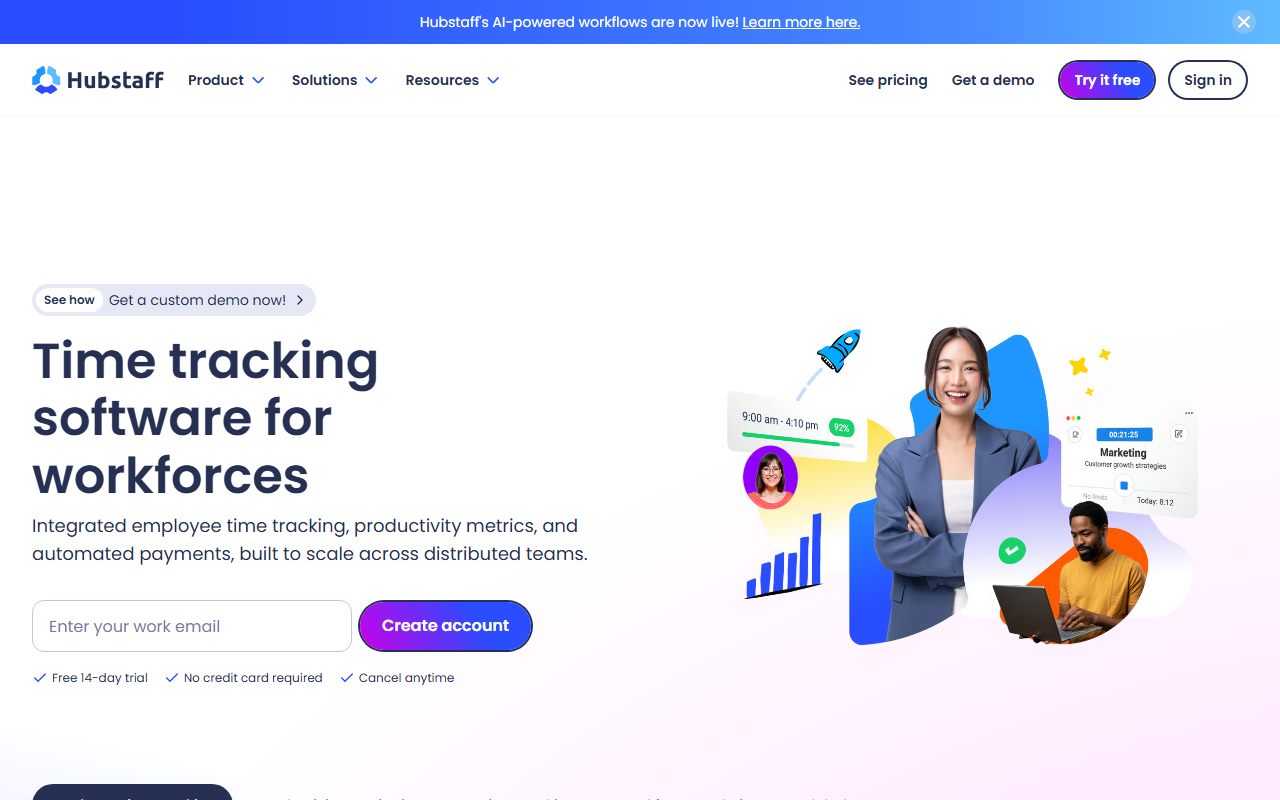
Hubstaff is a workforce evidence system that happens to keep timesheets. The stored object is still a time entry, but almost everything the vendor builds around it answers the same question: what was this person doing while the clock ran.
Activity levels score keyboard and mouse movement during tracked time. Screenshots attach visual context to intervals. App and URL tracking records what was open. Idle handling decides what happens when nothing moves. GPS job sites clock a mobile worker in and out when they cross a geofence. A silent desktop agent, sold for company-owned devices, tracks in the background with policy-driven start and stop.
On the output side the product goes further than most of this category. Clients and invoices are in the entry tier, and payments and payroll arrive at Team, so tracked hours become money inside the same tool.
The legal operator is Netsoft Holdings, LLC trading as Hubstaff, governed by Indiana law, with a notice address at 11650 Olio Rd, Suite 1000-193, Fishers, Indiana, per the terms of service read October 12, 2026.
The pricing page itself would not render in a plain fetch; the figures in this review were read from the fully rendered page using a headless browser on the same day, which is worth saying out loud since a price nobody can read is not a published price.
We make that argument at length in our note on when a vendor blocks the pricing page.
Who it is for, and who should skip it
This product has a clear constituency, and buyers outside it tend to regret the purchase.
- Agencies and studios paying remote contractors by tracked hours who need evidence behind an invoice
- Construction, field service, cleaning, logistics and security operations where geofenced clock-in settles disputes
- Companies paying across borders that want hours, approval and payout in one system
- Operations leads who need app and URL evidence for client billing or regulatory reasons
- Teams on company-owned devices where a silent background agent is a defensible policy
Two groups should not buy this. A salaried professional team that already trusts its own timesheets will find the monitoring features either unused or resented, and will have paid for them either way. And a buyer who needs to pilot before spending has no route in, because there is no free tier.
A third case is subtler. A company whose real problem is paying international contractors may be solving the wrong half of the problem with a tracker. Dedicated employer-of-record and contractor-payment platforms such as Deel, and domestic payroll products such as Gusto, are graded separately on this site, and our best payroll and HR software guide sets out where the boundary falls.
How the pricing is structured
Figures below were read from the fully rendered pricing page on October 12, 2026, in US dollars, per seat per month, on the annual view. The page labels the annual toggle as two months free.
- Starter: $4.99, 2 seat minimum. Time tracking, timesheets, activity levels, clients and invoices, limited reports, limited payments, limited screenshots, limited app and URL tracking
- Grow: $7.50, 2 seat minimum. Adds tasks, full reports, one integration, idle timeout, project budgets, work breaks and expenses
- Team: $10, 2 seat minimum, badged popular. Adds Insights with a three-month trial, unlimited screenshots, unlimited app and URL tracking, auto discard idle time, teams, payments and payroll, unlimited integrations
- Enterprise: $25, billed annually. Adds the silent app, locations, higher public API limits, payment by bank debit, HIPAA compliance, SOC-2 Type II compliance and SCIM user and group provisioning
- Add-ons, each per seat per month: Insights from $2.50, more screenshots from $2.50, Tasks from $2.50, locations from $3.33, silent app from $2.50, data retention from $1.67 for a six-year window
- VIP Support: $29 per month per organisation for organisations with monthly subscriptions between $275 and $400, and $59 per month above $400
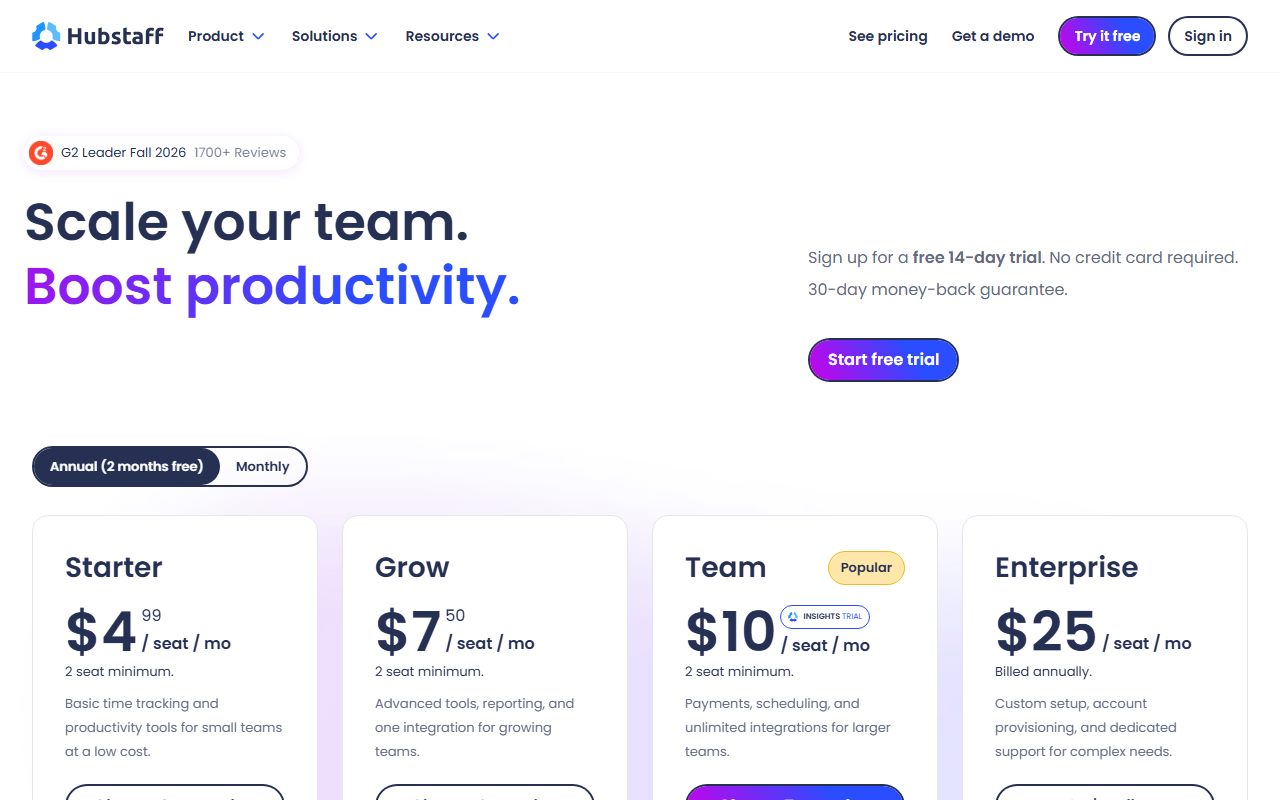
The add-on sheet is the whole story of this price list, and reading the tiers without it gives a false picture.
Tasks and Insights are both sold as add-ons from $2.50 per seat per month and both are included at Team. A ten-seat team on Starter that adds those two pays about $1,199 a year by our arithmetic, against $1,200 for Team.
In other words the cheap tier plus two obvious add-ons costs the same as the tier that bundles them, which makes the entry rate a marketing number rather than a buying decision. Our note on how to read a per-seat pricing page treats this pattern as the single most common way a per-seat sheet misleads.
Three contract terms matter as much as the rates. There is a 2 seat minimum on the first three tiers. Added seats on an annual plan are charged pro rata to the end of the term. And there are no prorated refunds or credits for removed users on either billing cycle, so shrinking a team does not shrink the bill until renewal. Our note on annual against monthly SaaS billing explains why that asymmetry should influence the billing choice.
Ease of use: what the score is built from
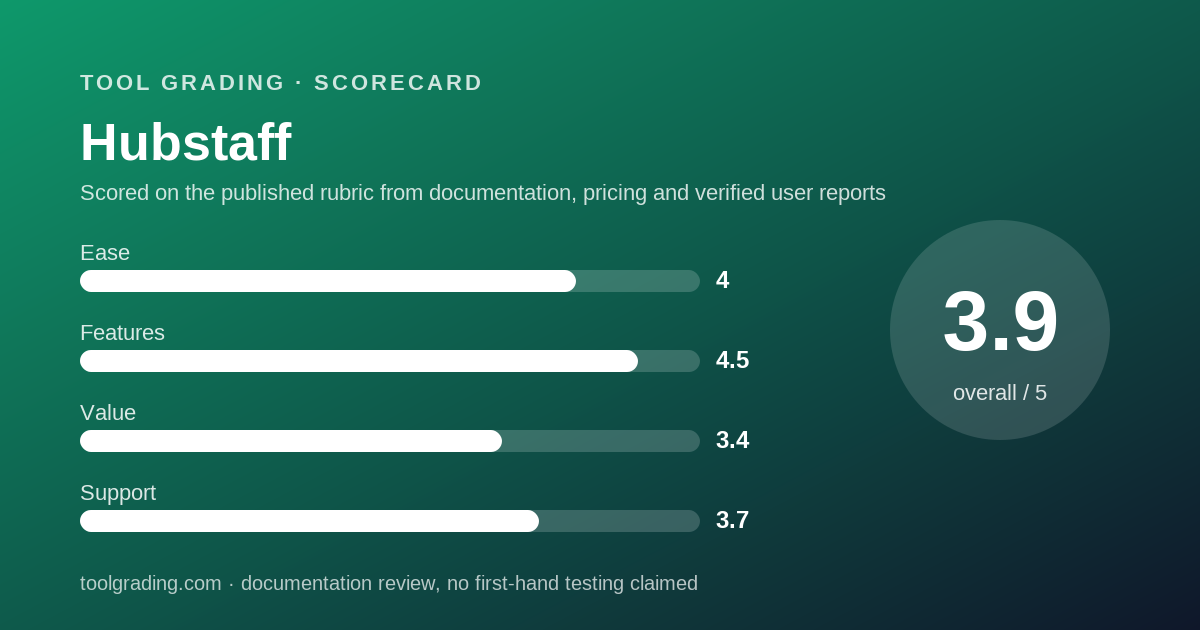
The ease sub-score measures time to deploy and time to competence without outside help. Hubstaff scores 4.0.
The mechanical rollout is straightforward. Desktop, web and mobile apps exist for Mac, Windows, Linux, Android, iOS and two browsers, and the trial needs no payment card, so an administrator can have a team tracking within a day.
The cost is political, and it is the main reason this is not a higher score. Deploying screenshots, activity scoring and app monitoring is a conversation with the workforce, not a configuration task, and the one product in this category that avoids that conversation does so by not selling the features at all.
There is a second friction. Because capability is split across tiers and six add-ons, an administrator cannot tell from the product what the organisation has bought. The feature matrix on the pricing page is detailed, but it is where the answer lives, not the application.
The free Project Viewer role is a genuinely good piece of design for a small company, because it lets an owner or accountant read reports without paying for a seat.
Feature depth: what the score is built from
The features sub-score is 4.5, the highest in this category on our rubric, and it is earned on three axes rather than on a long list.
Evidence. Nothing else graded here matches the combination of activity levels, screenshots, app and URL capture, idle policy, geofenced job sites and a silent agent. Whether a buyer wants that is a separate question from whether it exists.
Money. Clients and invoices at Starter, project budgets and expenses at Grow, payments and payroll at Team. A tracked hour can become a contractor payout without leaving the product, which very few trackers at this price can claim.
Administration. SCIM provisioning, higher API limits, ACH payment and the named compliance set sit at Enterprise. The vendor's own feature page claims GDPR, SOC 2 Type II, HIPAA, LGPD and CCPA, and the pricing page repeats HIPAA and SOC-2 Type II as Enterprise line items, which is a more specific and more consistent claim than one rival in this category manages.
The sub-score stops at 4.5 rather than higher because the depth is unusually fragmented. Six add-ons is six purchase decisions, and a feature that exists only as a paid add-on is not the same as a feature in the plan. Our page on how the Tool Grading rubric works sets out how tier and add-on placement are weighted.
Value at a realistic team size
Take a ten-person team and use the annual-view figures read October 12, 2026. The totals are our arithmetic from the published per-seat rates.
Starter costs $598.80 a year. Grow costs $900. Team costs $1,200. Enterprise costs $3,000.
For a contractor-heavy operation Team is the realistic tier, because payments and payroll, unlimited screenshots and unlimited integrations are the features that justify choosing this product over a cheaper timesheet. At $1,200 a year that is reasonable for what it does.
Three things hold the value sub-score to 3.4. The add-on sheet, which erases the apparent advantage of the entry tiers. The absence of any free tier, which means every evaluation is a 14-day sprint rather than a slow pilot. And the Enterprise step, from $10 to $25 per seat per month, which is the price a buyer pays for HIPAA, SOC-2 Type II and SCIM.
For a ten-person team that is $1,800 a year of difference, and a healthcare-adjacent small business has no cheaper route to the compliance line items.
The VIP Support pricing is the clearest illustration of the house style. Support at $29 or $59 per month per organisation is not bundled with any tier; it is priced against how much the organisation already spends. Our note on what priority support actually means argues that a published price for faster help is more honest than an unpublished promise, even when the price stings.
Support and documentation
The support sub-score is 3.7.
The documented channels are email to support@hubstaff.com, the help centre and a demo booking route. Cancellation is documented twice over, by email request or by archiving the organisation, which is more than many vendors publish.
No response-time commitment appears for the standard tiers. VIP Support is the paid route to faster handling, at $29 per month per organisation for organisations spending between $275 and $400 a month and $59 above that. Enterprise adds dedicated support, with no published service level attached to the phrase.
The pricing FAQ is the strongest part of the documentation. It answers the seat question, the proration question, the refund question and the redistribution question in plain language, and the plain language is not always flattering to the vendor, which is a point in its favour.
The weakness is the rendering. A pricing page that returns nothing to a plain request is a page that some buyers, some assistive technology and some research tools cannot read. The figures exist; getting at them took a second method.
What this grade does not include
No first-hand testing was run and none is claimed. Every figure above comes from the vendor's pricing page, feature pages or terms of service, read on October 12, 2026.
No third-party rating is printed either. The public review aggregator page for this product returned an HTTP 403 response when requested on October 12, 2026, so the only star figures we could read were the vendor's own badges, including a G2 Leader Fall 2026 badge and claims of 1,700 or more reviews on the pricing page and ratings of 4.5 to 4.6 out of 5 on the feature page. Those are vendor-published and we treat them as marketing, not evidence.
Two further vendor claims, cited as claims: more than 140,000 global users, and more than 35 integrations.
Alternatives on this site
Choose a surveillance-free tracker if your staff are salaried professionals and monitoring would cost you more in goodwill than it saves in hours. Otherwise choose Hubstaff if evidence is the reason you are buying.
Choose a cheap per-seat timesheet if all you need is billable hours, invoices and approvals. Otherwise choose Hubstaff if you need those hours to carry proof and turn into a payout.
Choose a contractor payment platform if paying people correctly across borders is the actual problem and hours are incidental. Deel is graded separately here. Otherwise choose Hubstaff if the hours themselves are the contested artefact.
Teams in regulated work should also weigh the security line items separately rather than bundling them into a tracker decision; our grade of 1Password Business covers the part of that problem a tracker does not solve.
Bottom line
Hubstaff is the right product for a specific and real problem: paying distributed or field workers for hours somebody might dispute. On evidence and on payout it is the deepest tracker graded on this site.
It is also the price sheet that rewards the most careful reading in this category. The $4.99 entry rate is true and misleading at the same time, because the configuration most buyers imagine costs roughly what the $10 tier costs.
For a ten-person contractor operation, Team at $1,200 a year is a fair price for hours plus evidence plus payroll. For a salaried in-house team, this is a monitoring product bought by accident.
Buy it if
- You pay contractors or remote staff by tracked hours and need evidence attached to those hours
- Part of your workforce is mobile or on site and geofenced clock-in would remove disputes
- You want tracked time to become a payout inside one product rather than through a payroll export
- You are willing to price the add-ons before signing rather than after
Skip it if
- Your team would treat screenshots and background activity tracking as a breach of trust
- You need a free tier to pilot the tool before any spend
- You are a single operator, because the 2 seat minimum means paying double
Frequently asked
Does Hubstaff have a free plan?
No. The pricing page read October 12, 2026 shows four paid tiers and offers a 14-day free trial with no credit card required, plus a 30-day money-back guarantee excluding that trial. No permanently free tier appears on the page.
How much does Hubstaff cost for a team of ten?
On the annual view read October 12, 2026, ten seats cost $598.80 a year on Starter, $900 on Grow, $1,200 on Team and $3,000 on Enterprise. Those totals are our arithmetic from the published per-seat rates, not vendor quotes.
Do the add-ons change the comparison?
Substantially. Adding Tasks and Insights at $2.50 each to Starter brings a ten-seat bill to about $1,199 a year by our arithmetic, which is within a dollar a month of the Team plan that includes both. Price the configuration, not the tier.
Do I pay for people who do not track time?
Yes for seats, no for viewers. The vendor's own pricing FAQ states that even if only two of three team members use its tracking features you still pay for all three. People who only need to read activity reports can take the free Project Viewer role instead.
Which tier has the screenshots and monitoring?
Limited screenshots and limited app and URL tracking start at Starter. Unlimited screenshots, unlimited app and URL tracking and auto discard of idle time arrive at Team, $10 per seat per month. More screenshots is also sold as an add-on from $2.50 per seat per month.
What happens if I remove a user mid-term?
The seat stays open for reassignment but the money is gone. The pricing FAQ states there are no prorated refunds or credits for removed users on either annual or monthly billing, while added seats on an annual plan are charged pro rata to the end of the term.
Sources
- Hubstaff pricing plans and FAQ - checked October 12, 2026
- Hubstaff time tracking feature page - checked October 12, 2026
- Hubstaff terms of service - checked October 12, 2026
Visit Hubstaff
We have no affiliate relationship with this vendor. Link goes to the official site.