 Tool

TimeCamp
The only tracker graded here with a free tier for unlimited users, sold from a pricing page that prints two different price lists at once.
Scored on the published rubric, from documentation, pricing and verified user reports.
Best for: Cost-sensitive teams of any size that want attendance, kiosk clock-in and timesheets for nothing, and will pay a few dollars a seat for invoicing on top.
Verdict
TimeCamp has the most generous free tier in this category by a wide margin and the least trustworthy pricing page. The free plan is described as free forever with unlimited users and unlimited projects, and it includes timesheets, a time clock kiosk, geofencing, automatic tracking by keyword, an activity timeline, idle tracking and two-factor authentication. Paid tiers are cheap: Starter $2.49, Premium $3.99 and Ultimate $4.99 per user per month billed annually on the current block of the page. The problem is that the same page, read on October 12, 2026, also carries an older plan table showing Starter at $2.99, Premium at $4.99 and Ultimate at $7.99 on annual billing. Two price lists on one page is a reason to confirm at checkout rather than a reason to walk away, but it costs the vendor value and support points here. The AI Time Tracker is also billed by token usage, with the vendor estimating about $6 per user per month, which no tier includes. This is a documentation review built from the vendor's pricing page and terms and conditions; no first-hand testing was run and none is claimed.
Visit TimeCamp
We have no affiliate relationship with this vendor. Link goes to the official site.
Where it is strong
- Free forever for unlimited users and unlimited projects, the only free tier in this category without a seat cap, per the pricing page read October 12, 2026
- The free tier includes a time clock kiosk, geofencing, keyword-triggered automatic tracking and two-factor authentication, features rivals charge for
- Ultimate at $4.99 per user per month billed annually carries SSO, audit log, timesheet approvals, screenshots and custom roles, which is the cheapest route to that set graded here
- Enterprise offers self-hosted and private-cloud deployment plus a data pipeline to BigQuery, unusual options at this price level
- Invoicing, attendance, time off and overtime tracking arrive at the first paid rung
Where it falls short
- The pricing page carries two conflicting plan tables simultaneously, with annual Starter shown as both $2.49 and $2.99 on the same page on the same day
- The AI Time Tracker is billed by token usage on every tier, with the vendor estimating about $6 per user per month, so the headline rate can be exceeded by the AI line alone
- The trial length is not published on the pricing page; the buttons say start your free trial without stating how long it runs
- Only one integration is allowed until Ultimate, where integrations become unlimited
- Support commitments are limited to Enterprise, which is an on-request tier with no published price
At a glance
| Starting price | $2.49 per user per month billed annually (Starter, current block of the pricing page) |
|---|---|
| Free plan | Yes, free forever, unlimited users and unlimited projects |
| Seat minimum | None published |
| Trial | Free trial offered on paid plans; length not published on the pricing page |
| Support channels | Help centre and contact form; enterprise support and an SLA are Enterprise-only line items |
| Top tier extras | Self-hosted and private-cloud deployment, custom integrations, audit log, data warehouse access, BigQuery pipeline |
What the product actually is
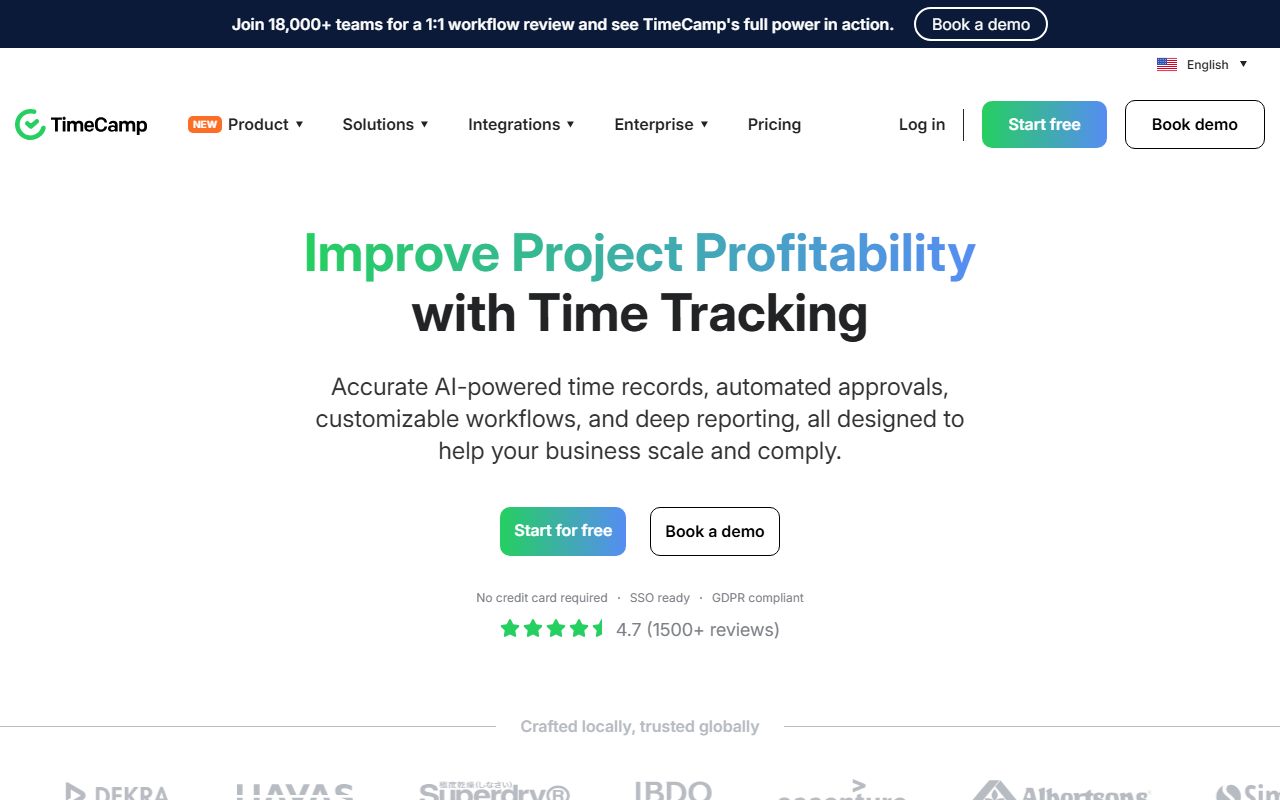
TimeCamp is an attendance and timesheet system with a billing layer bolted on top, and it is priced to win on the first of those three things.
The stored object is a time entry attached to a project and optionally a task. What is unusual is how many ways the free tier lets that entry be created. A manual entry. A timer. A weekly timesheet. A browser plugin that recognises activity in other tools. An automatic rule that fires when a keyword appears in the foreground window. A shared time clock kiosk. A geofence around a job site.
That list would normally describe a mid-tier plan at a rival. Here it describes the free plan, for unlimited users.
The paid tiers add the commercial layer: invoicing, attendance calendars, overtime and time off at Starter; budgets, billable time, resource planning and app and website tracking at Premium; approvals, billing rates, expenses, labor costs, screenshots, SSO and audit log at Ultimate.
The operator is TimeCamp SA of Wroclaw, Poland, registered in the National Court Register under number 0000755317, per the terms and conditions read October 12, 2026. A wholly owned US subsidiary, TimeCamp, Inc., is listed in Covina, California. A buyer that cares about contracting with a US entity should ask which one appears on the invoice.
Who it is for, and who should skip it
The fit is defined by budget and by headcount shape rather than by industry.
- Teams of twenty, fifty or two hundred people who need attendance records and will not pay per seat for them
- Shift, site and workshop operations that need kiosk clock-in and geofencing at no cost
- Small firms that want invoicing from tracked hours for a few dollars a seat
- Teams that need SSO and an audit log but cannot reach the enterprise rung of a larger vendor
- Operations willing to trade vendor polish for a materially lower bill
Two groups should look elsewhere. A buyer whose procurement process requires one unambiguous published price should not start with a page that prints two. And a team that depends on many integrations will be held to a single integration until the top paid tier.
There is a third case worth naming. A firm whose only real need is to put hours on an invoice may be better served by the timesheet already inside its accounting software. Xero and FreshBooks are both graded on this site, and our best accounting software for small business guide sets out which of them carry time data natively.
How the pricing is structured, and why there are two versions
The pricing page read on October 12, 2026 contains two plan tables with different numbers, both rendered, neither labelled as historical. This is the central fact of this review, so both are printed below in US dollars, per user per month.
- Current block, annual then month-to-month: Starter $2.49 then $3.49; Premium $3.99 then $4.99; Ultimate $4.99 then $6.99. Each annual price is shown beside a struck-through higher figure of $3.99, $6.99 and $9.99 respectively
- Older table on the same page, annual then monthly: Starter $2.99 then $3.99; Premium $4.99 then $6.99; Ultimate $7.99 then $9.99
- Free: $0, free forever, unlimited users and unlimited projects, in both blocks
- Enterprise: on request, in both blocks
- AI Time Tracker: billed by token usage on every tier, with the vendor estimating about $6 per user per month for time entry suggestions and $10 in credits included with the trial
- Summary comparison table at the foot of the page, which agrees with the current block: $0.00, $2.49, $3.99 and $4.99
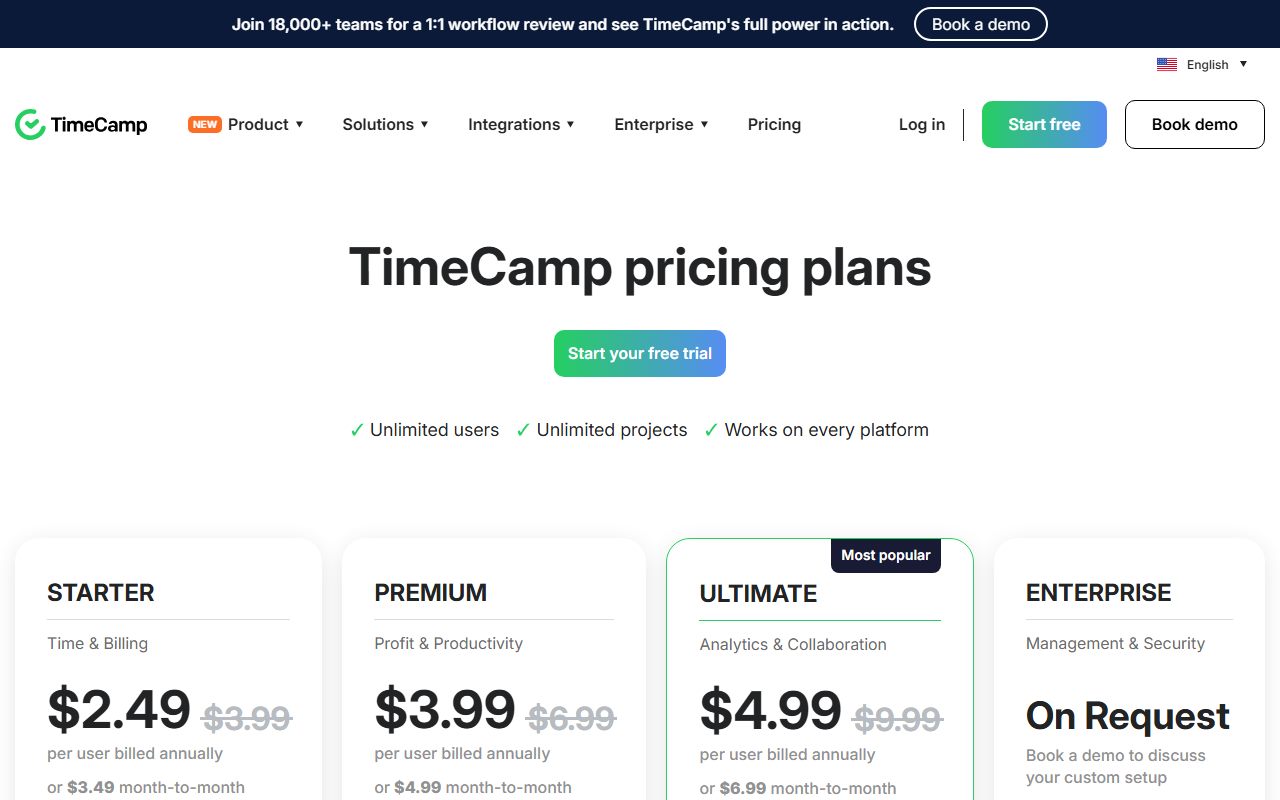
The most likely reading is that the struck-through figures are list prices, that the current block and the summary table are the live rates, and that the second table is a stale section the vendor has not removed. We are not asserting that. We are recording what two readings of the same page on the same day returned.
The practical advice is narrow and useful. Take the plan to checkout, read the figure on the payment screen, and treat that as the price. Our note on when a vendor blocks the pricing page argues that an unreadable price and a self-contradicting price are the same problem for a buyer, and our note on how to read a per-seat pricing page covers the struck-through list price as a pattern.
One more figure belongs in the budget. The AI Time Tracker appears on every tier including Free, but it is metered. At the vendor's own estimate of about $6 per user per month it would cost a ten-person team roughly $720 a year, which is more than the Ultimate plan for the same team. A buyer who does not want that line should know it exists before enabling the feature.
The free tier, which is the reason to look at this product
Per the pricing page, the free plan includes unlimited users, unlimited projects, timesheets, web, desktop and mobile apps, the browser plugin, a time clock kiosk, geofencing, import of users and projects by CSV, automatic time tracking with keywords, a personal activity timeline, idle time tracking and two-factor authentication.
Read that against the rest of the category. One graded rival caps its free tier at five users with a one-month reporting window. Another describes its free tier only as being for a limited number of users and does not publish the number. A third has no free tier at all. This one has no seat cap published anywhere on the page.
The limits are features rather than quotas. Invoicing, attendance calendars, time off, overtime, Excel export and unlimited tasks all wait for Starter. Billable time, budgets, resource planning and app and website tracking wait for Premium. Approvals, billing rates, expenses, labor costs and SSO wait for Ultimate.
That is a cleaner bargain than a seat cap, because a growing team is never forced to upgrade by headcount alone. Our note on what free tiers are actually for treats a feature-limited free tier as the more honest design of the two.
Ease of use: what the score is built from
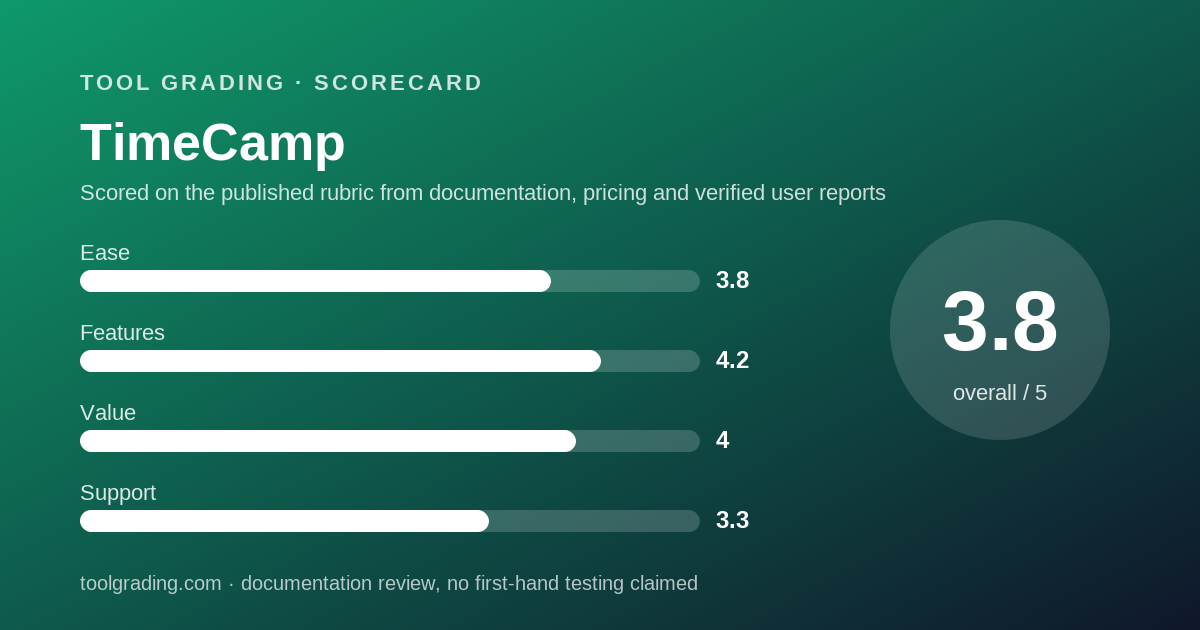
The ease sub-score measures time to deploy and time to competence for a small team without outside help. TimeCamp scores 3.8, the lowest in this category on our rubric.
The product does not lose points on the basics. A timer, a weekly grid and a kiosk are all immediately comprehensible, and CSV import of users and projects means a migration does not start with manual entry.
It loses points on the number of concepts a buyer has to hold at once. Four paid tiers, a free tier, a struck-through list price, a month-to-month alternative, a metered AI feature and a second contradictory price table all appear on one page. Before anything is configured, the buyer has to do research work that two rivals in this category do not require.
It also loses points on integration scarcity. Being limited to one integration until the top paid tier means the tool sits apart from the rest of a company's stack for most of its price range, and a tracker that does not reach the invoicing or project system is a tracker somebody re-types numbers out of.
Teams whose project records live in a general workspace tool should check the overlap before buying; our grade of Notion describes what that kind of tool can and cannot carry.
Feature depth: what the score is built from
The features sub-score is 4.2, and the shape of that score is unusual: broad at the bottom, broad at the top, thin in the integration layer.
Attendance and presence. Kiosk, geofencing, attendance calendar, overtime, time off and remote work detection cover the workforce-record job properly. Most of the useful parts are free or at Starter.
Profitability. Billable time, budgets and estimates, labor costs, fixed fee projects, expenses, historical billing rates and a pivot table report give a services firm the full margin picture at Ultimate.
Governance. Timesheet approvals, mandatory tags, custom user roles, audit log, time entry history, SSO and two-factor authentication are all documented, with two-factor sitting in the free tier.
Enterprise plumbing. Self-hosted deployment, private cloud hosting, a data warehouse connection, an Excel and Power BI API template set and a data pipeline to BigQuery are listed on the Enterprise tier. Very few vendors at this price point offer a self-hosted option at all.
The score stops at 4.2 because of the integration ceiling and because screenshots and activity monitoring, which some buyers specifically want, sit at the top paid rung. Our page on how the Tool Grading rubric works sets out how we weight tier placement against presence.
Value at a realistic team size
Take a ten-person team. Using the current annual figures read October 12, 2026, the totals are our arithmetic from the published per-user rates.
Free costs nothing, for all ten, with no seat cap. Starter costs $298.80 a year. Premium costs $478.80. Ultimate costs $598.80.
On the older table the same team would pay $358.80, $598.80 and $958.80. The gap between the two readings at Ultimate is $360 a year, which is not a rounding difference.
The value sub-score is 4.0, and the arithmetic alone would justify a higher number. Ultimate at $598.80 a year for ten people, with SSO, audit log, approvals, labor costs and unlimited integrations, is the cheapest route to that feature set graded on this site.
Two deductions bring it back to 4.0. The first is the price ambiguity, because a value grade rests on a price and this vendor publishes two. The second is the metered AI feature, which at the vendor's own estimate would add more to a ten-person bill than the entire Ultimate plan costs. A price list a buyer cannot total in advance is worth less than one they can.
Support and documentation
The support sub-score is 3.3, the lowest in this category on our rubric, and the reasoning is about what is published rather than about any reported experience.
The only support commitments on the pricing page are Enterprise line items: enterprise support and SLA, team onboarding and training, and setup assistance. Enterprise is an on-request tier with no published price, so no paying customer below it can see what support they are entitled to.
No response window is published for Free, Starter, Premium or Ultimate. No support channel is named on the pricing page at all; a buyer has to leave it to find the help centre and contact route.
The trial is the other documentation gap. Every paid tier carries a start your free trial button and the page never states how long the trial runs. The AI credit figure of $10 is published, which makes the absence of a trial length more conspicuous rather than less.
The pricing page also carries the contradiction already described, and a contradiction in the one document a buyer relies on most is a documentation quality signal. Our note on what priority support actually means explains why we grade published commitments rather than reputations.
What this grade does not include
No first-hand testing was run and none is claimed. Every figure in this review comes from the vendor's pricing page or terms and conditions, read on October 12, 2026, with the pricing page read twice, once in a plain request and once through a fully rendered browser, which is how the two conflicting tables came to light.
No third-party star rating is printed. The public review aggregator page for this category returned an HTTP 403 response when requested on October 12, 2026, so there is no independent rating figure we could read at source.
We also have no information about how the vendor behaves at renewal, how the self-hosted option is licensed, or what the Enterprise tier costs. Those are gaps, and they are stated as gaps.
Alternatives on this site
Choose a tracker with a single unambiguous price list if purchasing discipline matters more than the last few dollars a seat. Otherwise choose TimeCamp if the free tier for unlimited users is the feature that decides it.
Choose a monitoring-first product if your reason for buying is evidence behind contractor hours, since screenshots and activity monitoring here sit at the top paid tier. Otherwise choose TimeCamp if attendance and billing are the job.
Choose your accounting tool's native timesheet if hours only ever become invoices. Xero is graded separately here. Otherwise choose TimeCamp if attendance records, approvals and margin reporting all matter and the budget is small.
Bottom line
TimeCamp offers the best free tier and the lowest paid rates in this category, and it publishes them on a page that disagrees with itself.
The software side of the grade is strong. A free plan with no seat cap that includes kiosk clock-in and geofencing is genuinely unusual, and SSO plus audit log for under $5 per user per month has no cheaper equivalent graded on this site.
The buying side of the grade is weak. Two price tables, an unpublished trial length, an unnamed support channel and a metered AI feature that can cost more than the plan all point the same way.
For a cost-constrained team willing to confirm the figure at checkout, this is the most money-efficient tracker here. For a buyer who needs the price to be settled before the meeting, it is not.
Buy it if
- You want every member of a team of any size tracking time at no cost before deciding anything
- You need attendance, kiosk clock-in or geofenced sites and refuse to pay per seat for them
- You want SSO and an audit log for under $5 per user per month and will accept a smaller vendor
- You can confirm the price at checkout and are comfortable buying from a page that contradicts itself
Skip it if
- Your purchasing process requires a single unambiguous published price before signature
- You need more than one integration below the top paid tier
- You want AI time-entry suggestions at a predictable fixed cost rather than metered by token
Frequently asked
Is TimeCamp free for a whole team?
Yes, per the pricing page read October 12, 2026, which describes a free forever plan with unlimited users and unlimited projects. It includes timesheets, web, desktop and mobile apps, a time clock kiosk, geofencing, automatic tracking with keywords, idle tracking and two-factor authentication.
Why do you list two different prices for TimeCamp?
Because the vendor does. The current plan block read October 12, 2026 shows Starter at $2.49 per user per month billed annually with a struck-through list price of $3.99. A second table on the same page shows Starter at $2.99 annually and $3.99 monthly. Confirm at checkout.
How much does TimeCamp cost for a team of ten?
Using the current annual figures, ten users cost $298.80 a year on Starter, $478.80 on Premium and $598.80 on Ultimate, by our arithmetic from the published per-user rates. On the older table the same team would pay $358.80, $598.80 and $958.80.
What does the AI Time Tracker cost?
It is billed by token usage rather than included. The pricing page states that estimated token usage is about $6 per user a month for time entry suggestions and that the free trial includes $10 in credits. For a ten-person team that is roughly $720 a year on top of the plan.
Which tier has single sign-on?
Ultimate, at $4.99 per user per month billed annually on the current block. Ultimate also adds timesheet approvals, billing rates, expenses, labor costs, screenshots, pivot table reporting, audit log, custom user roles, unlimited integrations and historical billing rates.
Who operates TimeCamp?
TimeCamp SA, registered in Wroclaw, Poland at al. Wisniowa 36a lok. 311, under National Court Register number 0000755317, per the terms and conditions read October 12, 2026. A wholly owned US entity, TimeCamp, Inc., is listed at 440 N Barranca Ave, Covina, California.
Sources
- TimeCamp pricing plans - checked October 12, 2026
- TimeCamp terms and conditions - checked October 12, 2026
Visit TimeCamp
We have no affiliate relationship with this vendor. Link goes to the official site.