 Tool
Tool
Xero
A cloud ledger priced per organisation, where the entry tier is capped by invoice and bill volume rather than by how many people log in.
Scored on the published rubric, from documentation, pricing and verified user reports.
Best for: Teams of five to fifty where several people need to be in the books, who want a clean modern ledger and are comfortable with online-only support.
Verdict
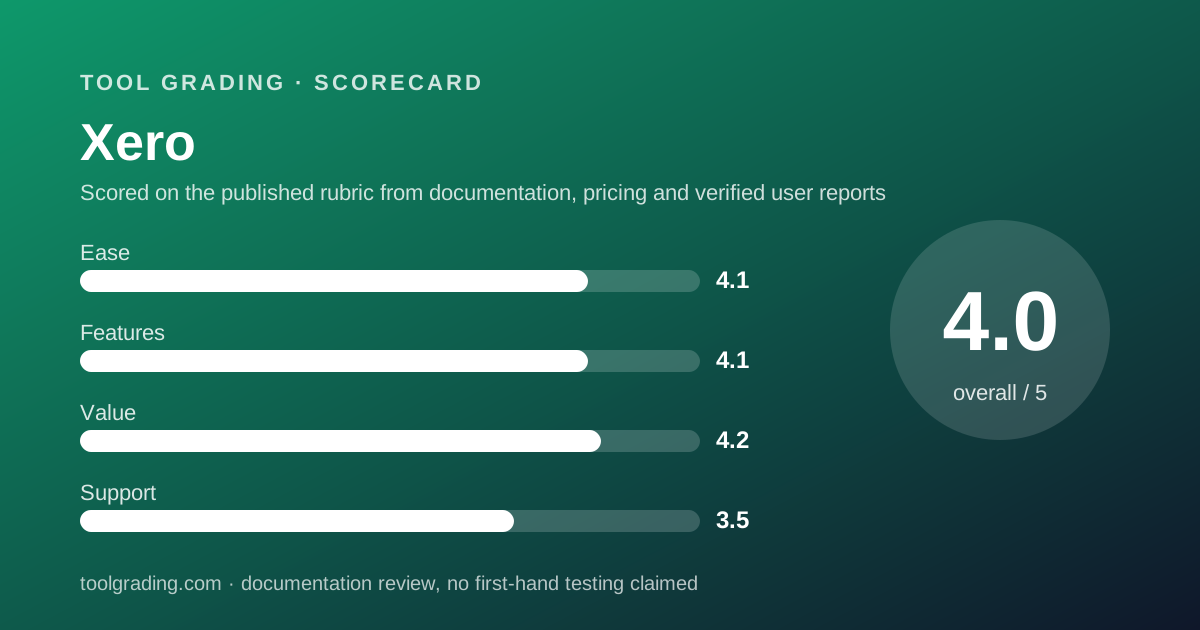
Xero is the cleanest-designed full ledger in the small-business tier and the one whose pricing shape most favours a team rather than a bookkeeper. The three US tiers read on October 7, 2026 are priced per organisation; the entry tier is limited by transaction volume (20 invoices and quotes, 5 bills per month) rather than by user count, and the pricing page lists no per-user charge on any plan. That makes it the natural choice for a business where ten people need to raise invoices, submit expenses or reconcile, and the natural comparison against QuickBooks Online whenever user caps are binding. Its weaknesses are specific. Support is online-only with callback rather than inbound phone, which verified user reports describe as the product's most consistent frustration. Multi-currency, projects and expense claims are confined to the top tier. And the US accountant ecosystem is smaller than the incumbent's, which matters if your accountant has a preference. This grade comes from vendor documentation, pricing structure and verified user reports, against the published rubric; it is a documentation review, no first-hand testing was run and none is claimed.
Visit Xero
We have no affiliate relationship with this vendor. Link goes to the official site.
Where it is strong
- Priced per organisation with no per-user charge listed on any plan as of October 2026, so a ten-person deployment costs the same as a one-person one
- The Growing tier at $59/mo regular removes the invoice and bill caps, which is a lower threshold for unlimited transactions than most competitors
- Bank reconciliation is the product's core strength: feeds, matching rules and auto-reconcile are built into the daily workflow rather than added to it
- App ecosystem of 1000+ connected apps per the vendor, with a documented public API, so missing features are usually available as an add-on
- Interface is consistently described in verified user reports as cleaner and faster than the incumbent, which lowers training cost for non-accountants
Where it falls short
- Support is online-only: the vendor states it does not offer inbound phone support and will call back on request, which users report as slow for urgent issues
- The Early tier caps at 20 invoices and quotes and 5 bills per month, which most active businesses exceed in the first week, so the practical entry price is the Growing tier
- Multi-currency, project tracking and employee expense claims are only on the Established tier at $97/mo regular, per the pricing page
- Payroll is not native in the US; it is delivered through a Gusto partnership at a separate monthly fee plus a per-person charge
- Inventory in the core product is basic, and the vendor lists an Inventory Plus add-on for anything beyond simple stock tracking
What the product actually is
Xero is a double-entry general ledger delivered as a web application, built from the start around the bank feed. That origin shapes everything else. Where QuickBooks Online was designed around the chart of accounts and later connected to banks, Xero's documentation presents the reconciliation screen as the centre of daily use: transactions arrive from the bank, the software proposes a match or a categorisation, and the operator confirms. Invoices, bills and expenses exist largely to be matched against those bank lines.
The data model underneath is conventional: a chart of accounts, contacts (customers and suppliers in one list), invoices and bills as sub-ledgers, tracking categories as optional dimensions, and fixed assets. The tracking categories are Xero's equivalent of classes and locations, and they are what let a small business report by department or project from one set of books.
The second structural fact is the pricing model. Xero prices per organisation, and the pricing page read on October 7, 2026 lists no per-user fee or user cap on any of the three US plans. The tiers differ by transaction volume on the entry plan and by features above it. A business should confirm the current user terms on the pricing page, since terms change; but the pricing shape as published is organisation-based rather than seat-based.
The third fact is that Xero is a platform as much as a product. The vendor cites 1000+ apps in its app store, and many capabilities that competitors build in (payroll in the US, advanced inventory, point of sale) are delivered through partners. That keeps the core clean and moves some cost and integration risk to the add-ons.
Who it is for, and who it is not
The best fit is a business of five to fifty people where more than a handful of staff need to be in the accounting system: raising invoices, approving bills, submitting expense claims, or reconciling their own area. Agencies, professional services firms, small distributors and multi-site businesses fall here. The per-organisation pricing means adding those people costs nothing, and the interface is simple enough that non-accountants can be given a role without a training programme.
It also fits businesses with an accountant or bookkeeper who prefers it, which is common outside the US and increasingly common within it, and businesses that want a modern API-first platform they can connect to other systems.
Three groups it fits less well. A business that needs inbound phone support for accounting emergencies should read the support section before buying; the vendor's own support page is explicit on this point. A business with real inventory complexity (multiple warehouses, assemblies, serial numbers) will need the Inventory Plus add-on or a partner app, and should price that. And a US business whose accountant, lender or acquirer expects QuickBooks files should weigh the ecosystem cost of being on the other platform.
How the pricing is structured
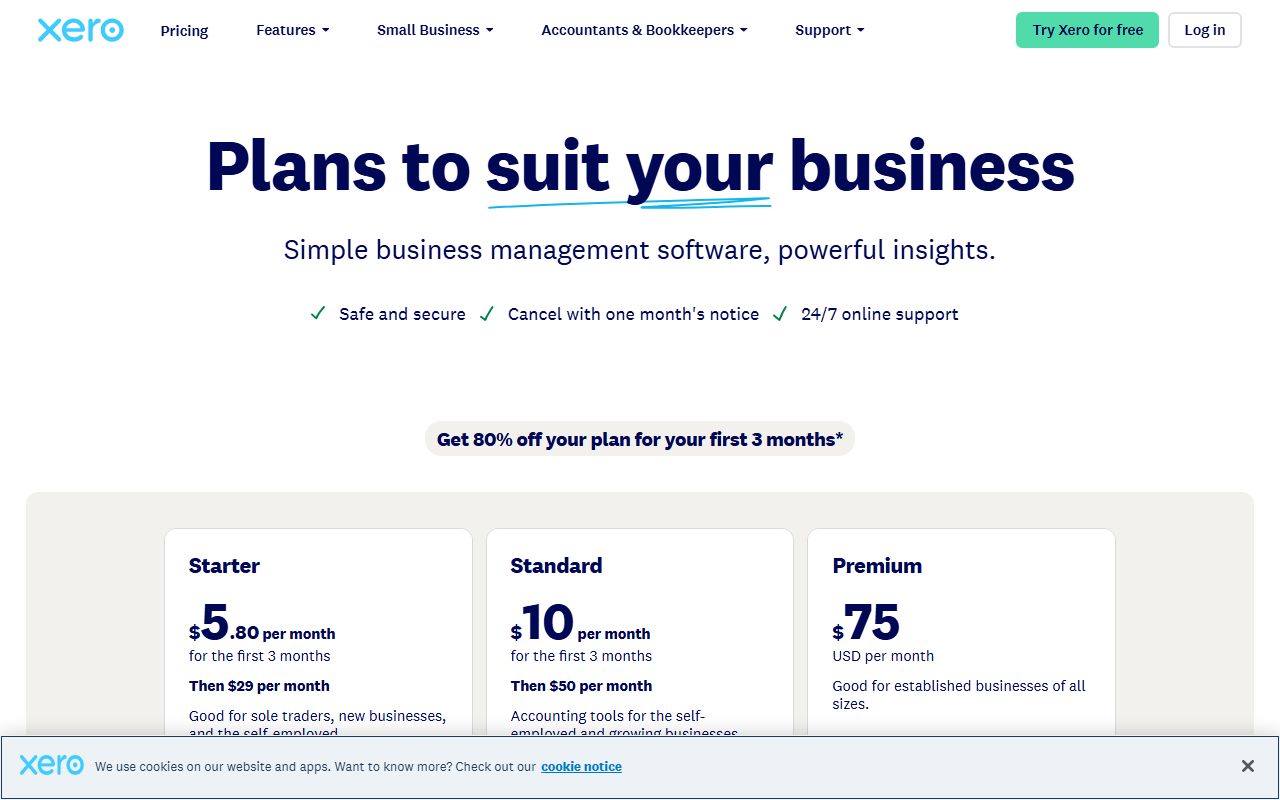
The figures below were read from the US pricing page on October 7, 2026. Every tier was shown with a promotional rate for the first three months (Early $5.40, Growing $11.80, Established $19.40 per month) followed by the regular rate. The regular rate is the rate to compare.
The structure is three per-organisation tiers. The entry tier is capped by volume: 20 invoices and quotes combined and 5 bills per month, with a 30-day cash-flow forecast. The middle tier lifts both caps to unlimited, extends the forecast to 60 days, and adds bill automation, dashboards and 3 budgets. The top tier adds the features that make Xero a management tool rather than a bookkeeping tool: multi-currency, project time and cost tracking, employee expense claims, KPI and ratio analysis, industry benchmarking, international bill payments and a 180-day forecast.
Payroll in the US is listed as Xero Payroll powered by Gusto at $36/mo base plus $6 per employee or contractor. That is a separate line on the bill and should be added for any business with staff. An auto-reconcile add-on is listed at $5.00/mo for the Early plan only (it is included above that), and an Inventory Plus add-on is listed as optional across tiers without a figure on the page as read.
The variables that move the bill: whether you exceed the Early caps (almost everyone does), whether you need multi-currency or projects (top tier only), and whether you need payroll. Users are not a variable on the plans as published.
- Early: $27/mo regular, 20 invoices and quotes, 5 bills, 30-day cash flow forecast (as of October 2026)
- Growing: $59/mo regular, unlimited invoices and bills, 60-day forecast, bill automation, 3 budgets
- Established: $97/mo regular, adds multi-currency, projects, expense claims, KPI analysis, 180-day forecast
- Payroll (powered by Gusto): $36/mo plus $6 per employee or contractor per month
- Auto-reconcile on Early: $5.00/mo; Inventory Plus: optional add-on, price not shown on the page as read
Ease of use: what the score is built from
The ease sub-score of 4.1 reflects an interface that verified user reports describe, with unusual consistency, as the cleanest in its category, offset by the same structural issue every ledger has: the chart of accounts and tracking categories have to be set up well, and the software cannot do that for you.
The documented daily loop is short. Bank transactions arrive; the reconciliation screen shows them on the left and proposed matches on the right; the operator accepts, edits or creates. Rules automate the recurring ones. For a non-accountant who has been told to reconcile the company card each week, the loop is learnable in an afternoon, and that is the main reason the product works for team-wide deployment.
Invoicing and quoting are similarly direct, with online payment options (card, ACH, digital wallet) attached to the invoice, and the vendor claims faster payment for invoices sent with a pay-now option. The claim is a vendor claim and is noted as such.
Where ease drops. Fixed assets, multi-currency revaluation, and the reporting layouts are areas where the documentation runs longer and public user questions concentrate. Users who learned the older reports describe a relearning cost after the redesign. And the Early tier's caps mean a new business can hit a wall in the first month and be asked to upgrade before it has finished setup, a pricing issue that presents as an ease issue.
Feature depth: what the score is built from
The feature sub-score of 4.1 is built from a strong core and a deliberate decision to deliver depth through partners.
The core is the ledger, the bank reconciliation, invoicing and bills, and reporting, and all four are complete for a business of this size. Tracking categories provide departmental and project dimensions. Budgets (3 on Growing, per the pricing page) and cash-flow forecasting are built in, which several competitors do not include at this tier. The top tier's multi-currency support is genuinely multi-currency, with revaluation, rather than a display convenience, which matters to any business invoicing abroad.
Projects on the Established tier cover time, cost and profitability per project, which is the feature that lets an agency or consultancy answer whether a client is worth keeping. Employee expense claims on the same tier bring the whole team into the system, which, combined with per-organisation pricing, is where Xero's structure pays off.
What is thinner. Inventory in the core is simple stock tracking; the vendor sells an Inventory Plus add-on for more. Payroll is a partner product rather than native. Time tracking outside Projects is not a core feature. And the automation layer is rules on bank lines rather than general workflow automation; anything more complex goes through the API or a connector. The 1000+ app ecosystem is the answer to all of these gaps, and the same caution applies as with any ecosystem: a logo on the app store is not a specification, and the add-on's price and depth should be verified before committing.
Value at a realistic team size
Value is calculated here for a ten-person team, and Xero's pricing shape makes the arithmetic short.
A ten-person service business that sends more than 20 invoices a month, which is almost any ten-person business, is on the Growing tier at $59/mo regular. If it invoices in a second currency, runs projects or wants staff to submit expense claims, it is on Established at $97/mo regular. Either way, all ten people can have a login at no additional cost on the plans as published. Add payroll for ten people at $36 plus $60, which is $96/mo, for an all-in figure of roughly $155 to $193 per month before payment processing fees.
The comparison that matters is with QuickBooks Online, where a ten-user deployment requires the Advanced tier at $340/mo regular because of user caps, and payroll is a separate add-on on top. For a team-wide deployment, Xero's structure is clearly the better value, and the sub-score of 4.2 reflects that.
Two caveats keep it below the maximum. The Early tier is priced attractively but capped so tightly that it is rarely the tier anyone stays on, so the practical entry price is $59/mo rather than $27/mo. And a business needing one Established-tier feature (multi-currency is the usual one) pays $38/mo more for the whole bundle, which is a typical bundling cost rather than a Xero-specific one. Promotional first-three-month pricing is excluded from this calculation deliberately.
Support and documentation
The support sub-score of 3.5 is the lowest of the four, and the reason is stated by the vendor itself.
Per the US support page read on October 7, 2026, Xero offers free and unlimited online customer support to subscribers through Xero Central, its help and community site. On phone support the page is explicit: the company can call you if you contact it, but does not offer inbound phone support. The page does not publish support hours or a response-time commitment, and no status page is linked from it. The Xero Community forum is offered for peer help.
The documentation side is strong. Xero Central articles are detailed, current and organised by task, and the developer documentation for the API is public and well maintained. For a team learning the product, self-service is adequate and the community is active.
The assisted side is where verified user reports concentrate their criticism. The consistent pattern is that routine questions are answered well online, but urgent problems (a bank feed that stops, a payroll run that fails, a locked period) feel slow when the only route is a ticket and a callback. This site does not measure response time and will not estimate it; but the complaint is frequent enough and specific enough to be treated as evidence, and it is the single most common reason given for choosing the incumbent over Xero in public comparisons.
A business for which inbound phone support is a requirement should treat this as a disqualifying fact rather than a minor one.
What verified users report
Across public review sites and the vendor's own community, the pattern for Xero is consistent.
The dominant positive is the interface and the reconciliation workflow. Users describe it as the ledger they can hand to a non-accountant, and bank reconciliation as the part of bookkeeping that stopped being a chore. The second positive is pricing for teams: not paying per user is cited repeatedly by businesses that moved from a per-seat tool.
The third positive is the ecosystem: the number of connected apps and the quality of the API.
The dominant complaint is support, described above, and specifically the absence of inbound phone support. It is the complaint that appears in otherwise positive reviews.
The second complaint is price increases over time, with the Early tier's caps and the gating of multi-currency and projects to the top tier mentioned specifically. This mirrors the pricing complaint against every vendor in the category.
The third is the reporting redesign, which long-standing users describe as a regression in some layouts, and the basic nature of core inventory.
These reports are weighed as pattern rather than measurement and are not converted into a number. They are the reason the support score sits well below the other three.
Alternatives on this site
QuickBooks Online is the direct competitor and the incumbent in the US. It has the deeper ledger, native inventory and class tracking on its Plus tier, and the larger accountant base, and it charges per company with hard user caps per tier. The decision between the two usually comes down to how many people need a login and which product the accountant prefers.
FreshBooks is the alternative for a service business whose central need is invoicing, time tracking and getting paid, with a lighter ledger behind it. It is simpler than either full ledger and is priced by billable client count and per additional team member.
For payroll, Xero's US offering is powered by Gusto, which is reviewed on this site as a standalone product. A business that wants payroll and HR beyond what the Xero bundle includes should read that review and price Gusto directly.
Bottom line
Xero is the ledger to price first for a team where many people need to be in the books. Per-organisation pricing with no per-user charge on the plans read on October 7, 2026, a clean reconciliation-centred workflow, and a Growing tier at $59/mo regular that removes transaction caps make it the strongest value in this category for a ten-person deployment.
Two facts from the vendor's own documentation should decide against it for some readers. There is no inbound phone support; the vendor will call back on request, and users report that as slow for urgent problems. And multi-currency, projects and expense claims are confined to the $97/mo Established tier.
If your accountant is platform-neutral and your team is the kind that needs logins, choose Xero and budget for the Established tier if you trade abroad. If your accountant lives in QuickBooks or you need to pick up a phone when the bank feed breaks, read the QuickBooks Online review and price the tier its user caps put you on. Check the current pricing page before buying; these figures are a snapshot.
Visit Xero
We have no affiliate relationship with this vendor. Link goes to the official site.