 Tool

Bitwarden
An open-source password manager whose business tiers start at four dollars a seat with no minimum and no feature paywall on the basics.
Scored on the published rubric, from documentation, pricing and verified user reports.
Best for: A small team that wants shared credentials, audit logs and directory sync at a flat low seat price, and can live without single sign-on until it grows.
Verdict
Bitwarden grades well on this rubric mainly because of what it refuses to put behind a second paywall. Teams is listed at $4.00 per user per month and Enterprise at $6.00, both billed annually, on the business pricing page read October 25, 2026.
For that $4 a team gets the parts that usually cost extra elsewhere: event and audit logs, the public API, user groups, Directory Connector, SCIM provisioning, and every Premium consumer feature for each member. The feature grid marks all of those as included on Teams.
The line between the two tiers is drawn at control rather than at capability. Passwordless SSO, organisation policies, custom roles, Access Intelligence, the account recovery workflow and the self-host option are all marked Enterprise only.
That is a defensible split and it is also the one that will decide the bill. A company with an identity provider and a compliance requirement is buying Enterprise, not Teams, whatever the headline price says.
This is a documentation review built from the vendor's published pricing and feature grid. No account was opened. One gap is worth stating up front: the Bitwarden help centre would not load from this machine on the day of checking, so support response targets are not quoted here.
Visit Bitwarden
We have no affiliate relationship with this vendor. Link goes to the official site.
Where it is strong
- Teams is listed at $4.00 and Enterprise at $6.00 per user per month, billed annually, which is the lowest published business entry price among the password managers graded on this site so far
- Both business plans list the number of users as Unlimited with a flat rate per seat, so there is no seat minimum and no band pricing to negotiate
- Event and audit logs are on Teams, not held back for Enterprise, and the grid says over 50 event types are recorded with timestamps, client type, IP address and user, retained indefinitely and exportable
- Directory Connector and SCIM provisioning are both marked included on Teams, which is unusual at this price and matters for onboarding and offboarding
- Every business member also receives the Premium consumer features, including the integrated TOTP authenticator, vault health reports, personal emergency access and 5 GB of personal plus 5 GB of organisation file storage
- The trial is a 14-day free trial, labelled as such on the pricing page, and the server source code is published, which is a verifiable claim rather than a marketing one
Where it falls short
- Passwordless SSO integration is marked Enterprise only, so a team that already runs an identity provider pays $6.00 rather than $4.00 per seat
- Organisation policies, custom roles, Access Intelligence and the account recovery workflow are also Enterprise only, which means the admin controls an IT lead will ask for are the upgrade trigger
- Self-hosting is marked Enterprise only on the business grid, despite being the feature most often cited as the reason to choose an open-source password manager
- The business pricing page carries no monthly-billing column: both prices are stated as per user per month billed annually, with taxes not included
- Secrets Manager is a separate line item at $6.00 per user per month on Teams and $12.00 on Enterprise, with machine accounts capped at 20 and 50 respectively and $1 per additional account
- The business page leans on vendor-quoted third-party figures, including a composite score and a return-on-investment claim, which a buyer cannot verify from the page itself
At a glance
| Starting price | $4.00 per user per month on Teams, billed annually (business pricing page, October 25, 2026) |
|---|---|
| Enterprise price | $6.00 per user per month, billed annually |
| Seat minimum | None stated; both tiers list users as Unlimited at a flat rate per seat |
| Free plan | Personal only, described on the pricing page as basic password management, always free |
| Trial | 14-day free trial on the business plans |
| Support channels | Priority 24/7 email support, marked included on both Teams and Enterprise |
| Secrets Manager | $6.00 per user per month on Teams, $12.00 on Enterprise |
| File storage | 5 GB personal plus 5 GB for organisation items, described as expandable |
| Self-hosting | Marked Enterprise only on the business feature grid |
What Bitwarden sells to a business
Bitwarden is a password manager with an admin layer on top. The vault is end-to-end encrypted and the server application's source code is published, which is the part of the pitch a buyer can actually inspect.
For a company the product is three things. A place for each employee's logins, a set of shared collections for credentials the team uses together, and an admin console with logs, groups and provisioning.
There are two separate products on the business price list. Password Manager is the one most buyers mean. Secrets Manager is a developer tool for API keys and machine credentials, billed per user on its own line.
This review grades Password Manager. Secrets Manager is covered only where its price changes the total, because it does.
The nearest product already graded on this site is 1Password Business, and the two are the obvious shortlist for a small team that has decided to stop sharing passwords in chat.
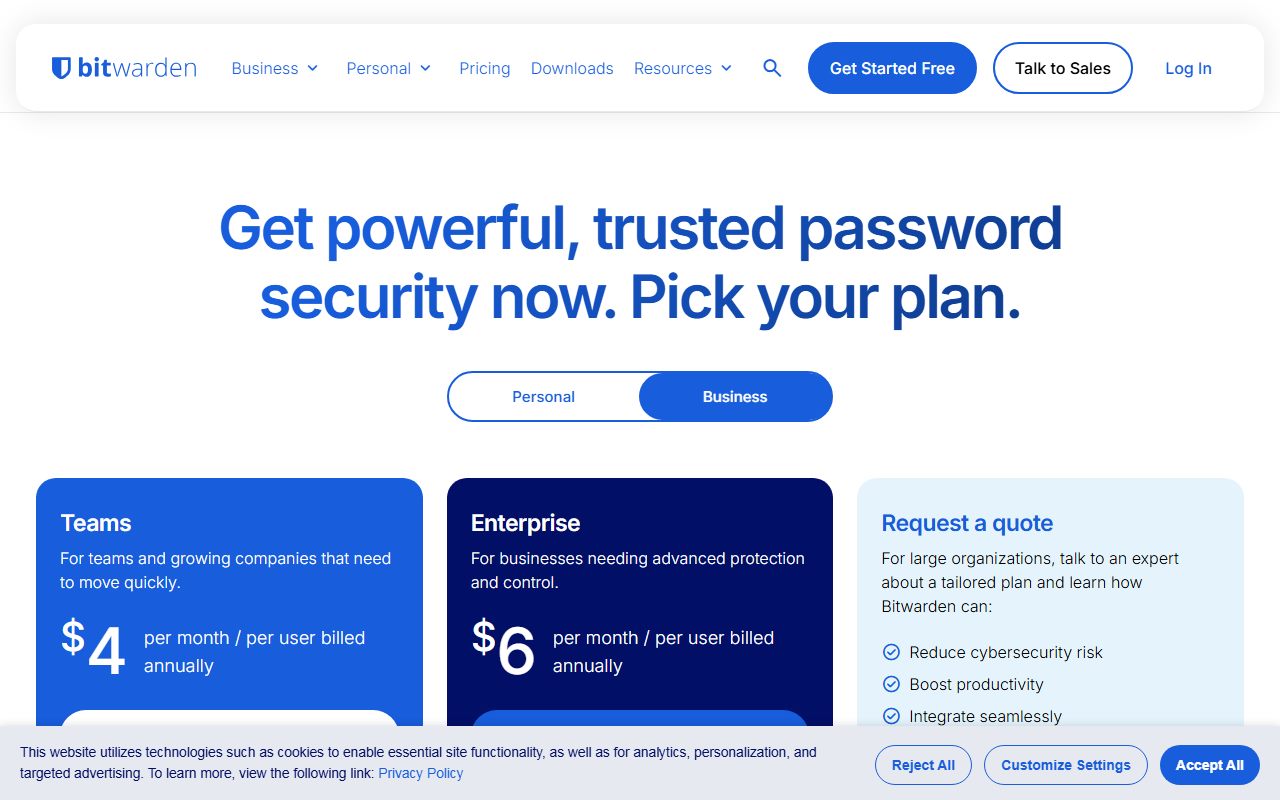
What the two business plans cost, as of October 2026
The business pricing page was read with a headless browser on October 25, 2026, so the figures below exist as strings in the page rather than in a summary of it.
Teams is listed at $4.00 per user per month. Enterprise is listed at $6.00 per user per month. Both prices carry the same qualifier: per month, per user, billed annually.
Underneath both plan cards the page adds a line that matters for budgeting. Pricing is shown in USD and based on an annual subscription, and taxes are not included.
There is no monthly-billing column on the page. A buyer who wants to pay month to month has nothing published to work from, which is a different situation from the annual discount our note on annual versus monthly billing describes.
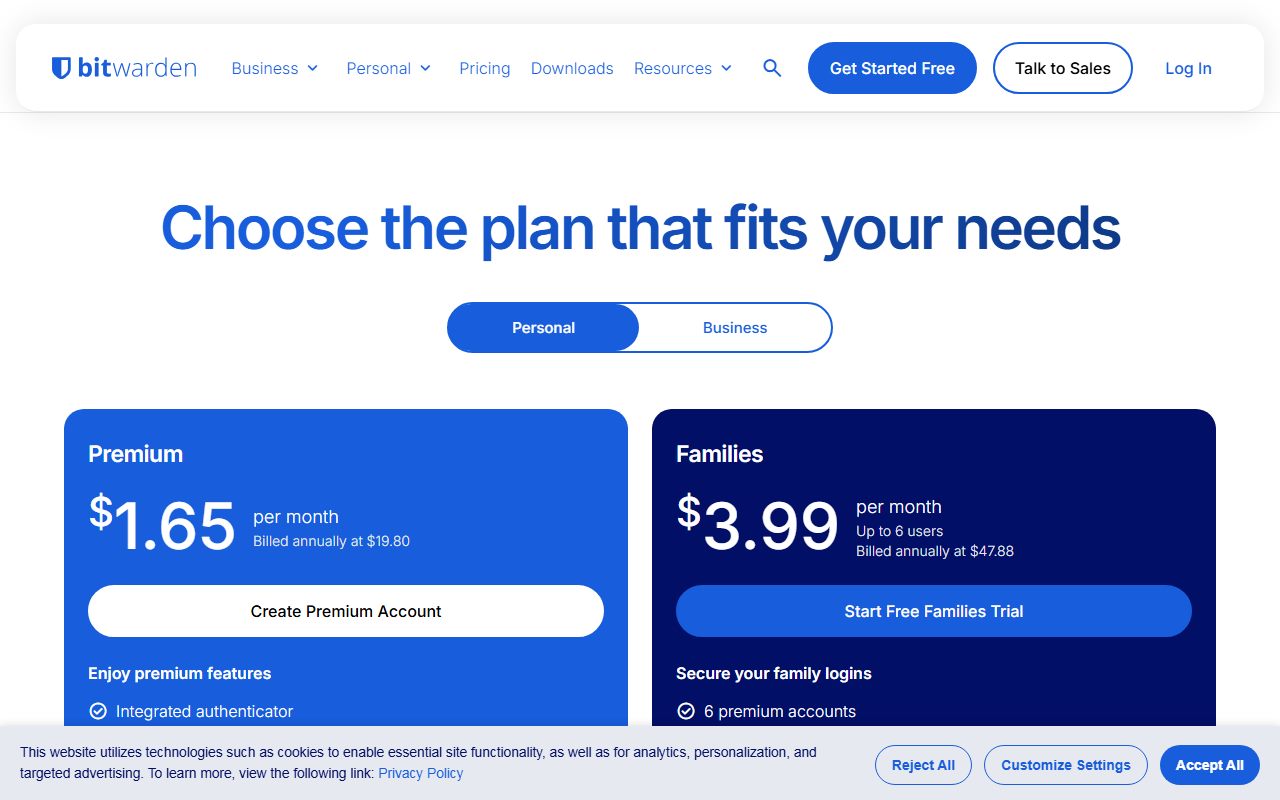
The personal side of the price list cross-checks cleanly, which is a useful signal that the whole set is real. Premium is $1.65 a month and the page says it is billed annually at $19.80, and 1.65 multiplied by 12 is 19.80.
The Families plan does the same: $3.99 a month for up to six users, billed annually at $47.88, and 3.99 multiplied by 12 is 47.88. Both multiplications are ours.
The line between Teams and Enterprise is control, not capacity
The feature grid on the business page marks each row with a check icon or a dash for each tier. Read that way, the split is unusually clear and it has nothing to do with how much you can store.
Everything in the list below is marked as Enterprise only, which means it is the reason a company moves from $4.00 to $6.00 a seat.
- Passwordless SSO integration with an existing identity provider
- Policies, described as organisation-wide controls and settings for how Bitwarden is used
- Access Intelligence, the vendor's risk view covering shadow IT and prioritised remediation
- Custom roles, which assign specific admin permissions rather than whole admin rights
- Account recovery workflow, letting an admin start recovery for a locked-out account
- Self-host option, running the server application on your own network
- A free Families plan for every user, shareable with five friends or family members
- Dedicated engagement success manager and dedicated onboarding and training, both noted as for qualified customers
What both tiers include, which is more than the price suggests
The more interesting half of the grid is what is not withheld. These rows carry a check icon on Teams as well as Enterprise, read October 25, 2026.
The practical effect is that the cheap tier is not a demo. A ten-person company can run real credential hygiene on the $4 plan and still prove what happened afterwards.
- Unlimited users at a flat rate per seat, on both tiers, with no stated minimum
- Unlimited collections, each holding an unlimited number of items
- API access through the Bitwarden Public API, for members, collections, groups, logs and policies
- Event and audit logs covering over 50 event types, with timestamp, client type, IP address and user, retained indefinitely and exportable
- User groups with per-collection permissions
- Directory Connector for syncing an existing directory service
- SCIM support for provisioning from an identity provider
- Organisation two-step login via Duo, enforceable across the organisation
- Priority 24/7 email support, marked included on both tiers
- Premium features for every user: integrated TOTP authenticator, vault health reports, personal emergency access, encrypted attachments and Bitwarden Send for text and files
- Enhanced two-step login with up to 10 hardware security keys, Yubico OTP, Duo, email and an authenticator app
- 5 GB personal and 5 GB organisation file storage, described as expandable
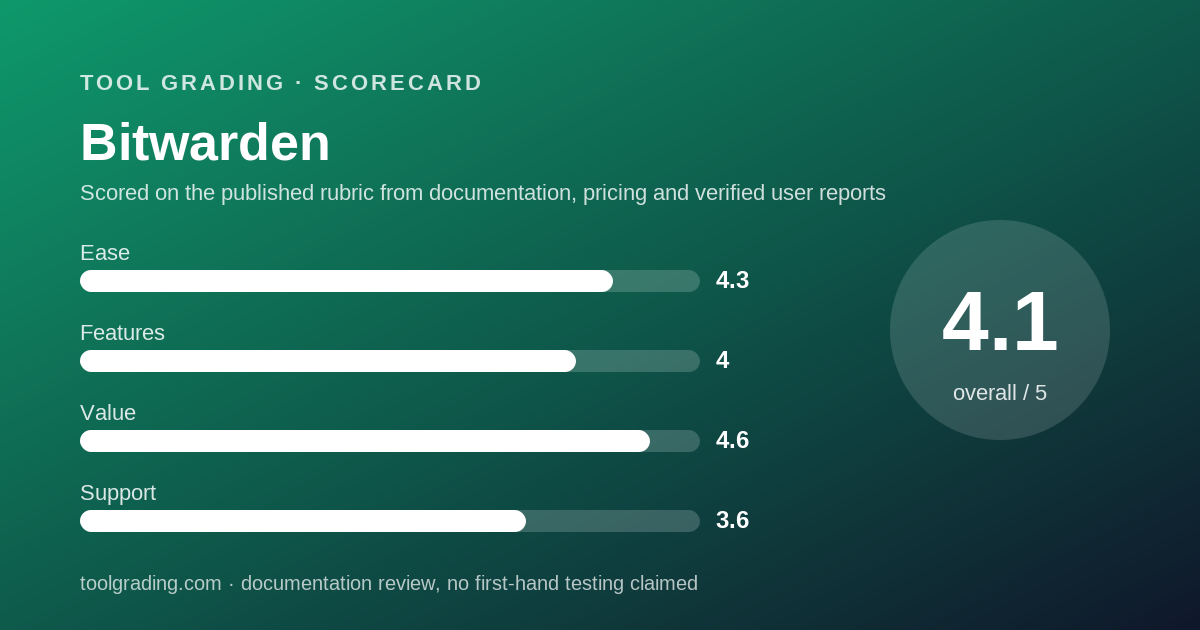
Value: 4.6, and the reason is the absence of a second paywall
Value is the highest of the four sub-scores on our rubric, which prices each tool at 1, 5 and 20 users against what the seat actually buys.
At one user a business plan makes little sense, since the personal Premium account at $1.65 a month covers a single vault. The business price only starts earning its keep once credentials are shared.
At five users Teams is $20 a month, or $240 a year by our own multiplication of the published seat price. That buys shared collections, groups, an exportable audit log and SCIM, which several competitors reserve for a higher tier.
At twenty users Teams is $80 a month, or $960 a year. Enterprise at the same headcount is $120 a month, or $1,440 a year, and the $480 difference buys SSO, policies, custom roles and self-hosting.
That $480 figure is the one to argue about internally, because it is the whole decision. Our note on how to read per-seat pricing covers why the gap between two tiers matters more than either headline.
The score is not 5 because the feature a mid-sized company most often needs, single sign-on, is the one gated behind the 50 percent uplift. That is a legitimate commercial choice and it is still a cost.
Ease of use: 4.3, built from onboarding rather than interface polish
Our ease sub-score covers onboarding, interface and time to first result. Two published facts carry most of the weight here, and neither requires seeing the product.
First, there is no seat minimum. The grid says users are Unlimited with a flat rate per seat, so a three-person company can buy three seats without a conversation with sales.
Second, the trial is a 14-day free trial, labelled on the pricing page, with a self-serve start button rather than a demo request. That is the shortest path to a working admin console in this category.
Onboarding at scale is also covered on the cheap tier. Directory Connector and SCIM are both on Teams, so adding and removing people can be wired to the directory rather than done by hand.
The score is held below 4.5 for one reason. The admin model has real concepts to learn, including collections, groups and, on Enterprise, custom roles, and the page's own FAQ concedes that self-hosting needs technical resources for server maintenance and updates.
Features: 4.0, deep on both tiers and gated in one place
Features covers the depth of the core job, integrations and limits. On the core job Bitwarden is complete at $4.00, which is the finding that drives the value score as well.
Integrations are the strongest part. SCIM, Directory Connector, the public API and Duo-based organisation two-step login are all on Teams, and the page's FAQ says SSO works with any identity provider using SAML 2.0 or OpenID Connect.
That SSO sentence carries a caveat worth repeating. The capability is broad, and the grid still marks passwordless SSO integration as Enterprise only, so breadth and availability are two different questions.
Secrets Manager is the one place where limits are numbered rather than described. Teams gets up to 20 machine accounts and Enterprise up to 50, with $1 per additional machine account, alongside unlimited secret storage and unlimited projects.
The score stops at 4.0 because the admin governance layer, the part that makes a password manager auditable rather than merely shared, sits entirely on the upper tier.
Support: 3.6, and the help centre would not load
The grid marks priority 24/7 email support as included on both Teams and Enterprise, which is better than the tiered support arrangements described in our note on what priority support actually means.
Email is also the only channel named for either tier. No phone line and no live chat appear in the support rows of the business grid.
What is missing is a number. No response-time target for either tier was found on the business pricing page, and a target is what turns the word priority into a commitment.
The obvious next step did not work. The help centre at bitwarden.com/help returned nothing to a headless browser from this machine on October 25, 2026, across two attempts with a clean profile.
So this is a gap in our reading rather than a documented absence, and we are saying so rather than claiming the vendor publishes no target.
The procedure for that situation is set out in our note on when a vendor blocks the pricing page.
The higher tiers do add human contact, with a dedicated engagement success manager and dedicated onboarding and training on Enterprise. Both rows carry the qualifier for qualified customers, so neither is a guarantee at ten seats.
Alternatives
The shortlist for this job is short, and the choice usually comes down to price against polish.
1Password Business is the direct comparison. Choose 1Password if your team will accept a higher seat price for a more opinionated interface and a longer commercial track record in the enterprise. Otherwise choose Bitwarden, which publishes its server source and starts at $4.00.
The second alternative is the one most small companies are actually using: a shared document, a chat message or a browser's built-in password store.
Nothing in that group produces an audit log, which is the single feature that changes an incident from a guess into a record.
If you are assembling a whole stack rather than one tool, a password manager belongs in the same pass as chat and video, which our shortlist for a ten-person remote team sets out alongside Slack.
And if you are migrating from another manager, read the export path before buying the seats. Our note on switching tools without losing data covers the order of operations.
What this grade is built from, and what it is not
This page is built from the vendor's own business pricing page and personal pricing page, read with a headless browser on October 25, 2026.
Every price and every included or excluded feature above was taken from the page text or from the labelled icon in the feature grid.
No account was created and no screenshots of the admin console were captured. Nothing here describes how the product feels to administer, because that is not a claim these sources can support.
The compliance list is reported as the vendor's claim. ISO 27001, SOC 2 Type II, SOC 3, GDPR, CCPA, HIPAA and the Data Privacy Framework all appear in the page's FAQ, and no certificate was inspected for this review.
The marketing statistics on that page were deliberately left out of the grade. A composite score from a research firm, a breach-cost figure and a return-on-investment claim are all vendor-quoted, and none can be checked from the page carrying them.
The only free business offer discussed above is the 14-day trial. A personal free account is a different product, and our note on what free tiers are actually for explains why the two should not be read as the same thing.
Bottom line
At $4.00 a seat billed annually, Bitwarden Teams is the cheapest credible way to get shared credentials and an exportable audit log into a small company. Nothing essential to that job is withheld from the lower tier.
Price Enterprise instead if single sign-on, policies or self-hosting are on your requirement list. At $6.00 a seat it is still inexpensive, and pretending the $4 price applies to you will make the budget conversation worse later.
Two figures to confirm at checkout rather than from this page. Taxes, which the pricing page excludes, and the Secrets Manager line if your developers want it, since that is a second per-user charge.
One thing we could not verify: a support response target. Priority 24/7 email support is listed on both tiers, and no number sits behind the word priority in the pages we could read on October 25, 2026.
Buy it if
- You want shared credentials and audit logs for under $5 a seat and do not yet need single sign-on
- You care that the server code is published, which is the one security claim a buyer can inspect rather than take on trust
- You need SCIM or directory sync on a small budget, since both are on the $4 tier rather than the $6 one
- You are replacing a spreadsheet or a shared mailbox, where the audit log alone changes what you can prove
Skip it if
- Single sign-on is non-negotiable, in which case price Enterprise at $6.00 a seat from the start and ignore the $4 headline
- You need a published support response time, because none was quotable from the vendor's own pages on October 25, 2026
- You want one vendor for passwords and developer secrets at one price, since Secrets Manager is billed separately per user
Frequently asked
How much is Bitwarden for a 10-person team?
Teams is listed at $4.00 per user per month billed annually, so ten seats is $480 a year and Enterprise at $6.00 is $720 a year. That multiplication is our own, from the published seat prices read October 25, 2026.
Is there a free Bitwarden plan for businesses?
No. The free plan on the pricing page is a personal account described as basic password management, always free. Both business tiers are paid, with a 14-day free trial offered in place of a free business tier.
What is the difference between Teams and Enterprise?
Control, not storage. Enterprise adds passwordless SSO, organisation policies, custom roles, Access Intelligence, the account recovery workflow, the self-host option and a free Families plan for each user, per the feature grid.
Is there a minimum number of seats?
The feature grid lists the number of users as Unlimited on both business plans and says you can add as many users as you like at a flat rate per seat. No minimum seat count is stated on the pricing page.
Does Bitwarden include a password manager and a secrets manager?
They are priced separately. Password Manager is $4.00 and $6.00 per user per month. Secrets Manager is an additional $6.00 on Teams and $12.00 on Enterprise, with machine accounts capped at 20 and 50.
Can Bitwarden be self-hosted?
The business feature grid marks the self-host option as Enterprise only, at $6.00 per user per month. The page's own FAQ notes that self-hosting requires technical resources for server maintenance, security and updates.
What compliance certifications does Bitwarden claim?
The pricing page FAQ names ISO 27001, SOC 2 Type II and SOC 3, plus compliance with GDPR, CCPA, HIPAA and the Data Privacy Framework. Those are the vendor's claims as published, not certificates inspected by this site.
Sources
- Bitwarden business pricing and feature grid - checked October 25, 2026
- Bitwarden pricing, personal plans - checked October 25, 2026
Visit Bitwarden
We have no affiliate relationship with this vendor. Link goes to the official site.