 Tool
ToolQuickBooks Online vs Xero: the deeper ledger against the one priced for a team
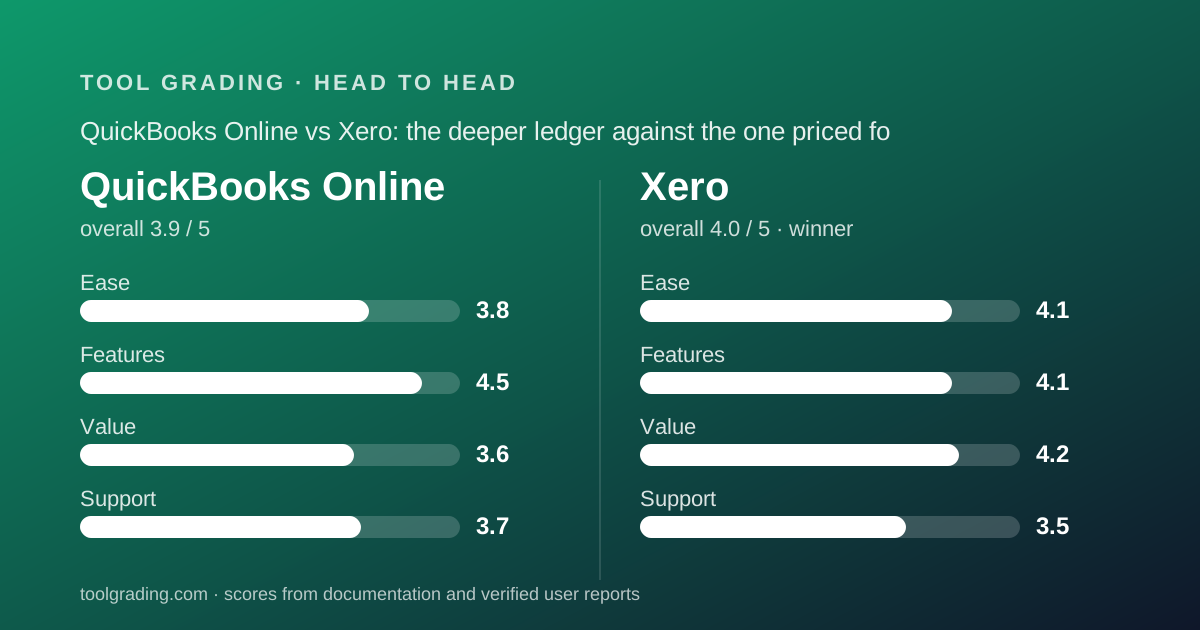
Xero grades 4.0 overall and QuickBooks Online 3.9, and the difference is almost entirely pricing shape. QuickBooks Online has the deeper ledger, native inventory and class tracking on its Plus tier, and the largest US accountant base, but it caps users per tier and a ten-login deployment lands on the $340 per month Advanced tier. Xero prices per organisation with no per-user charge on the plans read, so ten people cost the same as one. Xero wins for a team that needs logins; QuickBooks Online wins when the accountant already lives there.
 3.9QuickBooks Online
 4.0Xero
The short answer
This is a documentation comparison built from the two underlying grades on this site, QuickBooks Online and Xero, and from the vendors' pricing pages as of October 2026; no first-hand testing was run.
QuickBooks Online scores 3.8 on ease, 4.5 on features, 3.6 on value and 3.7 on support, a sum of 15.6 and an overall of 3.9. Xero scores 4.1, 4.1, 4.2 and 3.5, a sum of 15.9 and an overall of 4.0. Xero wins on ease and value, QuickBooks Online wins on features and support, and Xero takes the comparison on the sum and on the one structural fact that decides most ten-person deployments: who needs a login.
Both products are double-entry general ledgers delivered as web applications, and for a US business of five to fifty people both are complete. The reviews on this site describe them as built in opposite orders. QuickBooks Online was designed around the chart of accounts and later connected to banks; Xero was built from the start around the bank feed, and its documentation presents the reconciliation screen as the centre of daily use. That origin shapes who finds each product easy.
The pricing shapes are also opposite. QuickBooks Online is priced per company with a fixed user count per tier: 1, 3, 5 and 25 users on Simple Start, Essentials, Plus and Advanced, per the pricing page checked October 7, 2026. Xero is priced per organisation with no per-user charge listed on any of its three US plans, and its entry tier is limited by transaction volume instead. A business where two or three people touch the books can be on either product at a similar flat fee. A business where ten people raise invoices, submit expenses or reconcile their own area is on QuickBooks Advanced at $340 per month regular, or on Xero Growing at $59 per month regular, and that gap is the review.
How the two products are structured
QuickBooks Online's core data model is the chart of accounts. Every transaction, from a bank feed, an invoice, a bill or a manual journal entry, lands as a debit and a credit against accounts in that chart. Classes and locations are optional dimensions that slice one chart by department, project or site, and the QuickBooks review names them as the feature that separates a bookkeeping tool from a management-accounting tool; per the pricing page they are capped at 40 on Plus, unlimited on Advanced, and not listed on the two lower tiers. The product is also built around the accountant relationship: each paid tier includes accountant seats beyond the user count, and the review observes that for a US small business the accountant often picks the software and the business inherits it.
Xero's model is conventional underneath: a chart of accounts, contacts, invoices and bills as sub-ledgers, tracking categories as optional dimensions, and fixed assets. What differs is the centre of gravity. The reconciliation screen shows bank transactions on the left and proposed matches on the right; the operator accepts, edits or creates, and rules automate the recurring ones. Invoices, bills and expenses exist largely to be matched against those bank lines.
The third structural fact is platform strategy. Xero cites 1000+ apps and delivers US payroll, advanced inventory and point of sale through partners; US payroll is Xero Payroll powered by Gusto at $36 per month plus $6 per person. QuickBooks Online builds inventory, projects, budgets and classes into the Plus tier, and sells payroll as a separate product whose pricing was not read for its review.
For a ten-person business the structural question is whether it needs management dimensions and inventory inside the ledger, which favours QuickBooks Plus, or many people inside the ledger, which favours Xero.
Pricing for a 10-person team (as of October 2026)
Both pricing pages were read on October 7, 2026, and both apply to the US edition. Both vendors displayed promotional first-three-month rates, 50% off on QuickBooks Online and Early $5.40, Growing $11.80 and Established $19.40 per month on Xero, and both reviews use the regular rate, because the regular rate is the rate.
QuickBooks Online is priced per company per month. Free at $0 allows 1 user, 2 invoices per month and 1 bank connection. Simple Start at $38 regular allows 1 user plus 2 accountant seats. Essentials at $85 allows 3 users plus 2 accountant seats and adds enhanced reporting and employee time on invoices. Plus at $140 allows 5 users plus 2 accountant seats and adds inventory, project profitability, budgets and 40 classes and locations. Advanced at $340 allows 25 users plus 3 accountant seats and adds unlimited classes, batch invoicing, a spreadsheet sync and priority support. Payroll and payment processing sit outside every tier.
Xero is priced per organisation. Early at $27 regular is capped at 20 invoices and quotes combined and 5 bills per month, with a 30-day cash-flow forecast; auto-reconcile is a $5 add-on on this plan only. Growing at $59 lifts both caps to unlimited, extends the forecast to 60 days, and adds bill automation, dashboards and 3 budgets. Established at $97 adds multi-currency, projects, employee expense claims, KPI analysis and a 180-day forecast. No per-user fee or user cap is listed on any plan. Payroll powered by Gusto is $36 plus $6 per person.
For ten people, the QuickBooks review's arithmetic depends on how many need a login. If two or three do, Essentials at $85 or Plus at $140 covers the business. If all ten do, the five-user cap on Plus is binding and the business is on Advanced at $340. The Xero review's arithmetic is shorter: almost any ten-person business exceeds 20 invoices a month and is on Growing at $59, or on Established at $97 if it trades in a second currency or wants staff submitting expense claims, with all ten on a login at no extra cost. Add Gusto payroll for ten at $96 per month and Xero's all-in is roughly $155 to $193 per month before processing fees.
- QuickBooks Online Essentials: $85/mo regular, 3 users plus 2 accountant seats (pricing page, October 7, 2026)
- QuickBooks Online Plus: $140/mo regular, 5 users plus 2 accountant seats, inventory, projects, budgets, 40 classes and locations
- QuickBooks Online Advanced: $340/mo regular, 25 users plus 3 accountant seats, unlimited classes, priority support; the tier a ten-login team lands on
- Xero Growing: $59/mo regular, unlimited invoices and bills, 3 budgets, no per-user charge listed
- Xero Established: $97/mo regular, adds multi-currency, projects, expense claims, no per-user charge listed
- Xero Payroll powered by Gusto: $36/mo plus $6 per person; QuickBooks payroll is a separate product whose price was not read
Ease of use
Xero leads, 4.1 against 3.8, and both reviews identify the same structural limit on any ledger: the chart of accounts and the dimensions have to be set up well, and the software cannot do that for you.
Xero's score reflects an interface that verified reports describe, with unusual consistency, as the cleanest in its category. The documented daily loop is short: bank transactions arrive, the reconciliation screen proposes matches, the operator accepts or edits, and rules automate the rest. The Xero review's judgement is that a non-accountant told to reconcile the company card each week can learn the loop in an afternoon, and that this is the main reason the product works for team-wide deployment. Where ease drops: fixed assets, multi-currency revaluation and the reporting layouts, where public user questions concentrate, and the Early tier's caps, which can ask a new business to upgrade before it has finished setup.
QuickBooks Online's score reflects a product that is straightforward for a bookkeeper or an owner comfortable with accounting vocabulary and heavier for everyone else. The categorisation engine that learns from prior decisions is the part most often cited as a time-saver. For an owner without accounting background, the product assumes you know what an account, a class and a journal entry are. Two issues recur in public reports: undoing reconciliation mistakes is harder than making them, and the interface has grown by accretion, so related settings live in several places.
The 0.3 difference is the gap between a product designed to be handed to non-accountants and a product designed for the person who already knows the vocabulary. For a ten-person deployment where most of the ten are not accountants, that gap compounds, which is the same reason the value gap exists.
Feature depth
QuickBooks Online leads, 4.5 against 4.1, and its 4.5 is carried by the ledger rather than by the workflow layer.
The QuickBooks review's inventory: the general ledger, reporting and dimensions are the strongest in the small-business category. Classes, locations, projects and budgets on Plus mean a ten-person business can produce a profit-and-loss by department, by project and against budget from one set of books without exporting. Advanced lifts the class cap and adds batch invoicing and a spreadsheet sync. Inventory on Plus is real inventory, quantities, cost of goods sold and reorder points, sufficient for a product business under a few hundred SKUs. Bill pay with an allowance of free ACH payments on Plus and contractor 1099 management are included. What is thinner: invoicing and client-facing features are functional rather than polished, time tracking from Essentials is basic, payroll is a separate product, and the free tier at 2 invoices a month is a demonstration.
Xero's 4.1 is built from a strong core and a deliberate decision to deliver depth through partners. The ledger, bank reconciliation, invoicing, bills and reporting are complete for a business of this size. Tracking categories provide departmental and project dimensions. Budgets, 3 on Growing, and cash-flow forecasting are built in at tiers where several competitors do not include them. Multi-currency on Established is genuinely multi-currency with revaluation. Projects on Established cover time, cost and profitability, and employee expense claims on the same tier bring the whole team into the system, which combined with per-organisation pricing is where the structure pays off. What is thinner: core inventory is simple stock tracking with an Inventory Plus add-on for more, payroll is a partner product, time tracking outside Projects is not core, and automation is rules on bank lines rather than general workflow.
The cross-reading for a ten-person business: QuickBooks Plus at $140 includes inventory and 40 classes; Xero needs Established at $97 for projects and expense claims and an add-on for serious inventory. A product business with stock is better served by the QuickBooks ledger. A service business with people is better served by the Xero tier structure. The 0.4 gap is the inventory and the dimensions, and a business that needs neither should discount it.
Support and documentation
QuickBooks Online leads, 3.7 against 3.5, and both scores are the lowest or near-lowest on their respective pages, because both vendors draw the same complaint from verified users.
QuickBooks Online's self-service is extensive: a learn-and-support hub with nine topic areas, step-by-step articles, video, webinars, a community forum and an AI answer tool. Assisted support is tiered: chat on the free tier, unspecified channels on paid tiers, priority support listed explicitly on Advanced, and no product support hours or response commitments published. The recurring theme in public reports is good articles, long waits, and front-line agents who follow scripts.
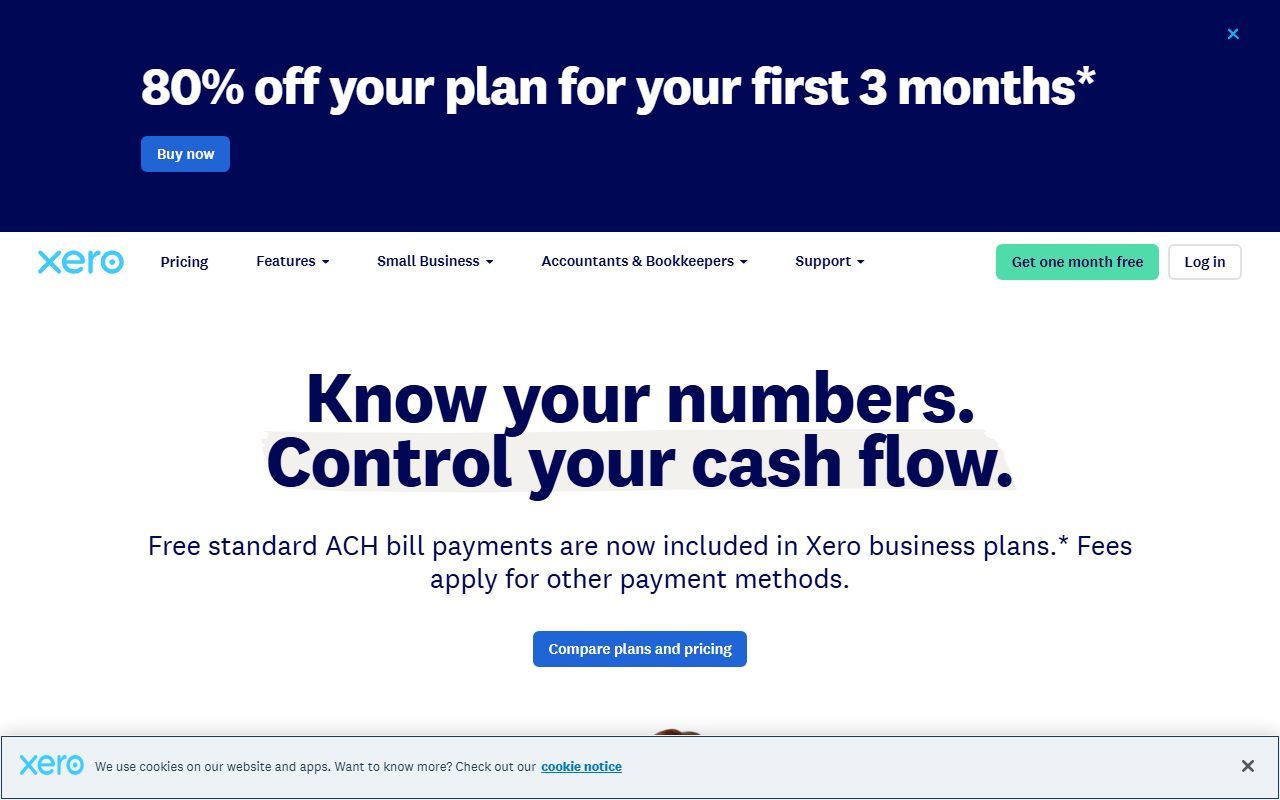
Xero's score is the lowest of its four, and the Xero review says the reason is stated by the vendor itself. Per the US support page read on October 7, 2026, Xero offers free and unlimited online support through Xero Central, and on phone support is explicit: the company can call you if you contact it, but does not offer inbound phone support. No support hours, response commitment or status page link appear on that page. The documentation is strong and the API well maintained. Verified reports concentrate on urgent problems, a stopped bank feed, a failed payroll run, a locked period, feeling slow when the only route is a ticket and a callback; the review calls this the most common reason given for choosing the incumbent over Xero and advises any business that requires inbound phone support to treat it as disqualifying.
The 0.2 difference is that QuickBooks has a phone channel users describe as slow, and Xero has a callback model users describe as slower. Neither entry estimates response time.
What verified users report
Both reviews weigh public reports as pattern rather than measurement, and both patterns have been stable for years.
For QuickBooks Online, the dominant positive is the ecosystem: the accountant already uses it, the bank exports to it, the payment processor connects to it, and users cite not having to explain their books to anyone. Second is the bank feed and categorisation. The dominant complaint is price increases over time and the gap between promotional and regular rates. Second is support quality below the top tier. Third is interface and performance: slow pages, settings scattered across menus, and features added without old ones being simplified.
For Xero, the dominant positive is the interface and the reconciliation workflow, described as the ledger that can be handed to a non-accountant. Second is pricing for teams, with not paying per user cited repeatedly by businesses that moved from a per-seat tool. Third is the ecosystem and the API. The dominant complaint is support, specifically the absence of inbound phone support, and it appears in otherwise positive reviews. Second is price increases over time, with the Early tier's caps and the gating of multi-currency and projects mentioned. Third is the reporting redesign and the basic nature of core inventory.
The two patterns share the price-increase and support complaints, which decide nothing between them. What differs is the positive: QuickBooks users stay for the ecosystem and Xero users stay for the interface and the pricing shape.
Choose QuickBooks Online if / choose Xero if
Choose QuickBooks Online if the accountant already works in it, because the switching cost of anything else is high and the ecosystem benefit is real. Choose it if the business has inventory to count, projects whose margin matters, or departments to report on, because Plus at $140 per month regular, per the pricing page checked October 7, 2026, puts inventory, project profitability, budgets and 40 classes inside the ledger. Choose it if only two or three people touch the books, so that Essentials or Plus covers the business for a flat fee. Do not choose it for a company-wide deployment where ten people need logins, because the five-user cap on Plus forces Advanced at $340 per month for reasons that have nothing to do with features, and do not compare its promotional rate against a competitor's regular one.
Choose Xero if several people need to be in the books: raising invoices, approving bills, submitting expense claims, reconciling their own area. Per-organisation pricing with no per-user charge on the plans read means adding them costs nothing, and the interface is simple enough that non-accountants can be given a role without training. Choose it if the accountant is platform-neutral, and budget for Established at $97 per month if the business trades abroad or wants projects and expense claims. Add Gusto payroll at $36 plus $6 per person. Do not choose it if inbound phone support for accounting emergencies is a requirement, because the vendor's own support page says it does not offer that, and do not plan to stay on Early, whose caps most active businesses exceed in the first week.
The honest middle case is a business with inventory and ten people who need logins. That business is choosing between QuickBooks Advanced at $340 and Xero Established at $97 plus an Inventory Plus add-on whose price was not shown on the page as read; it should price the add-on before deciding, and weigh its accountant's preference heavily.
Bottom line
Xero wins this comparison, 4.0 against 3.9 overall and 15.9 against 15.6 on the sum of sub-scores. It wins ease (4.1 against 3.8) and value (4.2 against 3.6), and loses features (4.1 against 4.5) and support (3.5 against 3.7). The value axis decides it, and it is decided by the vendors' own pricing shapes rather than by any judgement this site adds.
The figures, per both pricing pages checked October 7, 2026: a ten-person business where everyone needs a login is on QuickBooks Online Advanced at $340 per month regular, or on Xero Growing at $59 or Established at $97 per month regular. A business where two or three people touch the books is on QuickBooks Essentials at $85 or Plus at $140 against the same Xero figures, and at that headcount the choice is about the ledger rather than the bill. QuickBooks Plus includes inventory and 40 classes that Xero either delivers through an add-on or does not match; that is the whole of the feature gap and it is real for a product business.
Two facts from the vendors' own documentation should steer specific readers. Xero does not offer inbound phone support, and a business that needs to pick up a phone when the bank feed breaks should not choose it. QuickBooks caps users per tier, and a business that needs its team in the books should not choose it without pricing Advanced. The accountant's preference overrides both for many businesses, and both reviews say so.
Price the regular rate on both, add payroll and processing fees, and open both live pricing pages before deciding. This is a documentation comparison, and no first-hand testing was run or is claimed.
Visit QuickBooks Online
We have no affiliate relationship with this vendor. Link goes to the official site.
Visit Xero
We have no affiliate relationship with this vendor. Link goes to the official site.