 Tool
Tool
HubSpot CRM / Sales Hub
A free CRM record store with paid hubs bolted on - strongest when marketing, sales and support share one contact timeline.
Scored on the published rubric, from documentation, pricing and verified user reports.
Best for: Teams of five to fifty that want one contact record shared across marketing, sales and support, and can accept that the useful automation sits two tiers above free.
Verdict
HubSpot is less a CRM than a shared record store with product lines sold on top of it. The free tier is a real, usable contact and deal database, and that is the honest reason it dominates the small-business end of the category: a team can start at zero and never migrate. The structural cost is that the free tier and the Starter tier are deliberately thin on the automation, sequencing and reporting that make a sales team faster, and the jump from Starter to Professional is the steepest single step in the category. A ten-person sales team that needs sequences and custom reporting is looking at a Professional bill that competes with far more specialised tools. Buy it for the unified timeline and the documentation; budget for the tier you actually need rather than the tier you start on. This grade comes from vendor documentation, pricing structure and verified user reports, against the published rubric; it is a documentation review, no first-hand testing was run and none is claimed.
Visit HubSpot CRM / Sales Hub
We have no affiliate relationship with this vendor. Link goes to the official site.
Where it is strong
- The free CRM is a genuine database of contacts, companies, deals and tickets, not a time-limited trial - the migration cost of starting there is zero
- One contact timeline shared by marketing, sales and support hubs, so a salesperson sees the emails marketing sent and the tickets support closed
- Documentation, the Academy and the community forum are among the most complete in business software, which lowers the cost of self-service rollout
- Starter pricing is low enough that a two- or three-person team can get email templates, meeting links and a pipeline for less than one lunch per seat
- The product-line structure lets a team buy only Sales Hub and add Marketing or Service Hub later on the same records
Where it falls short
- The gap from Starter to Professional is the largest single price step in the category per the pricing page, and the features most sales teams want (sequences, custom reporting, call transcription) sit on the Professional side of it
- Per-seat pricing stacks across hubs: a person who sells and also handles support can need a seat in two products
- Verified user reports repeatedly describe the pricing as hard to predict, with add-ons, onboarding fees at higher tiers and contact-tier limits in Marketing Hub arriving after the initial decision
- Customisation of objects and pipelines is shallow at the lower tiers; custom objects are an Enterprise feature per the product page
- Promotional first-year rates are displayed alongside list rates, so the second-year bill can differ materially from the first
What the product actually is
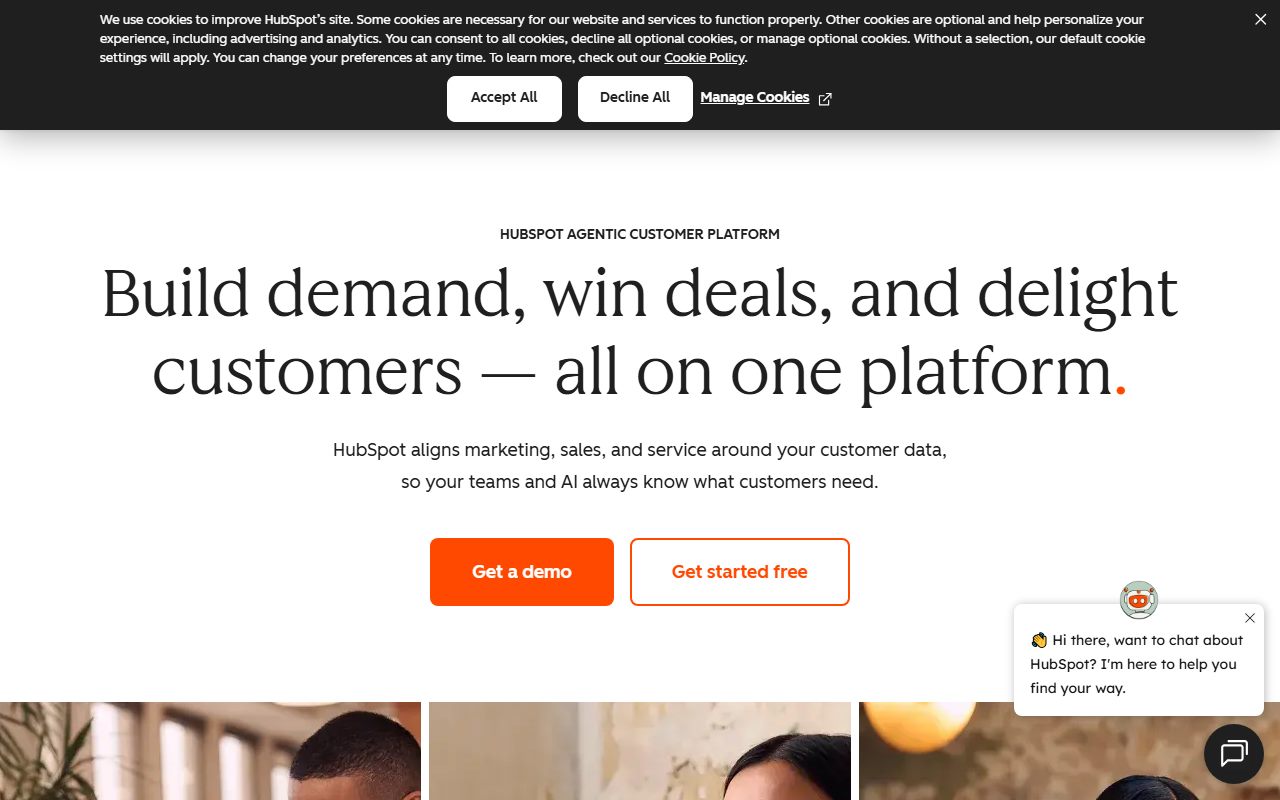
HubSpot is best understood as a single customer database with several products sold on top of it. The database has four standard objects: contacts, companies, deals and tickets. Every product line HubSpot sells - Marketing Hub, Sales Hub, Service Hub and the rest - reads and writes those same objects. A marketing email, a sales call, a support ticket and a form submission all land on the same contact record as a dated timeline entry.
That architecture explains both the appeal and the pricing. The appeal is that there is one truth about a customer and every team sees it; the salesperson knows marketing sent a webinar invite last week, and support knows the deal is still open. The pricing follows from the same fact: each hub is licensed separately, mostly per seat, so a person who needs both sales and service functionality can require a seat in both.
The CRM layer itself - the objects, the timeline, basic pipelines, email logging and meeting links - is free, with no time limit. That is a commercial strategy rather than generosity: a team that keeps its records in the free CRM for a year is a team that will not migrate when it needs automation. The documentation is explicit that the free tools carry limits, and the pricing page checked on October 7, 2026 shows caps on users and contacts for the free tier; the specific caps should be read from the live page because they move.
Who it is for, and who it is not
The team this fits best is one where more than one function touches the customer. A company with a marketing person sending campaigns, three or four salespeople working deals, and someone answering support email benefits directly from the shared record. The same company on three separate tools spends real hours reconciling who said what to whom, and HubSpot removes that cost by design.
It also fits very small teams starting from nothing. The free CRM is a better system of record than a spreadsheet, costs nothing, and the Starter tier - at the list rate shown on the pricing page - is cheap enough that a two-person founding team can get templates, sequences-lite and a meeting scheduler without a procurement conversation.
The product fits less well in two cases. A pure outbound sales team that does not run marketing and does not do support is paying for a shared record it does not need; a narrower CRM such as Pipedrive is cheaper at the tier where the sales features actually live, and simpler to configure. And a team with unusual data - custom objects, complex relationships between records, industry-specific entities - will hit the ceiling of the standard four-object model and discover that custom objects are gated at Enterprise per the product page. That team is often better served by a more customisable CRM such as Zoho CRM, at a lower price.
How the pricing is structured
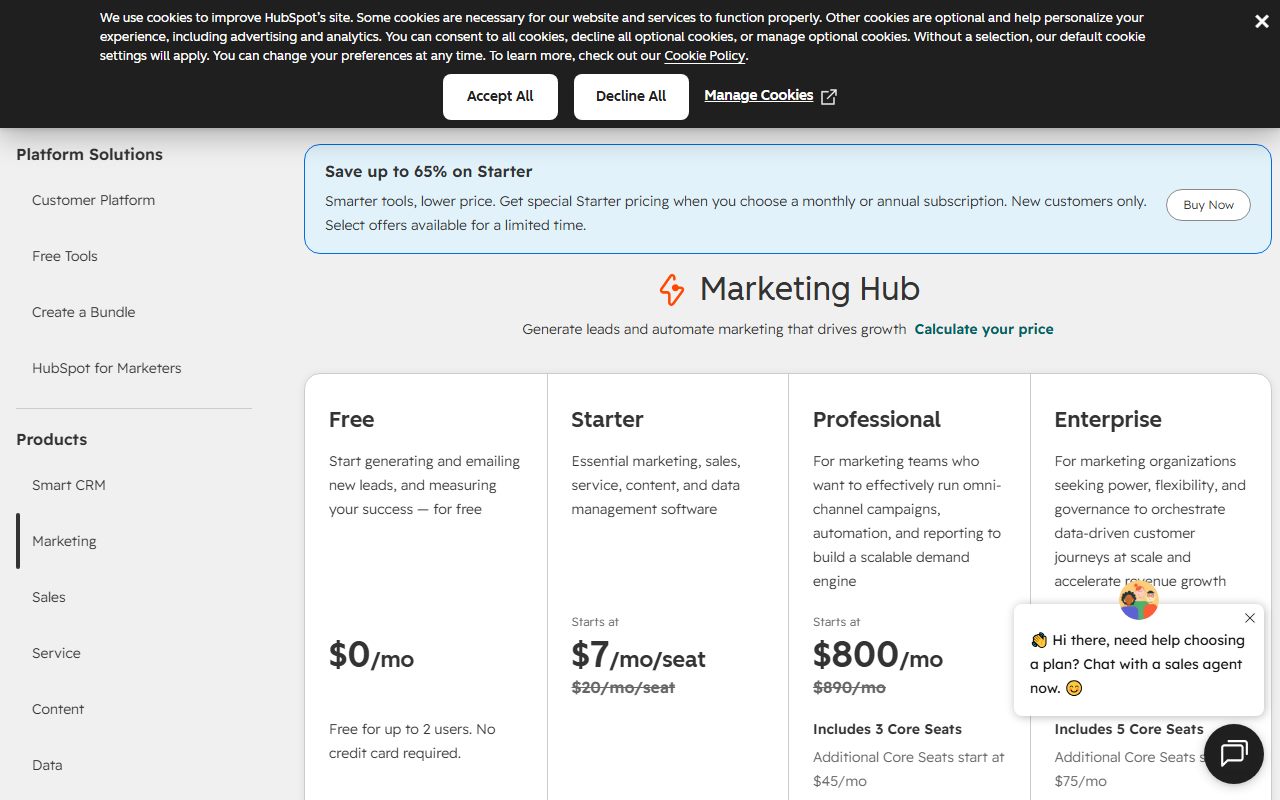
Two official pages were read for this entry on October 7, 2026: the CRM pricing page and the Sales Hub product page. The figures below are what those pages displayed; HubSpot publishes promotional rates alongside list rates, so the live page should be opened before any decision.
The structure has four rungs for Sales Hub. Free tools at $0 with caps on users and contacts. Starter, shown at a $20 per seat per month list rate with a discounted new-customer rate displayed next to it (the two pages showed different promotional figures on the same day, which is itself a data point about how the pricing is presented). Professional, which the product page states starts at $100 per seat per month. Enterprise, which starts at $150 per seat per month. Annual commitment is the basis for the lower figures; monthly billing is available at a premium.
The variables that push a bill up, in order: the tier a single required feature forces; the number of seats, including people who mostly read; whether a second hub is needed for the same people; and onboarding fees, which HubSpot has historically attached to Professional and Enterprise purchases and which neither page displayed in the sections read. The vendor does not publish a minimum seat count on the pages checked.
The honest summary: Starter is inexpensive, Professional is priced like a serious sales platform, and the gap between them is where most of the decision lives.
- Free: $0, capped users and contacts, no time limit (pricing page, October 7, 2026)
- Starter: $20 per seat per month list rate, promotional new-customer rate shown alongside
- Professional: from $100 per seat per month
- Enterprise: from $150 per seat per month
- Monthly billing available above the annual rate; onboarding fees and seat minimums not shown on the pages read
Ease of use: what the score is built from
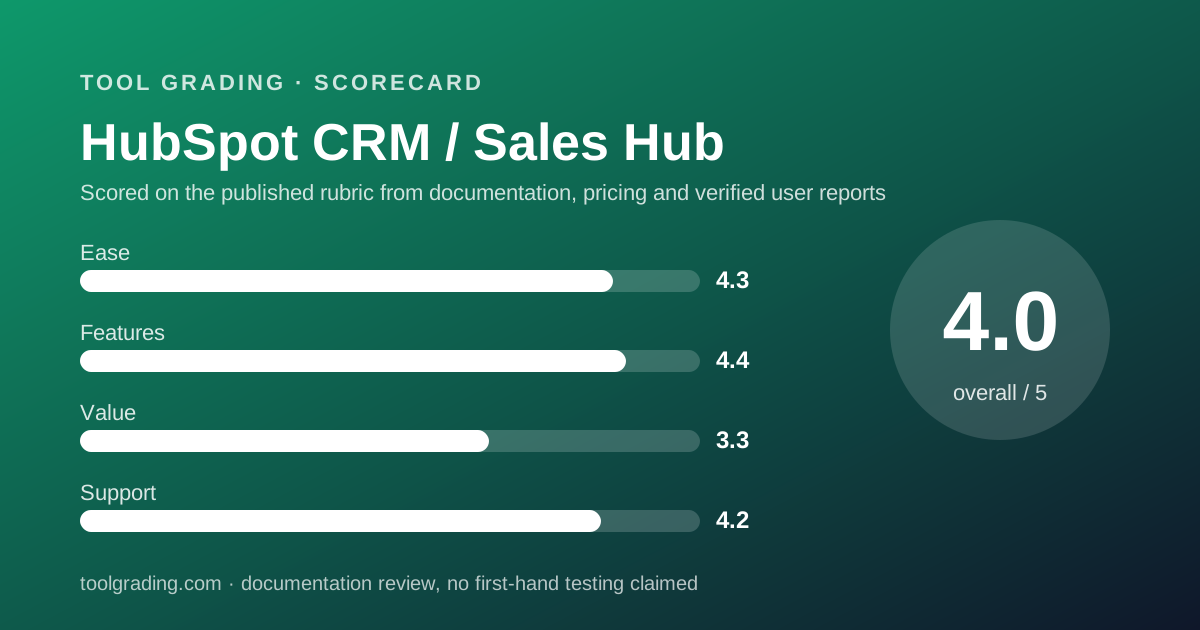
The ease sub-score of 4.3 rests on three documented properties. First, the setup path is short: the knowledge base setup guides walk a new account through importing contacts, connecting an email inbox and building a first pipeline in a sequence that a non-technical owner can follow without help. Second, the interface uses the same record layout for every object, so learning the contact screen is learning the deal screen. Third, email and calendar integration is a first-class, documented feature rather than an add-on, which removes the most common early failure in CRM rollouts: salespeople not logging activity because logging is a separate step.
What costs points is the breadth. The navigation carries every product HubSpot sells whether or not you have bought it, and the documentation itself notes that features appear in the interface with upgrade prompts. For a new user, telling the free feature from the gated one is a recurring small friction, and verified user reports mention it often.
For the five-to-fifty-person team, the realistic picture is a week of one person's attention, no consultant, and a product that salespeople do not resist using. That is better than most of the category.
Feature depth: what the score is built from
The feature score of 4.4 is high because the ceiling is high, and it is not 4.8 because a great deal of that ceiling is above the tier most small teams buy.
The capabilities that carry the score: the unified timeline across objects and hubs, which no narrower CRM can replicate; sequences, which the product page places at Professional and which automate multi-step outreach with branching; call recording and transcription at Professional; customisable workflows, which at Starter are counted (the pricing page showed a workflow cap at that tier) and at Professional are the real automation engine; and reporting that, at Professional and above, builds custom reports on any property.
Pipelines are solid rather than exceptional. The pricing page showed a pipeline count limit at Starter, and the deal object is a conventional stage-based record. Teams that want the pipeline itself to be the product - visual, fast, opinionated - will find Pipedrive stronger on that one surface.
Customisation is the weak axis at lower tiers. Custom properties are available early, but custom objects, the feature that lets a CRM model a thing that is not a contact, company, deal or ticket, is listed as Enterprise on the product page. A team selling to practices, franchises or households, where the entity relationships matter, should test whether the standard objects can be bent far enough before committing.
Value at a realistic team size
Take a ten-person team: six salespeople who need the sales features, two managers who need reporting, two people who mostly need to read records.
On the free tier, all ten can hold seats within the caps the page describes, at zero cost, with basic pipeline and email logging. That is genuinely usable for a team that does not yet run sequences or custom reports.
On Starter at the $20 list rate, eight working seats cost $160 per month on annual billing, and the two readers may be able to stay on free seats depending on the current seat rules, which the pages read did not specify and which should be verified. That is a low number for the category.
On Professional at the stated starting rate of $100 per seat per month, eight seats cost $800 per month, or $9,600 per year, before any onboarding fee and before monthly billing premiums. That figure is in the same range as dedicated sales platforms and well above the Professional tiers of Pipedrive or Zoho CRM as those vendors structure them. It buys sequences, custom reporting and call transcription, which is why the step exists.
The value score of 3.3 reflects that split. At the bottom of the ladder HubSpot is the best value in the category; at the rung where a growing sales team usually lands, it is one of the more expensive, and the pricing presentation - promotional rates next to list rates, hub seats stacking - makes the real second-year bill harder to forecast than it should be. Verified user reports are consistent on that last point.
Support and documentation
The support sub-score of 4.2 is carried by self-service. The knowledge base, read on October 7, 2026, is organised by hub and by task, with setup, how-to and troubleshooting guides, a developer documentation set for the API, Academy courses with certifications, and a community forum with named expert contributors and user groups. For a product whose main rollout risk is misconfiguration, this material is the most valuable support channel, and it is free at every tier.
Direct support follows the familiar ladder. The knowledge base home page lists the channels without tying them to tiers; HubSpot's published practice has been community and email support for free and Starter users, with chat and phone added at Professional and Enterprise. Because the pages read did not state the current mapping, a buyer should confirm which channels the intended tier includes rather than assume phone support is available at Starter.
A public status page exists and incident history is published. Verified user reports on support quality are mixed in the way they are for every vendor at this scale: fast and competent for configuration questions, slower when a problem needs engineering.
What verified users report
Across public review platforms and forums the pattern of praise and complaint is stable enough to treat as evidence.
The dominant positive is the free tier as a starting point, combined with the single customer record across functions. Users who like HubSpot describe it as the first CRM their salespeople actually kept up to date, and attribute that to the email logging and the clean record layout.
The dominant complaint is price trajectory: not the headline rate but the sequence of discoveries - a feature two tiers up, a seat needed in a second hub, contact-tier limits in Marketing Hub, an onboarding fee at purchase, a renewal that does not carry the first-year promotion. This is a presentation and packaging objection more than a product objection, and it is the most frequently cited reason for leaving.
These reports are weighed as evidence of pattern, not as measurements, and they are not converted into a number. They are the main reason the value score sits a full point below the feature score.
Alternatives on this site
Three alternatives are graded here, and each answers a different objection to HubSpot.
Pipedrive is the answer for a pure sales team that wants the pipeline to be the product. It is narrower, the per-seat structure is simpler, and the features most sales teams need arrive at a lower rung. It does not try to be a marketing or support tool, which is a limitation for some and the whole point for others.
Zoho CRM is the answer for a team that needs deep customisation at a low per-user rate. Its tier ladder puts custom fields, workflow rules and process automation lower than HubSpot does, and the comparison page checked for that entry shows per-user rates well below HubSpot Professional. The trade is a denser interface and a thinner English-language community.
Bottom line
HubSpot earns a high feature score and a middling value score, and the distance between them is the review. The product is coherent, the documentation is excellent, and the free tier is a real database rather than a demonstration. The pricing ladder is where a buyer must pay attention: the rung that most growing sales teams need is priced like a serious sales platform, and the way promotional and list rates are displayed makes the second-year bill harder to forecast than it should be.
Buy it if more than one function in your business touches the customer and the shared timeline would replace real reconciliation work; if you are starting from nothing and want a free system of record that will not need migrating; or if the Starter feature set is genuinely enough for the next year.
Do not buy it on the assumption that the free tier contains the sales automation, if your team is pure outbound sales with no marketing or support function, or if your data does not fit contacts, companies, deals and tickets.
Prices and tier contents are the parts of this page most likely to go stale. They carry a checked date for that reason; open the live pricing page before you sign anything.
Visit HubSpot CRM / Sales Hub
We have no affiliate relationship with this vendor. Link goes to the official site.