 Tool
ToolClickUp vs Notion: tracker with documents, or documents with a tracker
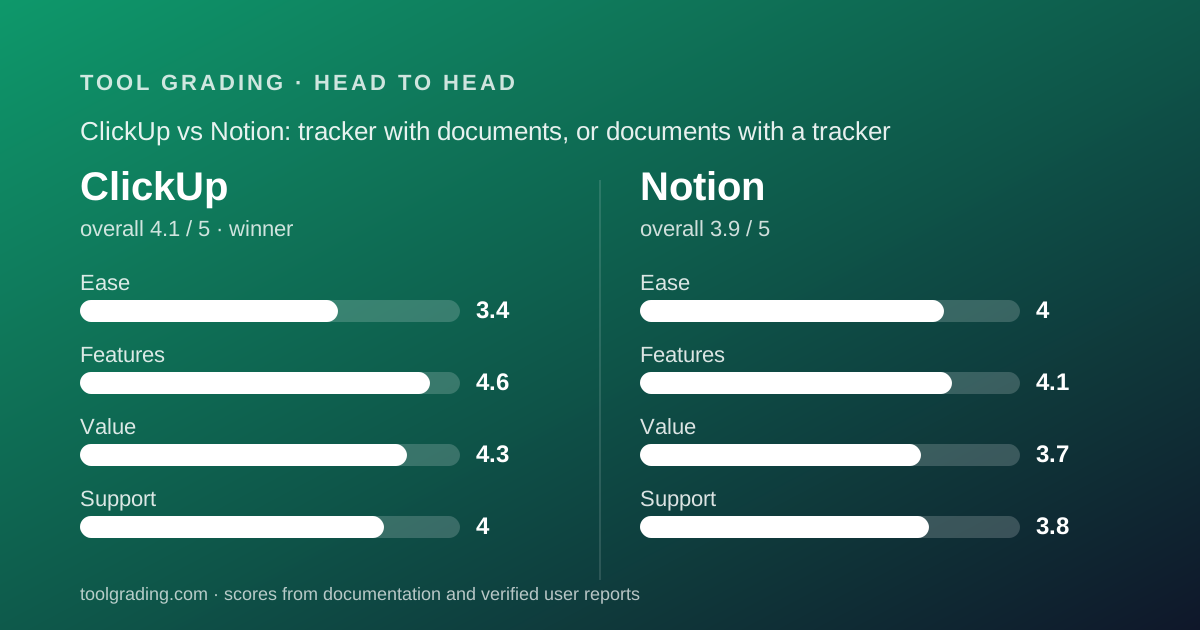
ClickUp grades 4.1 overall and Notion 3.9, and the gap is honest about what each product is. ClickUp is a deep task hierarchy that also ships documents, whiteboards and chat; Notion is the best writing environment in the category that also runs a capable database. ClickUp wins for a team whose work is tracked more than it is written, and it wins on price, with its Business tier at $12 per user billed annually against Notion Plus at $10 per member as displayed and Notion Business at $20.
 4.1ClickUp
 3.9Notion
The short answer
This is a documentation comparison built from the two underlying grades on this site, ClickUp and Notion, and from the vendors' pricing pages as of October 2026; no first-hand testing was run.
ClickUp scores 3.4 on ease, 4.6 on features, 4.3 on value and 4.0 on support, for a sum of 16.3 and an overall of 4.1. Notion scores 4.0, 4.1, 3.7 and 3.8, for a sum of 15.6 and an overall of 3.9. ClickUp wins on three of four axes and loses badly on the fourth, and that fourth axis, ease of use, is the one most likely to decide whether a specific team succeeds with it.
The decision rule from the Notion review is the right one for this page: count the pages. If the team writes more than it tracks, Notion is probably right, because its page-and-database model makes a spec, a meeting note, a task and a customer record the same kind of object, and nothing in the category writes as well. If the team tracks more than it writes, ClickUp is right, because its task object carries nested subtasks, multiple assignees, dependencies, time estimates and tracked time natively, and its Docs module is good enough to hold the notes beside the work.
The second factor is who will own the tool. ClickUp requires a configurer; a workspace left to grow organically becomes a sprawl of Spaces with inconsistent statuses. Notion requires a librarian; a workspace without an information architecture decays into unfindable pages. Both products fail the same way, through neglect, but ClickUp fails at setup and Notion fails a year later. A ten-person team should decide which of those two people it has before reading the rest.
How the two products are structured
ClickUp is a task hierarchy with a workspace wrapped around it. The spine, as the vendor documents it, is Workspace, Space, Folder, List, task, subtask and nested subtask, with every level above a List acting as a container with its own settings and permissions. A task carries status, assignees, dates, priority, custom fields, dependencies, time estimates and tracked time, checklists, comments and attachments. More than fifteen view types render tasks at any level of that hierarchy. Around the spine sit Docs, Whiteboards, Goals, Forms, Dashboards and Chat, each sharing the account, the permissions and the search. The design philosophy is explicit in the vendor's marketing: replace several tools with one.
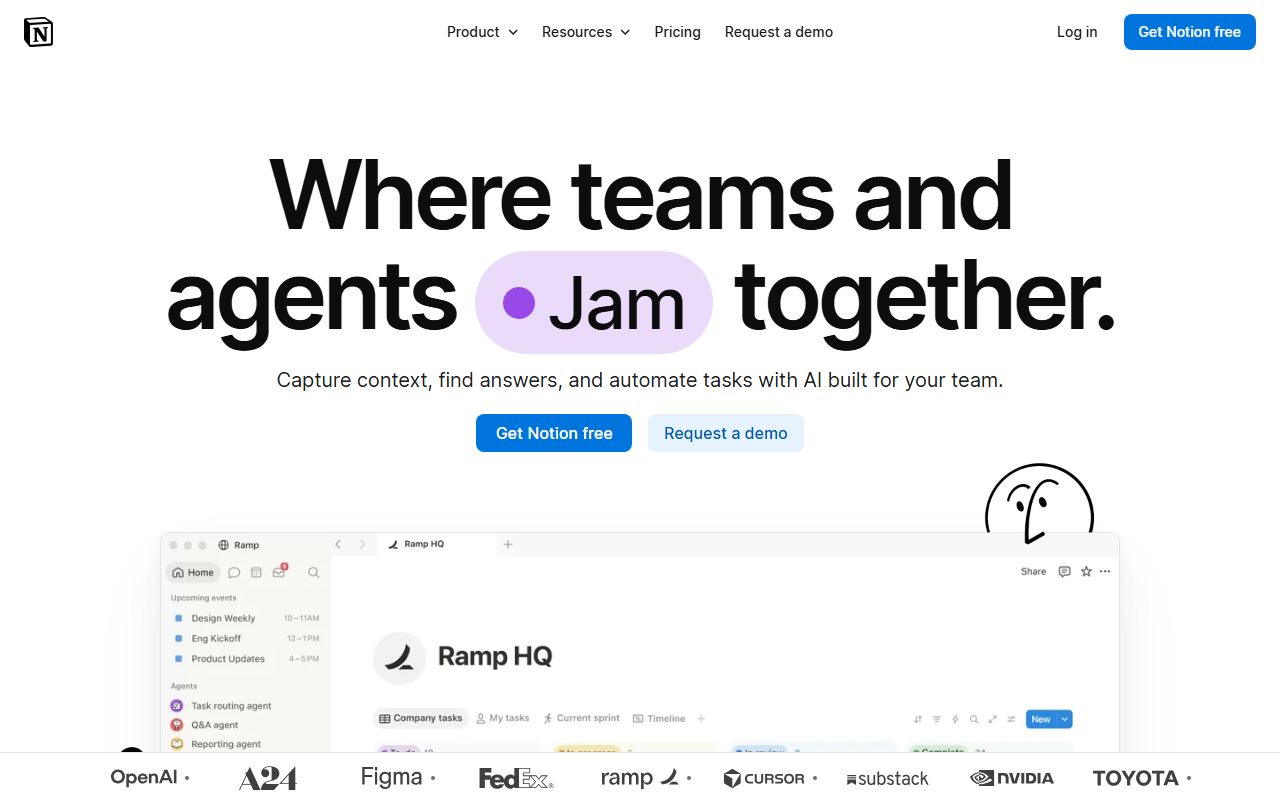
Notion has two primitives. A page is a document made of blocks, where a block can be text, a heading, a list, an embed, a toggle or another page. A database is a collection of pages sharing a set of properties, rendered as a table, board, timeline, calendar, gallery or list. The critical fact, as the Notion review puts it, is that a database row is itself a page: open a task in a Notion tracker and you are looking at a full document with properties at the top. That is why one workspace can hold a wiki, a tracker, a CRM and a meeting archive, all linking to each other.
The structural consequence is enforcement. ClickUp's model only knows tasks, so a dependency can block, an assignee is a field, and a workload view can be computed. Notion's model knows pages with properties, so a task is a convention the team adopts rather than a rule the tool enforces: no native dependency enforcement, no workload view across people, and reporting that depends on the team having built consistent databases.
The mirror-image consequence is writing. ClickUp Docs are capable but are not a wiki product with Notion's page model, and the ClickUp review says so directly. Notion's block editor, synced blocks and page nesting produce a writing environment no task-first competitor approaches. Each product is strongest exactly where the other is adequate.
Pricing for a 10-person team (as of October 2026)
Both pricing pages were read on October 7, 2026, and both sets of figures are printed below. ClickUp displays annual and monthly rates per user; Notion displays prices per member per month with a billing toggle, and the Notion review advises confirming the billing basis on the live page.
ClickUp for ten users: Unlimited at $7 per user per month billed annually is $70 per month or $840 per year, and includes unlimited storage, Gantt, integrations and time tracking. Business at $12 per user billed annually is $120 per month or $1,440 per year, and adds dashboards, unlimited message history and the larger automation quota. On monthly billing the same tiers are $100 and $190 per month. AI is a per-user add-on at $9 or $28 per user per month, and the higher figure exceeds the Business seat price.
Notion for ten members: Plus at $10 per member per month as displayed is $100 per month or $1,200 per year, with unlimited guests, unlimited blocks and 30 days of page history. Business at $20 per member is $200 per month or $2,400 per year, with 90 days of history, SSO, granular database permissions and the included AI capabilities. Custom agents are sold at $10 per 1,000 monthly credits after the trial.
The hidden levers differ. ClickUp's free tier has no member cap but 60MB of storage and 5 Spaces, which makes it a real trial of the task model and no home for a team attaching files. Notion's free tier caps guests at 10, file uploads at 5 MB and page history at 7 days. Notion's guest model is its structural advantage: a ten-person team working with fifteen clients pays for ten members on Plus, where a per-seat tracker would bill all twenty-five or push them into a limited guest role. ClickUp's advantage is that the entry paid tier already contains features competitors gate higher.
- ClickUp Free Forever: $0, unlimited members, 60MB storage, 5 Spaces, 100 automation executions (pricing page, October 2026)
- ClickUp Unlimited: $7 per user per month billed annually or $10 monthly; $840 per year for ten users; 1,000 automation executions
- ClickUp Business: $12 per user per month billed annually or $19 monthly; $1,440 per year for ten users; dashboards, 5,000 executions
- Notion Free: $0, up to 10 guests, 5 MB uploads, 7 days of page history (pricing page, October 2026)
- Notion Plus: $10 per member per month as displayed; $1,200 per year for ten members; unlimited guests, 30 days of history
- Notion Business: $20 per member per month as displayed; $2,400 per year for ten members; 90 days of history, SSO, included AI
Ease of use
Notion leads this axis decisively, 4.0 against 3.4, and ClickUp's 3.4 is among the lowest ease scores in the category on this site.
The ClickUp review builds the score from the documented size of the surface and the consistency of verified reports. The vendor documents seven levels of hierarchy, more than fifteen view types, a custom field library, a status system that can differ per Space, Folder or List, and a settings tree of ClickApps switched on per Space. Each is a decision a new workspace owner must make or leave at a default, and the vendor's own university courses and template library exist because the defaults are not enough. Verified reports are more uniform on this point than on any other: the learning curve is long, the interface is dense, and teams that succeeded had someone who spent real time on setup. Performance complaints, slow loading and lag in large workspaces, recur across several years of reviews. The review puts the time to a reliable configuration at weeks rather than days unless someone owns it.
Notion's score comes from the simplicity of two primitives. A new user opens a page and types; formatting, embedding and nesting all follow the same gesture; creating a database is a block type and switching its view is a menu. The help centre, which was readable for the Notion review, is organised around exactly those concepts, and the template gallery provides a starting workspace including a project tracker with tasks and sprints. The discount comes from what the product does not decide: no enforced hierarchy, no required properties, no rule about where meeting notes go. The score is very fast for the writing half and dependent on a self-imposed architecture for the tracking half.
For a ten-person team the practical difference is the first month. Notion is productive on day one and needs discipline to stay findable. ClickUp needs a named person for the first month and then holds its shape, because the hierarchy is enforced once it is built.
Feature depth
ClickUp leads, 4.6 against 4.1, and its 4.6 is the highest feature score in the category on this site.
The ClickUp score rests on three documented inputs. The task model is deeper than any direct competitor here: nested subtasks, multiple assignees, dependencies with waiting-on and blocking relationships, time estimates and native time tracking, custom fields with formulas, and task relationships across Lists. The included modules are the second input: Docs, Whiteboards, Goals, Forms, Dashboards and Chat are part of the account rather than paid add-ons. Automations are the third, with a template library the vendor describes at 100+ recipes, an AI builder, webhooks and per-tier execution quotas published on the pricing page at 100 on Free, 1,000 on Unlimited and 5,000 on Business. The discount is depth per module: the Docs are not a wiki product with Notion's page model, the Chat is not a replacement for a messaging tool, and the Whiteboards serve planning rather than design.
Notion's score rests on the editor and the database engine. The editor is the strongest in the category and, in the words of the Notion review, it is not close: block-level structure, synced blocks, toggles, callouts, embeds of most external content, and a page model where any page can hold any other page. The database engine is capable: relations, rollups, formulas, filtered and sorted views, timeline and calendar renderings, and row templates, all documented in depth. The discount is the distance between that database and a dedicated tracker: no native dependency enforcement, no workload view, automations thinner than the recipe engines of ClickUp or monday.com, and deeper integrations listed at Business tier.
The net is that ClickUp's weakest module, Docs, is a usable version of Notion's strongest feature, and Notion's weakest area, the tracker, is a usable version of ClickUp's strongest feature. The 0.5 gap measures the fact that tracking is harder to approximate with pages than writing is to approximate with a document module.
Support and documentation
ClickUp leads narrowly, 4.0 against 3.8, and the margin is channels rather than documentation.
ClickUp is unusual in one documented respect: the pricing page lists 24/7 support on every tier including Free. Above that baseline, the Business tier lists priority support in the vendor's materials and the Enterprise tier lists a customer success manager and live training. Response commitments are not published as hard numbers. Self-service material is extensive, with a help centre, a university with structured courses, webinars, a template library and a community; for the ClickUp review the help centre refused automated reading, so the assessment rests on the product and automation pages and on verified reports, which are positive about coverage and mixed about currency because the product changes quickly. A public status page exists, and given the recurring performance complaints the review suggests bookmarking it.
Notion's self-service is the stronger of the two on paper. The help centre, readable for the Notion review, is organised by concept rather than feature list, and is supported by a product-tour library, webinars, a template gallery, an academy with certifications, a community forum and a consultant directory. For a product whose main risk is a badly organised workspace, a consultant directory is a meaningful resource. Channels by tier are thinner: in-app chat on the lower tiers, premium 24/7 support only at Enterprise, and no response commitment published for Free, Plus or Business. Verified reports describe chat support as responsive for account and billing questions and slower for anything technical. A public status page exists.
The practical safety net on Notion Plus is 30 days of page history, and the review's advice is to understand that figure before needing it. The practical safety net on ClickUp is a 24/7 channel whose behaviour under load no documentation can grade.
What verified users report
Both reviews weigh public reports as pattern rather than measurement, and both patterns are large and stable.
For ClickUp, the dominant positive is value: reviewers describe replacing several tools and paying less in total. The second is flexibility, with the hierarchy and custom fields cited as the reason the tool fit a process others could not. The dominant complaint is complexity: an overwhelming interface, too many settings, and a learning curve that caused part of the team to disengage. Second is performance in workspaces with many tasks or heavy dashboards. Third is a feeling of unfinished breadth, where a module adjacent to tasks works but lacks the polish of a dedicated product. A smaller theme is release pace, welcomed by some and described as destabilising by others.
For Notion, the dominant positive is flexibility combined with a pleasant editor: reviewers describe building exactly the workspace they wanted and enjoying writing in it. The second is consolidation of a wiki, a notes app and a light tracker into one subscription. The dominant complaint is sprawl and search as a workspace grows, usually attributed to a missing structure rather than to the tool. Second is offline and mobile editing. Third is that the tracker half is weaker than a dedicated tool, raised most often by teams that tried to run deadline-driven projects in it. A smaller theme is performance on very large pages and databases.
The complaints map onto the structures exactly. ClickUp's users are overwhelmed at the start and stay if they get through it. Notion's users are delighted at the start and drift if nobody curates. For a ten-person team the question is which failure mode it is better equipped to avoid: a dense first month, or a slow decay into duplicate pages. Teams that have a process-minded operations person tend to survive ClickUp; teams that have a natural documenter tend to keep Notion findable.
Choose ClickUp if / choose Notion if
Choose ClickUp if a named person will own the workspace for the first month, if the team's work is nested or varied enough to need the hierarchy, and if the per-seat budget matters. Choose it if you are currently paying for a tracker, a time-tracking tool and a whiteboard separately and would like to pay for one. Choose it for agency delivery with client Spaces, for software development with sprints and nested subtasks, or for operations with recurring tasks and intake forms. Start on Unlimited at $7 per user billed annually, per the pricing page checked October 7, 2026, and expect to move to Business at $12 when dashboards and the 5,000-execution automation quota become necessary. Do not choose it for a team that wants to open a tool and be productive in an hour, and do not expect the included Docs or Chat to replace a dedicated product without compromise.
Choose Notion if the team's work is mostly written: specs, decision records, client notes, policies, research, a handbook that is the real asset. Choose it if someone will own the information architecture, and if guest collaboration matters to the bill, because unlimited guests from Plus is the lever that keeps clients and contractors off the member count. Choose it for a product team writing specs, a consultancy keeping client deliverables, or a startup documenting processes as they form. Do not choose it as the primary tracker for a deadline-driven team with real dependencies, and do not evaluate it on the Free tier for ten people, because a 5 MB upload cap and 7-day history make that tier a demonstration.
If the team genuinely needs both, the pairing that both reviews imply is a dedicated tracker linking to Notion for the documents. ClickUp is the tracker in that pairing for a budget-conscious team willing to configure it.
Bottom line
ClickUp wins this comparison, 4.1 against 3.9 overall, on feature depth, value and support, and loses on ease by the widest margin of any axis on this page. That shape is not a contradiction. ClickUp does more per dollar than any direct competitor graded here and asks more of the buyer to get there; Notion asks almost nothing on day one and asks for discipline every day after.
For a ten-person team, the verified figures as of October 7, 2026 make the price case plain: ClickUp Business at $1,440 per year includes dashboards, time tracking, Gantt and a 5,000-execution automation quota, while Notion Plus at $1,200 per year includes the best editor in the category and a database that must be shaped into a tracker by hand. Notion Business at $2,400 per year is the most expensive tier of any tool reviewed on this site at that headcount, and the step is justified only by SSO, 90-day history or the included AI.
The decision is about the ratio of writing to tracking. A team that tracks should buy ClickUp and accept the configuration month. A team that writes should buy Notion and appoint a librarian. A team that cannot say which it is should count its pages and its tasks for a week and let the numbers decide. Open both live pricing pages before signing; tier contents on both products have moved and will move again. This is a documentation comparison, and no first-hand testing was run or is claimed.
Visit ClickUp
We have no affiliate relationship with this vendor. Link goes to the official site.
Visit Notion
We have no affiliate relationship with this vendor. Link goes to the official site.