 Tool
ToolAsana vs monday.com: which work-management tool fits a 10-person team
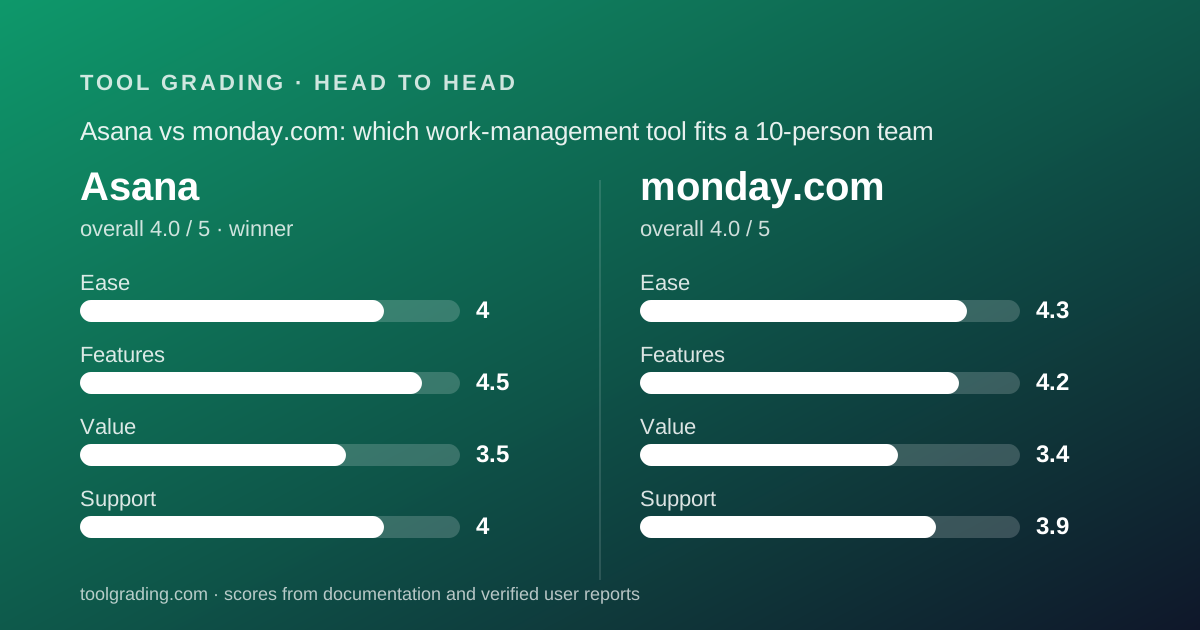
Asana grades 4.0 overall and monday.com rounds to the same 4.0, but the sub-scores point in opposite directions: Asana wins on feature depth and support, monday.com wins on ease of adoption. Asana takes this comparison on the sum of its sub-scores and on structure, because a task with an owner, a date and a dependency chain scales further than a coloured board. monday.com is the better pick for a team of ten or more running a visible pipeline that non-technical staff must keep updated.
 4.0Asana
 4.0monday.com
The short answer
This is a documentation comparison built from the two underlying grades on this site, Asana and monday.com, and from the vendors' pricing pages as of October 2026; no first-hand testing was run.
The two products land at the same displayed overall grade. Asana scores 4.0 on ease, 4.5 on features, 3.5 on value and 4.0 on support, for a sum of 16.0 and a rounded overall of 4.0. monday.com scores 4.3, 4.2, 3.4 and 3.9, for a sum of 15.8, which also rounds to 4.0. The winner here is decided by the unrounded sum and by the argument behind it, and both favour Asana by a small margin.
The argument is about what each product stores. Asana stores a task object with exactly one assignee, a due date, a parent, subtasks, dependencies and custom fields, and every view is a rendering of that object. monday.com stores a row in a board with typed columns, and every view is a projection of that table. The task object handles nested, dependency-heavy work better; the row handles flat, status-driven pipelines better and is easier for a team that already lives in spreadsheets.
For a ten-person team whose work has single owners, real deadlines and tasks that wait on other tasks, Asana is the stronger long-term platform. For a ten-person team whose work is a pipeline of stages that needs to be visible on a wall, monday.com is faster to adopt and its pricing minimum stops being a penalty at exactly that headcount. The rest of this page lays out the evidence behind both halves of that sentence.
How the two products are structured
Asana's data model is a task with an opinionated schema. The review on this site describes it plainly: a task has a name, one assignee, a due date, a parent project, optional subtasks, optional dependencies and optional custom fields. List, board, timeline and calendar are four renderings of that single record. The consequence shows up when a manager asks what is late across six projects: a tool that stores task objects answers once, because the object carries the date and the owner wherever it is displayed.
monday.com's model is a board engine. A workspace holds boards, a board holds groups, a group holds items, and an item is a row with typed columns: status, people, date, timeline, numbers, formula, dropdown, files, link, and a connect-boards column for cross-board references. The pricing page lists 8 column types on the free tier and more above it. Kanban, calendar, timeline, Gantt and chart views are projections of the same rows. Automations are plain-language sentences that fire when a column changes, and dashboards read widgets across boards.
The practical difference is hierarchy. Asana's task can nest and can block another task natively. monday.com supports subitems and dependency columns, but public user discussion, as summarised in the monday.com review, is consistent that these are bolted onto a flat model rather than native to it, and teams with deeply nested work tend to end up elsewhere. The opposite difference is legibility: a monday.com board reads like a spreadsheet that has learned to act, which is why operations and marketing staff keep it updated, while an Asana project rewards a structural decision someone has to make first.
monday.com also sells four product lines on the same engine: Work Management, CRM, Dev and Service. The data model does not change between them, which matters for a small business that wants one vendor for several functions. Asana is a work tracker and does not attempt that.
Pricing for a 10-person team (as of October 2026)
Only one side of this comparison carries verified figures. The Asana review did not verify prices against the live pricing page, and this site does not print a figure it has not checked, so Asana's pricing is described here as structure only: a free tier with a seat cap, paid tiers priced per seat per month with an annual discount, and the first paid tier as the rung where timeline, custom fields and reporting live. A team evaluating Asana on the free tier is evaluating a much weaker product than the one being graded. The per-seat rate at the useful tier sits at the higher end of the category, which is the reason the value sub-score is 3.5.
monday.com's Work Management pricing page was read on October 7, 2026, and the figures are below. Prices are per seat per month billed annually; the page states an 18% discount for annual over monthly billing. The structural facts that determine the bill: a 10-seat minimum on Basic, Standard and Pro; Timeline and Gantt views gated at Standard; and an automation quota of 250 actions per month on Standard against 25,000 on Pro.
For ten people, the seat minimum is neutral, which is the one headcount where it is. On Standard, ten seats at $12 is $120 per month or $1,440 per year; on Pro, ten seats at $19 is $190 per month or $2,280 per year. The step from Standard to Pro is a 58% increase in the seat price, and the automation quota is what usually forces it. Open both vendors' live pricing pages before signing, since tier contents move more often than this page will be updated.
- monday.com Free: $0, up to 2 seats, up to 3 boards, 8 column types (pricing page, October 2026)
- monday.com Basic: $9 per seat per month billed annually, 10-seat minimum, unlimited viewers and items
- monday.com Standard: $12 per seat per month billed annually, 10-seat minimum, Timeline and Gantt, 250 automation actions per month; $1,440 per year for ten seats
- monday.com Pro: $19 per seat per month billed annually, private boards, 25,000 automation actions per month; $2,280 per year for ten seats
- Asana: free tier with a seat cap, then per-seat paid tiers with an annual discount; figures not verified for the Asana entry and therefore not printed here
Ease of use
monday.com leads this axis, 4.3 against Asana's 4.0, and the gap comes from what each product asks a team to decide before it is useful.
The monday.com review builds its score from three documented properties. A board is legible without training, because rows, columns and coloured status labels are a vocabulary anyone who has opened a spreadsheet already has. The pricing page advertises 200+ templates, and a template is a pre-built board, so a team's first board can be a copy rather than a design. And automations are written as sentences, readable by the person who will be affected by them, which is why operations staff build their own recipes on monday.com and ask IT to build them on other tools. The discount is that a flat board forces an early choice about how to represent structure, one board per project or one board with a project column, and the documentation offers options rather than a rule.
Asana's score reflects a product that is pleasant immediately and useful only after a decision. Creating a project, adding tasks and setting dates needs no training. But someone has to settle what a project is, what a task is, which custom fields exist and what the statuses mean. Teams that make those choices once get reports that mean something; teams that let everyone improvise get several hundred tasks with inconsistent fields. The Asana review puts the realistic cost at a week of one person's attention, and notes that the documentation is strong enough that the week does not need a consultant.
The verified-user pattern confirms the gap. The dominant positive for monday.com in public reports is adoption: staff who refused previous tools keep its boards updated. The equivalent praise for Asana is clarity of accountability, which is a benefit that arrives after the structure is in place, not on day one.
Feature depth
Asana leads here, 4.5 against 4.2, and the margin is the data model again.
Three capabilities carry Asana's score, all consequences of the task-as-object design. Dependencies and timeline: marking that one task cannot start until another finishes, and seeing the consequence on a dated timeline, is the capability board tools lack and the reason teams migrate. Rules and templates: moving a task to a stage can assign it, date it and notify someone without code, and project templates mean the hundredth campaign starts configured like the first. Intake and reporting: forms create structured tasks with fields already filled, and portfolio views answer cross-project questions, trustworthy in proportion to how consistently the structure was kept. What is thinner is anything resembling a document or a spreadsheet with formulas; Asana is a tracker, not a workspace.
monday.com's score is built from the breadth of column types, views, automations and dashboards, discounted for hierarchy and dependency. The typed-column library is the strongest element, and the formula column is what lets a board replace a spreadsheet rather than sit beside one. Views are complete at Standard and above, including workload and Gantt, and a dashboard can read widgets from multiple boards. The automation recipe library is large and the integrations cover mainstream systems. The discount is specific: subitems are documented as nested rows rather than full items with their own board context, and public user reports describe the dependency columns as weaker than Asana's model. A team whose work is deeply structured will feel that within a month.
One point in monday.com's favour that Asana does not match: the formula and numbers columns give a board light spreadsheet behaviour, and the four product lines mean a lightweight CRM or request-intake board can sit on the same account as the project boards. For a ten-person business that wants one tool for several pipelines, that breadth is real. For a team whose single problem is dependency-heavy project delivery, it is beside the point.
Support and documentation
Asana edges this axis, 4.0 against 3.9, and the difference is self-service quality.
The Asana review describes the help centre and training material as thorough, current and written for someone trying to do a job rather than someone browsing features. For a product whose main risk is being configured badly, good documentation prevents the most expensive failure mode. Community support is substantial, and for configuration questions an active forum with long-standing members often answers faster than a ticket. Channels and response commitments vary by tier in the familiar pattern, self-service and email at the bottom and priority handling at enterprise level, and the review's advice is to verify what the purchased tier actually entitles you to.
monday.com maintains a help centre, a community forum, a template centre and an academy with recorded courses. For the monday.com review the help centre refused automated reading, so the assessment of its depth rests on the pricing page, the product pages and public descriptions in verified reports, which are favourable about coverage and less favourable about how quickly articles keep up with interface changes. The pricing page lists 24/7 support explicitly only on the Enterprise tier and publishes no response commitment on Basic, Standard or Pro. Verified reports describe ticket-based support on the mid tiers with ordinary questions answered in hours to a day.
Both vendors maintain a public status page. Neither entry estimates real-world response time, because neither can be graded from documentation. The practical difference for a ten-person team: Asana's self-service material is more likely to get a team through the configuration week without a ticket, and that is what the 0.1 reflects.
What verified users report
Both reviews weigh public reports as evidence of pattern rather than as measurement, and the patterns are consistent enough on both sides to be useful.
For Asana, the dominant positive is clarity of accountability: the single-assignee rule that some teams find restrictive is the same rule that makes it impossible for a task to be everyone's and therefore nobody's. The dominant complaint is price at scale, specifically per-seat cost multiplied by people who only need visibility, and it is the most frequently reported reason for leaving. Second is notification volume on busy projects, which is configurable and rarely configured until it hurts. Third is the absence of native time tracking at lower tiers, which matters to agencies billing hours and not at all to internal teams.
For monday.com, the dominant positive is adoption, attributed to the visual status model, with the automation recipe format second; non-technical users describe automations they built themselves. The dominant complaint is price structure rather than price: the seat minimum, the charge for people who mostly read, and the automation quota that forces an upgrade from Standard to Pro. Second is notification volume, loud by default. Third is the limit of the flat model when work grows nested, raised mostly by engineering and product roles.
The overlap is instructive. Both products draw the same two complaints, per-seat billing for readers and notification noise, which means neither is a reason to choose one over the other. The complaints that differ are the ones that decide: Asana's users leave over price per seat at the useful tier, and monday.com's users leave over the seat minimum and the automation cap. A ten-person team on monday.com Standard will meet the automation cap before it meets any other limit, and a ten-person team on Asana will feel the per-seat rate the moment it adds read-only stakeholders.
Choose Asana if / choose monday.com if
Choose Asana if your work has the shape it assumes: discrete tasks, one owner each, dates that matter, and some tasks that cannot start until others finish. Choose it if someone will own the configuration for the first fortnight, if you can justify the paid tier for everyone who needs a working seat, and if cross-project reporting that reconciles is the reason you are buying a tool at all. Choose it if the team has outgrown a board and the specific failure was not being able to see what is blocked. Do not choose it on the strength of the free tier, which deliberately omits timeline, custom fields and reporting, and do not choose it if most of the intended users only need to read.
Choose monday.com if the team is ten or more, the work is a visible pipeline with stages, and the people doing the work are the kind who stop updating tools that look like forms. Choose it if the team already lives in a spreadsheet and wants that spreadsheet to act. Choose it if you want one vendor for project boards, a lightweight CRM board and a request-intake board on one account. Budget for Pro rather than Standard if more than three or four automation recipes will be active, because 250 actions per month, per the pricing page, is a figure a busy ten-person team can exhaust in a week. Do not choose it for a team of four to eight, because the 10-seat minimum means paying for ten, and do not choose it for deeply nested, dependency-heavy work.
If the team is exactly ten and the work is somewhere between those two shapes, the deciding question is whether a manager will need to ask what is late across many projects. If yes, Asana. If the question is instead what is stuck at which stage, monday.com.
Bottom line
Asana wins this comparison by the narrowest margin the rubric allows: a sum of 16.0 against 15.8, both rounding to 4.0 overall. It wins on feature depth (4.5 against 4.2) and support (4.0 against 3.9), and loses on ease (4.0 against 4.3) and value (3.5 against 3.4 is a loss for monday.com, but neither value score is good). The product with the richer object wins because the richer object is what a growing team needs in year two, and because its documentation is the stronger safety net for the configuration week both products demand.
monday.com is not a consolation choice. At ten seats its pricing minimum stops being a penalty, its Standard tier at $12 per seat billed annually, per the pricing page checked October 7, 2026, is a verified figure in the middle of the category, and its adoption record in verified reports is the best argument any tool in this category has. A ten-person operations or marketing team with pipeline-shaped work will be better served by it than by Asana, and this page says so.
The honest summary is that the two products are graded almost identically because they are both well-built and both priced like they know it, and the choice between them is a question about the shape of your work rather than the quality of the tools. Check both live pricing pages before deciding; Asana's figures were not verified for its entry and monday.com's carry a checked date for a reason. This is a documentation comparison, and no first-hand testing was run or is claimed.
Visit Asana
We have no affiliate relationship with this vendor. Link goes to the official site.
Visit monday.com
We have no affiliate relationship with this vendor. Link goes to the official site.